Superb quality and spec AB-Com PULSe 4K SE. Crazy offer! Only £99! FREE UK DELIVERY! 4K UHD, Enigma 2, Multiboot 4 images & more!...
Superb quality and spec AB-Com PULSe 4K Rev II Twin Satellite tuner only £149! FREE UK DELIVERY! 4K UHD, Enigma 2, SATA HDD facility, Multiboot 4 images & more!...

Difficulty flashing different images

Hi Again,

I thought I would add some images to explain what is happening. Just so you know, between each attempt, I have stopped the server and rebooted to stop any running processes. I have then accessed the server over ftp and deleted /newroot. I have refreshed the FileZilla page to confirm it has gone. I then stopped and rebooted the server a second time to check with Filezilla that the directory was not there.

I originally used a Vix image from online flashing facility download. I have now seen that only Quad 4K images are offered so this is why my Vix is Quad 4K based and I am not sure how to change that.

I have now downloaded the latest versions of both OpenVix and TeamBlue and moved them both via ftp to /media/hdd/imagebackups which can be seen from this image:
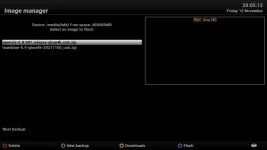
Vix 1.webp

I have then tried to flash the machine using both images (remember that between each attempt I have gone though the cleanup process described above)

After the first attempt this is the message I receive:
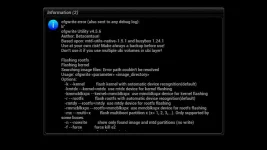
Vix 2.webp

If I then immediately try again (ie, no cleanup process, so /newroot now exists [confirmed by ftp as shown below]):
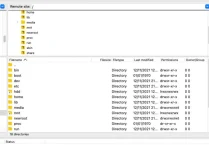
Screenshot 2021-11-12 at 20.33.50.webp

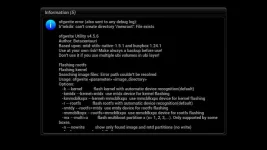
I get this message about /newroot:

Vix 3.webp

It is the same result whether I use the correct Vix image for my machine, the latest TeamBlue version or the online download facility (I even tried Open Pli) version. I have just checked by trying all three again before posting this.

Abu suggested I have to usb flash it. I have taken the Vix image and extracted it to get the folder and file structure and placed it as instructed in the root of my USB. The machine recognises the image on the USB and starts the process. I press the power button and it immediately stalls, probably for the same reason that the GUI image attempts stall and fail.

I cannot find a reason why this is happening but it is and it is very frustrating It seems to me the only solution is to wipe the server from the machine using ftp (or something else) and then reinstall everything to a vanilla status but I do not know if this is feasible to do or how to do it.

Looking for ideas please. I have a very expensive brick on my table at the moment.

Geoff
 
Hi Again,

I thought I would add some images to explain what is happening. Just so you know, between each attempt, I have stopped the server and rebooted to stop any running processes. I have then accessed the server over ftp and deleted /newroot. I have refreshed the FileZilla page to confirm it has gone. I then stopped and rebooted the server a second time to check with Filezilla that the directory was not there.

I originally used a Vix image from online flashing facility download. I have now seen that only Quad 4K images are offered so this is why my Vix is Quad 4K based and I am not sure how to change that.

I have now downloaded the latest versions of both OpenVix and TeamBlue and moved them both via ftp to /media/hdd/imagebackups which can be seen from this image:

View attachment 62774

I have then tried to flash the machine using both images (remember that between each attempt I have gone though the cleanup process described above)

After the first attempt this is the message I receive:

View attachment 62775

If I then immediately try again (ie, no cleanup process, so /newroot now exists [confirmed by ftp as shown below]):

View attachment 62776

I get this message about /newroot:

View attachment 62777

It is the same result whether I use the correct Vix image for my machine, the latest TeamBlue version or the online download facility (I even tried Open Pli) version. I have just checked by trying all three again before posting this.

Abu suggested I have to usb flash it. I have taken the Vix image and extracted it to get the folder and file structure and placed it as instructed in the root of my USB. The machine recognises the image on the USB and starts the process. I press the power button and it immediately stalls, probably for the same reason that the GUI image attempts stall and fail.

I cannot find a reason why this is happening but it is and it is very frustrating It seems to me the only solution is to wipe the server from the machine using ftp (or something else) and then reinstall everything to a vanilla status but I do not know if this is feasible to do or how to do it.

Looking for ideas please. I have a very expensive brick on my table at the moment.

Geoff

I will check out usb flashing tomorrow morning, just to check out the process (I normally only usb flash on receipt of a box - unless I can get round it) - cannot do it tonight.
Will post any extra information.
 
What do you mean by stopping server? Best to keep things simple instead of adding variables/complications. You renamed files despite nobody advising you to, it has complicated things. Yes, I appreciate you should not have to ask questions to get it working. Forget flashing by ofgwrite at the moment, lets get the correct image flashed by USB again. I have flashed various images by USB today to test it, it works fine as a process. Disconnect the cables to your HDD and ensure there is only one USB stick in fat32 filesystem. Delete the old folder on USB stick before transferring image.

There is too much noise/distractions in your posts and approach. Sorry, I don't mean to be rude. Please answer following questions.

When flashing by USB, are you pressing the power button on receiver or remote?
Which bootloader are you on. The number is displayed on LCD screen when box is booting up.
If at all possible, record a video of the USB flashing so we can see issue. Enigma2 is not running when you are flashing by USB.
 
Last edited:
Petty sue he is try to flash Gigablue Quad on a UHD UE, which will not work, but then he forced it
 
Have you tried downloading the link I sent you

Unzipping it to a small USB stick, turn off the receiver via the rocker switch as the back, plug the usb stick in the receiver, turn on the receiver by the rocker switch, wait for a message to come up, press the round power button on the receiver - let it do its thing
 
Hi Abu,

I probably am giving too much information in one go but I am trying to make sure you understand what I have done. A server reboot kills the server and restarts it but it does not always kill off all processes. So I was brought up to physically stop the server (by switching the electricity off) then reboot it by restarting the machine. In the old days we called it a soft or hard reset! To make sure there were no gremlins left in the machine I physically turned it off for a good 10 seconds before restarting it.

The boot loader is 1846.

The flashing is done only using the power button on the receiver itself, not the one on the remote (which I assume would not work?).

Enigma2 is off for USB flashing as the entire machine is off then only switched on after the usb is inserted. I do not think the USB stick is the issue as it tries to start the flash. I think it is an internal permissions or other software issue that is preventing a file writing in the flash process. That is why I wondered how to reset the entire machine to a vanilla state.

I have once again reformatted the USB stick: [No idea why but the images are not uploading properly either. They are png files so should be OK].

View attachment 62782

View attachment 62783

Have once again downloaded the image from the OpenVix site and expanded it on my Mac and transferred it to the root of the USB. The only set of files on it.

The receiver only has power, ethernet and the monitor connected to it (I have been banished to the kitchen with an old monitor by my wife) and here is the video of what happens:


Actually I cannot work out how to upload the video. I do not want to upload it to a third party website and the forum does not appear to accept mpeg or mov files. It is fairly simple, I insert the USB and switch on. The mini screen recognises the image and tells me to press the power button with the LED flashing purple. I press the power button on the machine, after about 1 or 2 seconds, the purple goes red and nothing happens.


I have then restarted the machine and shown the attempt to flash OpenVix 6 ufrom the GUI: (Again, I cannot load this video)

It recognises the image, does a back up, starts a countdown while it prepares for the flash and at about 235 or 234 stops and gives me the message I posted earlier.

NOW THIS IS BIZARRE

I was not happy with the video so tried again. I accidentally flashed the quad version of OpenVix that I had downloaded through the GUI and the blooming thing worked! Does my UHD UE 4K have an identity crisis? Does it think it is a Quad 4K?

So I then downloaded openATV quad version and that too has worked. So it appears I may have a wolf in sheep's clothing. The delivery box and the receiver case are both stamped UHD 4K but it seems the innards are a quad unit? Is there a way to check?

Only problem is that when I flashed the ATV I was not asked about a slot so it has (I assume) overwritten the OpenVix. I am moving (quad) files now to get back to OpenVix. Can someone tell me why it did not ask about the slot to use for multi booting?

It would seem this box thinks it is a Quad. It is happily flashing between Vix, ATV and Teamblue using quad images. However, I am not getting an option to select the eMMC slot when I perform an update so I am limited to one or the other. I can flash and restore but that is a bit of a long winded way to change between images. I understood I would be able to select an image and just reboot as I do on a Mac or PC. Do I need to install a plugin or an extension for this to work?

The technical spec says it should have 4 Gig of eMMC onboard. Is there a way to check?

More questions I am afraid but at least all the questions on flashing can now be ignored. I will take to Gigablue on Monday to find out what is happening with this machine but any other advice in the meantime will be gratefully received.

BTW I am leaving it in Vix for now.


Geoff
 
Last edited:
Hi Abu,

I probably am giving too much information in one go but I am trying to make sure you understand what I have done. A server reboot kills the server and restarts it but it does not always kill off all processes. So I was brought up to physically stop the server (by switching the electricity off) then reboot it by restarting the machine. In the old days we called it a soft or hard reset! To make sure there were no gremlins left in the machine I physically turned it off for a good 10 seconds before restarting it.

The boot loader is 1846.

The flashing is done only using the power button on the receiver itself, not the one on the remote (which I assume would not work?).

Enigma2 is off for USB flashing as the entire machine is off then only switched on after the usb is inserted. I do not think the USB stick is the issue as it tries to start the flash. I think it is an internal permissions or other software issue that is preventing a file writing in the flash process. That is why I wondered how to reset the entire machine to a vanilla state.

I have once again reformatted the USB stick: [No idea why but the images are not uploading properly either. They are png files so should be OK].

View attachment 62782

View attachment 62783

Have once again downloaded the image from the OpenVix site and expanded it on my Mac and transferred it to the root of the USB. The only set of files on it.

The receiver only has power, ethernet and the monitor connected to it (I have been banished to the kitchen with an old monitor by my wife) and here is the video of what happens:


Actually I cannot work out how to upload the video. I do not want to upload it to a third party website and the forum does not appear to accept mpeg or mov files. It is fairly simple, I insert the USB and switch on. The mini screen recognises the image and tells me to press the power button with the LED flashing purple. I press the power button on the machine, after about 1 or 2 seconds, the purple goes red and nothing happens.


I have then restarted the machine and shown the attempt to flash OpenVix 6 ufrom the GUI: (Again, I cannot load this video)

It recognises the image, does a back up, starts a countdown while it prepares for the flash and at about 235 or 234 stops and gives me the message I posted earlier.

NOW THIS IS BIZARRE

I was not happy with the video so tried again. I accidentally flashed the quad version of OpenVix that I had downloaded through the GUI and the blooming thing worked! Does my UHD UE 4K have an identity crisis? Does it think it is a Quad 4K?

So I then downloaded openATV quad version and that too has worked. So it appears I may have a wolf in sheep's clothing. The delivery box and the receiver case are both stamped UHD 4K but it seems the innards are a quad unit? Is there a way to check?

Only problem is that when I flashed the ATV I was not asked about a slot so it has (I assume) overwritten the OpenVix. I am moving (quad) files now to get back to OpenVix. Can someone tell me why it did not ask about the slot to use for multi booting?

It would seem this box thinks it is a Quad. It is happily flashing between Vix, ATV and Teamblue using quad images. However, I am not getting an option to select the eMMC slot when I perform an update so I am limited to one or the other. I can flash and restore but that is a bit of a long winded way to change between images. I understood I would be able to select an image and just reboot as I do on a Mac or PC. Do I need to install a plugin or an extension for this to work?

The technical spec says it should have 4 Gig of eMMC onboard. Is there a way to check?

More questions I am afraid but at least all the questions on flashing can now be ignored. I will take to Gigablue on Monday to find out what is happening with this machine but any other advice in the meantime will be gratefully received.

BTW I am leaving it in Vix for now.


Geoff

You need to check the back of the box if it has hdmi In, e-sata and 2 usb connections at the back its a GB UHD 4K otherwise its a GB UE 4K… and the GB UE 4K has a smaller LCD.
I am guessing that you are not seeing the slot request because you are either hitting the OK button too fast or holding it down when you are flashing!!! .. or the OK button is stuck!
On OpenViX its absolutely multiple steps and on OpenATV you also get asked if you want to do a settings backup etc etc
 
I accidentally flashed the quad version of OpenVix that I had downloaded through the GUI and the blooming thing worked! Does my UHD UE 4K have an identity crisis? Does it think it is a Quad 4K?

So I then downloaded openATV quad version and that too has worked. So it appears I may have a wolf in sheep's clothing. The delivery box and the receiver case are both stamped UHD 4K but it seems the innards are a quad unit? Is there a way to check?
Geoff

You did say that you had to rename the firmware to get it to flash?
I did this some years ago and flashed the wrong firmware and the solution for me was to rename the correct firmware on the usb to the firmware that the box now thinks it is.
This was on an old box though that didn't matter. I think I flashed Zgemma H7 firmware on a Mutant HD51 but I managed to get it back working again.
As it's a new box I would probably speak to WoS and confess all before you try anything drastic.
 
Do the reverse of what you did the 1st time, use the UE software but rename it to exactly what the quad name is flash that then you should be back to normal
 
Hi Twol,

The e-sata is internal and there are three USB (one USB 3.0). There is a fourth USB at the front under the card reader cover. I have compared the case with the manual and images on the websites and it looks like a UHD 4K. The mystery is why does it respond to Quad images only and why am I not getting access to the eMMC for using different slots?

It is a brand new remote controller so I am sure there is nothing wrong with it. I have not been rushing through the menu structure when trying to do it. it simply does not give me an option to select a slot. it offers the backup then the machine immediately starts the flash without offering any alternatives. I wonder if the eMMC is there or not or if it is faulty as the software does not appear to recognise it.

I have written to GigaBlue for help but that will not be answered for a few days I suspect.

I would do some Vix screen shots or a video but I cannot get them to work on the forum at the moment. No idea why as I have added Mac screenshot images before.

Geoff
 
Thanks Willo.

I am in touch with GigaBlue to try to resolve it. It is more likely to be a manufacturing issue than a vendor issue. I am now flashing it regularly using the Quad images so I do not think my original flash caused the problem. The machine definitely thinks it is a Quad so something is not right. The lack of option to select a slot is also worrying as it implies the software is not recognising any eMMC Ram. I am also chasing them about that. Problem is their response is nothing like as good as the forum!

I can now at least use the machine with OpenVix and get it set up to learn more about how OpenVix works and what it offers. The rest will resolve itself in due course.

Geoff
 
Hi adm,

I missed your post yesterday. You will see I have managed to resolve most if the issues now. Using a workable (Quad) image helped!
 
Jon,

Yes I have tried and it only works with a QUAD image not the UHD UE images. Convinced it is a machine fault.
 
OK I will try that thanks.


PS:

It was a good idea Jon but it did not work. I think when I did it first time I accidentally did it with a quad image which is why it worked. As I say, I am convinced it is an issue with the machine internal gubbins.
 
Last edited:
Jon,

Yes I have tried and it only works with a QUAD image not the UHD UE images. Convinced it is a machine fault.

It's not a machine fault you have flashed the wrong firmware as you admitted here: https://www.world-of-satellite.com/showthread.php?64730-New-User-Issues-with-Unicable-and-scanning&p=518558&viewfull=1#post518558

You need to download the correct image and extract it to a usb stick: https://www.openvix.co.uk/openvix-builds/gbue4k/openvix-6.0.001.release-gbue4k_usb.zip

Open the gigablue folder on the usb and rename 'ue4k' to 'quad4k' and then flash the box.

This will then restore the box to being a UHD 4K which is what it was in the first place.
 
Thanks Willo,

When I tried that it did not recognise that there was an image on the USB. To check I charged it back to ue4k and it then recognised the image but does not complete the flash. So back where I was.
 
Hi all,

I have found in the file structure over ftp a folder called “backup_teamblue_gbue4k”


It contains two files:

Screenshot 2021-11-13 at 12.13.06.webp


I wondered if I could reinstall this backup which must have been done automatically on 11th November. However, I cannot see how to restore from an old backup in the menu system. I have searched the web but although it gives guides on how to do a backup, there is nothing I can find on how to do a restore from files like this. Is there a guide anywhere that someone knows of?

I assume it will be like flashing the receiver but how do I get the files into a format that the online flashing can recognise?


Last edited:

OpenViX Feeds Status

Back
Top