

Superb quality and spec AB-Com PULSe 4K SE. Crazy offer! Only £99! FREE UK DELIVERY! 4K UHD, Enigma 2, Multiboot 4 images & more!...
Superb quality and spec AB-Com PULSe 4K Rev II Twin Satellite tuner only £149! FREE UK DELIVERY! 4K UHD, Enigma 2, SATA HDD facility, Multiboot 4 images & more!...
You are using an out of date browser. It may not display this or other websites correctly.
You should upgrade or use an alternative browser.
You should upgrade or use an alternative browser.
[SF8008] Movie list directory sort order
- Thread starter Willo3092
- Start date


Download the MovieList file from Github again.
Willo3092
ViX Beta Tester
The file on my box came from github. Built last night at 02:30 and box works.
Try this:
Try this:
Code:
sed -i 's/\x0//g' /usr/lib/enigma2/python/Components/MovieList.pyHow did you download the file from github? Sounds like an encoding error has been introduced.
Willo3092
ViX Beta Tester
Code:
Welcome to OpenViX for sf8008
openvix 6.0 sf8008

sf8008 login: root
Password:
root@sf8008:~# sed -i 's/\x0//g' /usr/lib/enigma2/python/Components/MovieList.py
root@sf8008:~#
I went to the file on github and switched to raw and copied and pasted the whole lot to MovieList.py
Is this the correct page for ViX 6.0 python components?
https://github.com/OpenViX/enigma2/tree/Dev-python3-compatible/lib/python
Sorry, I must have done something wrong. I just did the same from the above link and all is now working and sorting fine :thumbsup:
Last edited:
Willo3092
ViX Beta Tester
@willo3092 and @ccs please get the output from "cat /proc/mounts".
Code:
Welcome to OpenViX for sf8008
openvix 6.0 sf8008

sf8008 login: root
Password:
Last login: Fri Nov 19 10:06:42 GMT 2021 on pts/0
root@sf8008:~# cat /proc/mounts
/dev/mmcblk0p16 / ext4 rw,relatime,data=ordered 0 0
proc /proc proc rw,relatime 0 0
sysfs /sys sysfs rw,relatime 0 0
debugfs /sys/kernel/debug debugfs rw,relatime 0 0
configfs /sys/kernel/config configfs rw,relatime 0 0
devtmpfs /dev devtmpfs rw,relatime,size=469304k,nr_inodes=117326,mode=755 0 0
tmpfs /media tmpfs rw,relatime,size=64k,nr_inodes=117395 0 0
tmpfs /var/volatile tmpfs rw,relatime,size=469580k,nr_inodes=117395 0 0
/dev/sdd1 /media/hdd ext4 rw,relatime,data=ordered 0 0
/dev/mmcblk0p3 /boot vfat rw,relatime,fmask=0022,dmask=0022,codepage=437,iocharset=iso8859-1,shortname=mixed,errors=remount-ro 0 0
devpts /dev/pts devpts rw,relatime,gid=5,mode=620 0 0
/etc/auto.network /media/autofs autofs rw,relatime,fd=6,pgrp=2016,timeout=5,minproto=5,maxproto=5,indirect 0 0
tmpfs /newroot tmpfs rw,relatime 0 0
root@sf8008:~#
All network mounts look fine in mount manager:
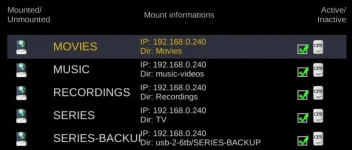
I can access all of them from movie list but can't use as a recording location on ViX 6.0 but I can on ViX 5.4.
Probably running my "sed" command repaired the file.

ccs
ViX Beta Tester
- Joined
- Sep 6, 2014
- Messages
- 5,836
- Reaction score
- 5
- Points
- 0
@willo3092 and @ccs please get the output from "cat /proc/mounts".
Code:
root@vuultimo4k:~# cat /proc/mounts
rootfs / rootfs rw 0 0
/dev/root / ext4 rw,relatime,nodelalloc,data=journal 0 0
devtmpfs /dev devtmpfs rw,relatime,size=799672k,nr_inodes=85983,mode=755 0 0
proc /proc proc rw,relatime 0 0
sysfs /sys sysfs rw,relatime 0 0
debugfs /sys/kernel/debug debugfs rw,relatime 0 0
tmpfs /media tmpfs rw,relatime,size=64k 0 0
tmpfs /var/volatile tmpfs rw,relatime 0 0
/dev/sda1 /media/hdd ext4 rw,relatime,data=ordered 0 0
devpts /dev/pts devpts rw,relatime,gid=5,mode=620 0 0
fusectl /sys/fs/fuse/connections fusectl rw,relatime 0 0
nfsd /proc/fs/nfsd nfsd rw,relatime 0 0
/etc/auto.network /media/autofs autofs rw,relatime,fd=6,pgrp=1675,timeout=5,minproto=5,maxproto=5,indirect 0 0
root@vuultimo4k:~#
Code:
root@vuultimo4k:~# cat /etc/auto.network
# automounter configuration
ET10000 -fstype=nfs,rw,nolock,tcp,nfsvers=3,rsize=8192,wsize=8192,timeo=14,soft 192.168.1.132:/media/hdd/movie
SYNOLOGY -fstype=nfs,rw,nolock,tcp,nfsvers=3,rsize=8192,wsize=8192,timeo=14,soft 192.168.1.115:/volume1/ET10000
root@vuultimo4k:~#
Code:
root@vuultimo4k:~# nfsstat -o all
Server packet stats:
packets    udp        tcp        tcpconn
0          0          0          0

Server rpc stats:
calls      badcalls   badfmt     badauth    badclnt
0          0          0          0          0

Server reply cache:
hits       misses     nocache
0          0          0

Server io stats:
read       write
0          0

Server read ahead cache:
size       0-10%      10-20%     20-30%     30-40%     40-50%     50-60%     60-70%     70-80%     80-90%     90-100%    notfound
32         0          0          0          0          0          0          0          0          0          0          0

Server file handle cache:
lookup     anon       ncachedir  ncachenondir  stale
0          0          0          0          0

Client packet stats:
packets    udp        tcp        tcpconn
0          0          0          0

Client rpc stats:
calls      retrans    authrefrsh
432        0          432

Client nfs v3:
null             getattr          setattr          lookup           access
0         0%     152      35%     0         0%     38        8%     115      26%
readlink         read             write            create           mkdir
0         0%     63       14%     0         0%     0         0%     0         0%
symlink          mknod            remove           rmdir            rename
0         0%     0         0%     0         0%     0         0%     0         0%
link             readdir          readdirplus      fsstat           fsinfo
0         0%     0         0%     49       11%     3         0%     6         1%
pathconf         commit
3         0%     0         0%

root@vuultimo4k:~#
Code:
root@vuultimo4k:~# mount
rootfs on / type rootfs (rw)
/dev/root on / type ext4 (rw,relatime,nodelalloc,data=journal)
devtmpfs on /dev type devtmpfs (rw,relatime,size=799672k,nr_inodes=85983,mode=755)
proc on /proc type proc (rw,relatime)
sysfs on /sys type sysfs (rw,relatime)
debugfs on /sys/kernel/debug type debugfs (rw,relatime)
tmpfs on /media type tmpfs (rw,relatime,size=64k)
tmpfs on /var/volatile type tmpfs (rw,relatime)
/dev/sda1 on /media/hdd type ext4 (rw,relatime,data=ordered)
devpts on /dev/pts type devpts (rw,relatime,gid=5,mode=620)
fusectl on /sys/fs/fuse/connections type fusectl (rw,relatime)
nfsd on /proc/fs/nfsd type nfsd (rw,relatime)
/etc/auto.network on /media/autofs type autofs (rw,relatime,fd=6,pgrp=1675,timeout=5,minproto=5,maxproto=5,indirect)
root@vuultimo4k:~#
Last edited:
So, here...I can access all of them from movie list but can't use as a recording location on ViX 6.0 but I can on ViX 5.4.
https://github.com/OpenViX/enigma2/blob/Dev-python3-compatible/lib/python/Screens/Timeshift.py#L72
Add "autofs". And restart enigma.
Go in timeshiftsetup and see if it allows you to set up timeshift onto your NAS.
Willo3092
ViX Beta Tester
You have broken the file somehow, or it is missing.
It is supposed to look like this:
Code:
supported_filesystems = ('ext4', 'ext3', 'ext2', 'nfs', 'autofs')
birdman
Moderator
AFAIR "autofs" just shows for an autofs mountpoint. When you actually get a network file-system mounted there it will show up with whatever network protocol is used, so nfs (nfs3/nfs4?) or smb (cifs?).So, here...
https://github.com/OpenViX/enigma2/blob/Dev-python3-compatible/lib/python/Screens/Timeshift.py#L72
Add "autofs". And restart enigma.
birdman
Moderator
e.g.:
(attempt to mount that using smb3 failed with, "mount error: smb3 filesystem not supported by the system")
//samba.lacknet/GordonBackup on /var/volatile/tmp/x type cifs (rw,relatime,vers=
3.02,sec=ntlmssp,cache=strict,username=Gordon,domain=,uid=0,noforceuid,gid=0,nof
orcegid,addr=192.168.1.242,file_mode=0755,dir_mode=0755,nounix,serverino,mapposi
x,rsize=1048576,wsize=1048576,echo_interval=60,actimeo=1)
(attempt to mount that using smb3 failed with, "mount error: smb3 filesystem not supported by the system")
So why don't their NAS mounts show in "cat /proc/mounts"?
Look at their posts #47 and #49.
Look at their posts #47 and #49.
ccs
ViX Beta Tester
- Joined
- Sep 6, 2014
- Messages
- 5,836
- Reaction score
- 5
- Points
- 0
That's weird, I hadn't noticed that but ViX 6.0.002 won't let you select that as a recording path any more. I have used that as my default path for the last 5 years.
It WILL let you select it from the 'Edit autotimer defaults' though and that is where my box is recording to.
View attachment 62846
I don't see any NAS options in "autotimer defaults"
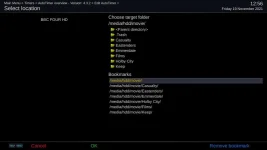
but do in recordings & timeshift/recording and playback, where there are 2 SYNOLOGY's.
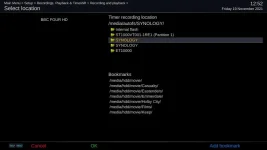
Maybe I need to bookmark it first, but which one??
I bookmarked ET10000 and now it shows where expected, including default movie location and autotimer default location.
Last edited:
I don't see any NAS options in "autotimer defaults"View attachment 62854
but do in recordings & timeshift/recording and playback, where there are 2 SYNOLOGY's. View attachment 62855
Maybe I need to bookmark it first, but which one??
I bookmarked ET10000 and now it shows where expected, including default movie location and autotimer default location.
And can you set it up?
ccs
ViX Beta Tester
- Joined
- Sep 6, 2014
- Messages
- 5,836
- Reaction score
- 5
- Points
- 0
And can you set it up?
Changing autotimer default location to /media/autofs/ET10000 is working, now recording to the ET10K's default movielist.
Changing default movielocation to ET10000 isn't doing anything, list still comes up with /media/hdd/movie (despite rebooting).
Changing timer location in recording and playback also works.
Last edited:
Willo3092
ViX Beta Tester
You have broken the file somehow, or it is missing.
It is supposed to look like this:
Code:supported_filesystems = ('ext4', 'ext3', 'ext2', 'nfs', 'autofs')
This is the raw page:
https://raw.githubusercontent.com/O...n3-compatible/lib/python/Screens/Timeshift.py
I have replaced the original with supported_filesystems = ('ext4', 'ext3', 'ext2', 'nfs', 'autofs') but still not booting.
View attachment Enigma2_debug_2021-11-19_13-45-03.log
ccs
ViX Beta Tester
- Joined
- Sep 6, 2014
- Messages
- 5,836
- Reaction score
- 5
- Points
- 0
Looks like a typo...
Code:
13:45:05.4369   File "/usr/lib/enigma2/python/Components/Timeshift.py", line 72
13:45:05.4369     supported_filesystems = ('ext4', 'ext3', 'ext2', 'nfs', 'autofs')
13:45:05.4373                                                                      ^
13:45:05.4374 [B]IndentationError[/B]: unindent does not match any outer indentation level
13:45:05.4417 [eDVBDB] ---- saving lame channel db
13:45:05.4478 [eDVBDB] saved 63 channels and 513 services!
13:45:05.4578 [eDVBResourceManager] release cached channel (timer timeout)Similar threads


- Replies
- 0
- Views
- 10K