Superb quality and spec AB-Com PULSe 4K SE. Crazy offer! Only £99! FREE UK DELIVERY! 4K UHD, Enigma 2, Multiboot 4 images & more!...
Superb quality and spec AB-Com PULSe 4K Rev II Twin Satellite tuner only £149! FREE UK DELIVERY! 4K UHD, Enigma 2, SATA HDD facility, Multiboot 4 images & more!...

[SF8008] Movie list directory sort order

This is what I have now

Code:
	def isValidPartition(self, path):
		if path is not None:
            supported_filesystems = ('ext4', 'ext3', 'ext2', 'nfs', 'autofs')
			valid_partitions = []
			for partition in Components.Harddisk.harddiskmanager.getMountedPartitions():
				if partition.filesystem() in supported_filesystems:
					valid_partitions.append(partition.mountpoint)
			print("[" + self.__class__.__name__ + "] valid partitions", valid_partitions)
			if valid_partitions:
				return Components.Harddisk.findMountPoint(realpath(path))+'/' in valid_partitions or Components.Harddisk.findMountPoint(realpath(path)) in valid_partitions
		return False

But looks different in the py file

2021-11-19_140531.webp
 
supported_filesystems = ('ext4', 'ext3', 'ext2', 'nfs', 'autofs') should line up with valid_partitions = []
 
I don't see any NAS options in "autotimer defaults"View attachment 62854

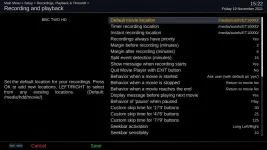
but do in recordings & timeshift/recording and playback, where there are 2 SYNOLOGY's. View attachment 62855

Maybe I need to bookmark it first, but which one??

I bookmarked ET10000 and now it shows where expected, including default movie location and autotimer default location.

Can we stick with enigma and not autotimer. I'm starting to get confused. Question was are you able to set up the NAS as a recording location in Recordings or Timeshift.
 
Can we stick with enigma and not autotimer. I'm starting to get confused. Question was are you able to set up the NAS as a recording location in Recordings or Timeshift.

Add timer from epg and instant record both work, no additional options show up in timeshift location to save to NAS.

List still shows /media/hdd/movie.

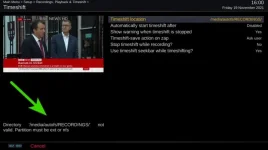
These are the only changes (first 3 settings).

time.webp
 
Just guessing, maybe change nfs to nfsd ?


Code:
root@vuultimo4k:~# df -Ta
Filesystem           [COLOR="#FF0000"]Type       [/COLOR]1K-blocks      Used Available Use% Mounted on
/dev/root            ext4         3655616    413792   3036412  12% /
devtmpfs             devtmpfs      799672         4    799668   0% /dev
proc                 proc               0         0         0   0% /proc
sysfs                sysfs              0         0         0   0% /sys
debugfs              debugfs            0         0         0   0% /sys/kernel/debug
tmpfs                tmpfs             64         0        64   0% /media
tmpfs                tmpfs         807996       220    807776   0% /var/volatile
/dev/sda1            ext4       975558636 828294904 147247348  85% /media/hdd
devpts               devpts             0         0         0   0% /dev/pts
fusectl              fusectl            0         0         0   0% /sys/fs/fuse/connections
[COLOR="#FF0000"]nfsd                 nfsd               0         0         0   0% /proc/fs/nfsd[/COLOR]
/etc/auto.network    autofs             0         0         0   0% /media/autofs
root@vuultimo4k:~#
 
Just guessing, maybe change nfs to nfsd ?
[/CODE]

That didn't work I'm afraid.

Commenting out all references to 'IsValidPartition' works for timeshift though.

Code:
	def pathStatus(self, path):
		if not isdir(path):
			self.errorItem = self["config"].getCurrentIndex()
			footnote = _("Directory '%s' does not exist!") % path
			green = ""
		# elif not self.isValidPartition(path):
			# self.errorItem = self["config"].getCurrentIndex()
			# footnote = _("Directory '%s' not valid. Partition must be ext or nfs") % path
			# green = ""
		elif not fileExists(path, "w"):
			self.errorItem = self["config"].getCurrentIndex()
			footnote = _("Directory '%s' not writeable!") % path
			green = ""
		elif not self.hasHardLinks(path): # Timeshift requires a hardlinks
			self.errorItem = self["config"].getCurrentIndex()
			footnote = _("Directory '%s' is not hard links capable!") % path
			green = ""
		else:
			self.errorItem = -1
			footnote = ""
			green = self.greenText
		self.setFootnote(footnote)
		self["key_green"].text = green

	# def isValidPartition(self, path):
		# if path is not None:
			# supported_filesystems = ('ext4', 'ext3', 'ext2', 'nfs', 'autofs')
			# valid_partitions = []
			# for partition in Components.Harddisk.harddiskmanager.getMountedPartitions():
				# if partition.filesystem() in supported_filesystems:
					# valid_partitions.append(partition.mountpoint)
			# print("[" + self.__class__.__name__ + "] valid partitions", valid_partitions)
			# if valid_partitions:
				# return Components.Harddisk.findMountPoint(realpath(path))+'/' in valid_partitions or Components.Harddisk.findMountPoint(realpath(path)) in valid_partitions
		# return False

Well it gets rid of the message, timeshift doesn't work using the NAS
 
Last edited:
.... so it looks like supported_filesystems = ('ext4', 'ext3', 'ext2', 'nfs', 'autofs') still isn't including the right filesystem.

How good are you at print statements?
 
.... so it looks like supported_filesystems = ('ext4', 'ext3', 'ext2', 'nfs', 'autofs') still isn't including the right filesystem.

How good are you at print statements?

I will have a go if you tell me what to do
 
Actually this may be an issue depending on how the Synology is setup e.g. ext4 or btrfs file system. The latter doesn‘t support hardlinks which are needed by Timeshift. I guess its fine for Recording but ???
 
I will have a go if you tell me what to do

I think you'll have to wait until someone (alot) more knowledgeable can advise, I understand the theory, but the practice is another matter.
 
Actually this may be an issue depending on how the Synology is setup e.g. ext4 or btrfs file system. The latter doesn‘t support hardlinks which are needed by Timeshift. I guess its fine for Recording but ???

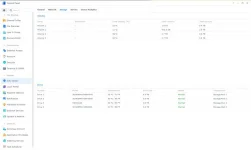
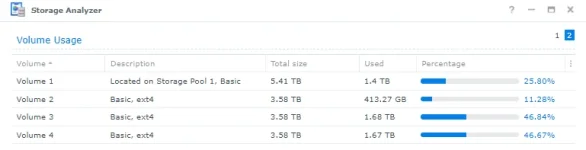
I'm certain that everything is Ext4. Trouble is there is no Storage Manager in the latest firmware and I cant find out where it would tell me.

2021-11-19_165500.webp
 
That didn't work I'm afraid.

Commenting out all references to 'IsValidPartition' works for timeshift though.

Code:
	def pathStatus(self, path):
		if not isdir(path):
			self.errorItem = self["config"].getCurrentIndex()
			footnote = _("Directory '%s' does not exist!") % path
			green = ""
		# elif not self.isValidPartition(path):
			# self.errorItem = self["config"].getCurrentIndex()
			# footnote = _("Directory '%s' not valid. Partition must be ext or nfs") % path
			# green = ""
		elif not fileExists(path, "w"):
			self.errorItem = self["config"].getCurrentIndex()
			footnote = _("Directory '%s' not writeable!") % path
			green = ""
		elif not self.hasHardLinks(path): # Timeshift requires a hardlinks
			self.errorItem = self["config"].getCurrentIndex()
			footnote = _("Directory '%s' is not hard links capable!") % path
			green = ""
		else:
			self.errorItem = -1
			footnote = ""
			green = self.greenText
		self.setFootnote(footnote)
		self["key_green"].text = green

	# def isValidPartition(self, path):
		# if path is not None:
			# supported_filesystems = ('ext4', 'ext3', 'ext2', 'nfs', 'autofs')
			# valid_partitions = []
			# for partition in Components.Harddisk.harddiskmanager.getMountedPartitions():
				# if partition.filesystem() in supported_filesystems:
					# valid_partitions.append(partition.mountpoint)
			# print("[" + self.__class__.__name__ + "] valid partitions", valid_partitions)
			# if valid_partitions:
				# return Components.Harddisk.findMountPoint(realpath(path))+'/' in valid_partitions or Components.Harddisk.findMountPoint(realpath(path)) in valid_partitions
		# return False

Well it gets rid of the message, timeshift doesn't work using the NAS

So debug log should (hopefully) say why its not using it as Tineshift device
 
I'm certain that everything is Ext4. Trouble is there is no Storage Manager in the latest firmware and I cant find out where it would tell me.

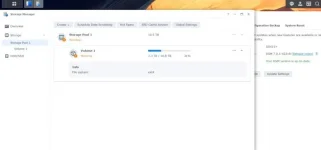
Storage Manager still on my Synology (Main Menu)...

snip.webp
 

OpenViX Feeds Status

Back
Top