Superb quality and spec AB-Com PULSe 4K SE. Crazy offer! Only £99! FREE UK DELIVERY! 4K UHD, Enigma 2, Multiboot 4 images & more!...
Superb quality and spec AB-Com PULSe 4K Rev II Twin Satellite tuner only £149! FREE UK DELIVERY! 4K UHD, Enigma 2, SATA HDD facility, Multiboot 4 images & more!...

[SF8008] Movie list directory sort order

Unless you have ghosting configured they only appear as required (and disappear when not).

Yes, you're right. I used to mount my shares with fstab and the shares were always visible in /media/net/

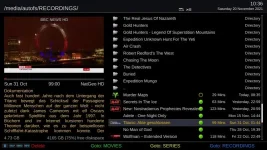
Just checked by playing a recording on the NAS and the RECORDINGS folder has appeared in /media/autofs/

It does say 'mount when needed' in Mount Manager. :o
 
v6 does a file-system type check.
But if the location isn't isn't yet mounted (because it will be automounted) it might show up as an invalid filesystem?

I've just tried to set timeshift to the NAS AFTER starting to play a recording but still gives an error about partition type.
 
Because use of tabs is silly (what it represents is undefined).
Python standard is actually 4 spaces.

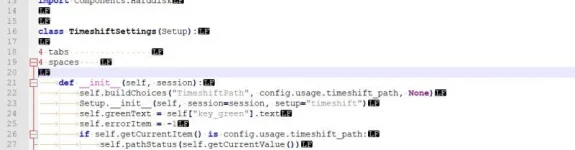
Me again, this is a snapshot of notepad++ editing a .py file (the language is set to python). I've added some tabs and spaces, neither of which correspond to line 21. :confused:

A single press of the delete key, positioned before def on line 21 removes all of "---->" (4 characters.)

tabs.webp
 
Opened MovieList.py in Notepad++ and CTRL A > DELETE then pasted the whole contents of the raw page.
AFAIK that should be fine as long as it ends up as a Linux format text file (not Windoze or Mac) by the time it reaches the box.
I imagine that if you started with the old contents of the file it'll happen automatically.
 
Last edited:
I've just tried to set timeshift to the NAS AFTER starting to play a recording but still gives an error about partition type.
But what is in your valid list?
It needs to have nfs and cifs (and nfs4?), not autofs.
(Assuming timeshift works on cifs - recordings do).
 
But what is in your valid list?
It needs to have nfs and cifs (and nfs4?), not autofs.
(Assuming timeshift works on cifs - recordings do).

Just added cifs to the list and it works:

Code:
			supported_filesystems = ('ext4', 'ext3', 'ext2', 'nfs', 'cifs')

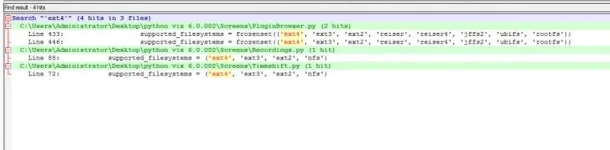
Do we need to do the same for Recordings.py and PluginBrowser.py?

2021-11-20_082807.webp

EDIT: Just added cifs to Recordings.py and I can now record to the NAS as well :thumbsup:
 
Last edited:
What does cat /proc/mounts show when timeshift is active?

Are you running Samba ?
 
What does cat /proc/mounts show when timeshift is active?

Are you running Samba ?

Yes, I'm running Samba:

Code:
Welcome to OpenViX for sf8008
openvix 6.0 sf8008

sf8008 login: root
Password:
root@sf8008:~# cat /proc/mounts
/dev/mmcblk0p16 / ext4 rw,relatime,data=ordered 0 0
proc /proc proc rw,relatime 0 0
sysfs /sys sysfs rw,relatime 0 0
debugfs /sys/kernel/debug debugfs rw,relatime 0 0
configfs /sys/kernel/config configfs rw,relatime 0 0
devtmpfs /dev devtmpfs rw,relatime,size=469304k,nr_inodes=117326,mode=755 0 0
tmpfs /media tmpfs rw,relatime,size=64k,nr_inodes=117395 0 0
tmpfs /var/volatile tmpfs rw,relatime,size=469580k,nr_inodes=117395 0 0
/dev/sdd1 /media/hdd ext4 rw,relatime,data=ordered 0 0
/dev/mmcblk0p3 /boot vfat rw,relatime,fmask=0022,dmask=0022,codepage=437,iocharset=iso8859-1,shortname=mixed,errors=remount-ro 0 0
devpts /dev/pts devpts rw,relatime,gid=5,mode=620 0 0
/etc/auto.network /media/autofs autofs rw,relatime,fd=6,pgrp=2019,timeout=5,minproto=5,maxproto=5,indirect 0 0
//192.168.0.240/Recordings /media/autofs/RECORDINGS cifs rw,relatime,vers=2.0,sec=ntlmssp,cache=strict,username=Willo3092,domain=DS916PLUS,uid=0,noforceuid,gid=0,noforcegid,addr=192.168.0.240,file_mode=0755,dir_mode=0755,iocharset=utf8,nounix,serverino,mapposix,rsize=65536,wsize=65536,actimeo=1 0 0
root@sf8008:~#
 
Yes, I'm running Samba:

Code:
Welcome to OpenViX for sf8008
openvix 6.0 sf8008

sf8008 login: root
Password:
root@sf8008:~# cat /proc/mounts
/dev/mmcblk0p16 / ext4 rw,relatime,data=ordered 0 0
proc /proc proc rw,relatime 0 0
sysfs /sys sysfs rw,relatime 0 0
debugfs /sys/kernel/debug debugfs rw,relatime 0 0
configfs /sys/kernel/config configfs rw,relatime 0 0
devtmpfs /dev devtmpfs rw,relatime,size=469304k,nr_inodes=117326,mode=755 0 0
tmpfs /media tmpfs rw,relatime,size=64k,nr_inodes=117395 0 0
tmpfs /var/volatile tmpfs rw,relatime,size=469580k,nr_inodes=117395 0 0
/dev/sdd1 /media/hdd ext4 rw,relatime,data=ordered 0 0
/dev/mmcblk0p3 /boot vfat rw,relatime,fmask=0022,dmask=0022,codepage=437,iocharset=iso8859-1,shortname=mixed,errors=remount-ro 0 0
devpts /dev/pts devpts rw,relatime,gid=5,mode=620 0 0
/etc/auto.network /media/autofs autofs rw,relatime,fd=6,pgrp=2019,timeout=5,minproto=5,maxproto=5,indirect 0 0
//192.168.0.240/Recordings /media/autofs/RECORDINGS cifs rw,relatime,vers=2.0,sec=ntlmssp,cache=strict,username=Willo3092,domain=DS916PLUS,uid=0,noforceuid,gid=0,noforcegid,addr=192.168.0.240,file_mode=0755,dir_mode=0755,iocharset=utf8,nounix,serverino,mapposix,rsize=65536,wsize=65536,actimeo=1 0 0
root@sf8008:~#

Why didn't your post #47 show the "cifs" mount?

Have you got "unix extensions" enabled in "smb.conf"? Turn it on.

Add "cifs" to validpartitions in Timeshift.py with "unix extensions" enabled and check it works. For Timeshift hardlinks are absolutely required, so we must see this working in timeshift setup.
 
Unix extensions are off by default, the line unix extensions = Yes would need adding to /etc/samba/smb-user.conf.
 
Why didn't your post #47 show the "cifs" mount?

Does it only show when it's in use? It only appears in /media/autofs/ when I'm actually using it.

Have you got "unix extensions" enabled in "smb.conf"? Turn it on.

No I haven't, I've never needed to touch that in the past. I'll try it.

Add "cifs" to validpartitions in Timeshift.py with "unix extensions" enabled and check it works. For Timeshift hardlinks are absolutely required, so we must see this working in timeshift setup.

I've added cifs in Timeshift.py and Recordings.py and I can now use the NAS share for timeshift and recordings and both confirmed working.
 
Just at the bottom or in a particular section?

Mine looks like this with one extra line highlighted....

Code:
root@vuultimo4k:/etc/samba# cat smb-user.conf
## User changes to Samba config go here

## You can overrule the insecure defaults and enforce password
## protected access to shares by uncommenting the following
## line, including the secure settings:

[global]
#       include = /etc/samba/distro/smb-secure.conf
[COLOR="#FF0000"]        disable netbios = No[/COLOR]

## You can hide and veto access to certain directories, e.g. mount points of
## other boxes in order to prevent round trips through your LAN
## In Samba 4.x this needs to be configured per share:

[Root]
#       veto files = /ThisBox/OtherBox/AnotherBox/YetAnotherBox/
#       hide files = /ThisBox/OtherBox/AnotherBox/YetAnotherBox/

[Harddisk]
#       veto files = /ThisBox/OtherBox/AnotherBox/YetAnotherBox/
#       hide files = /ThisBox/OtherBox/AnotherBox/YetAnotherBox/
root@vuultimo4k:/etc/samba#
 
Mine looks like this with one extra line highlighted....

Code:
root@vuultimo4k:/etc/samba# cat smb-user.conf
## User changes to Samba config go here

## You can overrule the insecure defaults and enforce password
## protected access to shares by uncommenting the following
## line, including the secure settings:

[global]
#       include = /etc/samba/distro/smb-secure.conf
[COLOR="#FF0000"]        disable netbios = No[/COLOR]

## You can hide and veto access to certain directories, e.g. mount points of
## other boxes in order to prevent round trips through your LAN
## In Samba 4.x this needs to be configured per share:

[Root]
#       veto files = /ThisBox/OtherBox/AnotherBox/YetAnotherBox/
#       hide files = /ThisBox/OtherBox/AnotherBox/YetAnotherBox/

[Harddisk]
#       veto files = /ThisBox/OtherBox/AnotherBox/YetAnotherBox/
#       hide files = /ThisBox/OtherBox/AnotherBox/YetAnotherBox/
root@vuultimo4k:/etc/samba#

So where does this line go? :confused:

Unix extensions are off by default, the line unix extensions = Yes would need adding to /etc/samba/smb-user.conf.
 
Just put it where I added my extra line.
 
Do I need both lines?

Code:
## User changes to Samba config go here

## You can overrule the insecure defaults and enforce password
## protected access to shares by uncommenting the following
## line, including the secure settings:

[global]
#       include = /etc/samba/distro/smb-secure.conf
        disable netbios = No
	unix extensions = Yes

## You can hide and veto access to certain directories, e.g. mount points of
## other boxes in order to prevent round trips through your LAN
## In Samba 4.x this needs to be configured per share:

[Root]
#       veto files = /ThisBox/OtherBox/AnotherBox/YetAnotherBox/
#       hide files = /ThisBox/OtherBox/AnotherBox/YetAnotherBox/

[Harddisk]
#       veto files = /ThisBox/OtherBox/AnotherBox/YetAnotherBox/
#       hide files = /ThisBox/OtherBox/AnotherBox/YetAnotherBox/
 
I added disable netbios = No so that network browser could see my other ViX box.

If you haven't set it you probably don't need it.

My Vix boxes and NAS use nfs, apologies, as I had assumed you were using nfs as well for quite some time in this thread.

I'll try out my setup when the dust has settled.
 
Last edited:
Aah, no all my boxes connect to the NAS only. I don't need them to see each other.
All my autotimers are set to record to the NAS on a box that otherwise is rarely used and I use the main box to set one-off recordings and instant recordings.

All the boxes have the NAS shares mounted as AutoFS CIFS and I have configured the coloured buttons in Movie Selection to switch between shares.

1_0_19_22D9_80D_2_11A0000_0_0_0_20211120103615.webp
 

OpenViX Feeds Status

Back
Top