
Superb quality and spec AB-Com PULSe 4K SE. Crazy offer! Only £129! FREE UK DELIVERY! 4K UHD, Enigma 2, Multiboot 4 images & more!...
Superb quality and spec AB-Com PULSe 4K Rev II Twin Satellite tuner only £179! FREE UK DELIVERY! 4K UHD, Enigma 2, SATA HDD facility, Multiboot 4 images & more!...
You are using an out of date browser. It may not display this or other websites correctly.
You should upgrade or use an alternative browser.
You should upgrade or use an alternative browser.
[SF8008] FTP/password problems
- Thread starter robbie74
- Start date

Did you enter password on box with remote and save it.
New images now need your password entered on FileZilla to proceed further.
Note write it down so you dont forget it.
Reread your post again but never ever used ftp in utilities'
Samba on nfs are the only ones i have used
Menu-setup-network-password.
New images now need your password entered on FileZilla to proceed further.
Note write it down so you dont forget it.
Reread your post again but never ever used ftp in utilities'
Samba on nfs are the only ones i have used
Menu-setup-network-password.
Last edited:

adm
Forum Supporter

Having issues with ftp & latest openvix py3 , ftp wont start in utilities & filezilla/dcc wont connect & putty wont connect. i have set a password ??
Thanks
Are you saying that FTP is disabled on the box and the cannot be enabled?
Try a reboot of the box before trying again.
Remember that passwords are case sensitive.


Willo3092
ViX Beta Tester
Did you do a clean flash without restoring settings & plugins ? Friend on mine was having same problem and the reason was OpenVPN ja miniDLNA -plugins.
I had similar problems with samba not installing from a fresh flash and settings restore.
I removed vpnmanager from extrainstalledplugins and it was fine and samba installed automatically.
Adding vpnmanager after the restore worked okay without affecting samba.
Who uses FTP on box as i never have and unsure what it does.
On laptop i can use FTP via FileZilla when box has a password and a network connection.
silly question but with a network test done on box is it all green
Rechecked box IP is correct.
On laptop i can use FTP via FileZilla when box has a password and a network connection.
silly question but with a network test done on box is it all green
Rechecked box IP is correct.
Last edited:

ccs
ViX Beta Tester
- Joined
- Sep 6, 2014
- Messages
- 5,836
- Reaction score
- 5
- Points
- 0
Who uses FTP on box as i never have and unsure what it does.
On laptop i can use FTP via FileZilla when box has a password and a network connection.
You need FTP running (The one in Network/Utilities, it's "running" in the image by default). If you stop FTP, FileZilla won't connect.
adm
Forum Supporter
Who uses FTP on box as i never have and unsure what it does.
You need something on both sides of the link for FTP (and the other network utiities) to work. If the FTP client on the box is disabled then the FTP client on your computer will not be able to connect to the box.
On laptop i can use FTP via FileZilla when box has a password and a network connection.
That's because the FTP utility on the box is usually enabled by default. In this case it appears that it may be disabled and the orginal poster cannot enable it again. It is more commo forSAMBA to have this problem and often a solution for one person doesn't work for another.
Tried updating to latest version 6 0 007 , still got this issue where ftp wont start
Did they not say its running by default.
Are you trying to ftp into box

Joe_90
Moderator
Tried updating to latest version 6 0 007 , still got this issue where ftp wont start
Paste the FileZilla log here. FTP should be started automatically. I haven't had any FTP issues with Release 6.
Paste the FileZilla log here. FTP should be started automatically. I haven't had any FTP issues with Release 6.
Status: Connecting to 192.168.1.10:21...
Status: Connection attempt failed with "ECONNREFUSED - Connection refused by server".
Error: Could not connect to server
Status: Waiting to retry...
tried manually starting ftp on box but it wont start
Joe_90
Moderator
Here's my log:
13:54:17 Status: Connecting to 192.168.0.125:21...
13:54:17 Status: Connection established, waiting for welcome message...
13:54:17 Status: Insecure server, it does not support FTP over TLS.
13:54:18 Status: Logged in
13:54:18 Status: Retrieving directory listing...
13:54:18 Status: Directory listing of "/" successful
Here is a screenshot of my FileZilla settings. I wonder if you have FileZilla set to require TLS? The server doesn't support encrypted connections.
13:54:17 Status: Connecting to 192.168.0.125:21...
13:54:17 Status: Connection established, waiting for welcome message...
13:54:17 Status: Insecure server, it does not support FTP over TLS.
13:54:18 Status: Logged in
13:54:18 Status: Retrieving directory listing...
13:54:18 Status: Directory listing of "/" successful
Here is a screenshot of my FileZilla settings. I wonder if you have FileZilla set to require TLS? The server doesn't support encrypted connections.
Attachments
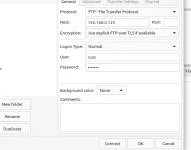
Here's my log:
13:54:17 Status: Connecting to 192.168.0.125:21...
13:54:17 Status: Connection established, waiting for welcome message...
13:54:17 Status: Insecure server, it does not support FTP over TLS.
13:54:18 Status: Logged in
13:54:18 Status: Retrieving directory listing...
13:54:18 Status: Directory listing of "/" successful
Here is a screenshot of my FileZilla settings. I wonder if you have FileZilla set to require TLS? The server doesn't support encrypted connections.
its not a problem with filezilla , its an issue with new openvix 6 & my box , ftp just wont turn on
Joe_90
Moderator
its not a problem with filezilla , its an issue with new openvix 6 & my box , ftp just wont turn on
FTP is active by default. Copy of debug log please.
ccs
ViX Beta Tester
- Joined
- Sep 6, 2014
- Messages
- 5,836
- Reaction score
- 5
- Points
- 0
When I successfully stop and restart FTP I see this...
Code:
10:38:02.1786 [ActionMap] Keymap 'ColorActions' -> Action = 'green'.
10:38:02.1787 [Console] command: /etc/init.d/vsftpd stop
10:38:02.1788 [eConsoleAppContainer] Starting /bin/sh
10:38:02.2055 [Console] finished: /etc/init.d/vsftpd stop
10:38:02.2057 [Console][eBatch] retval=0, cmds=[] cmds left=0, data:
* stopping FTP Server: vsftpd... stopped /usr/sbin/vsftpd (pid 1743)
done.
10:38:02.2057
10:38:04.7021 [gRC] main thread is non-idle! display spinner!
10:38:12.7152 [eInputDeviceInit] 1 18f (399) 1
10:38:12.7153 [eRCDeviceInputDev] emit: 1
10:38:12.7170 [InfoBarGenerics] Key: 399 (Make) KeyID='KEY_GREEN' Binding='('GREEN',)'.
10:38:13.0520 [eInputDeviceInit] 0 18f (399) 1
10:38:13.0520 [eRCDeviceInputDev] emit: 0
10:38:13.0535 [InfoBarGenerics] Key: 399 (Break) KeyID='KEY_GREEN' Binding='('GREEN',)'.
10:38:13.0536 [ActionMap] Keymap 'ColorActions' -> Action = 'green'.
10:38:13.0537 [Console] command: /etc/init.d/vsftpd start
10:38:13.0538 [eConsoleAppContainer] Starting /bin/sh
10:38:13.0809 [Console] finished: /etc/init.d/vsftpd start
10:38:13.0810 [Console][eBatch] retval=0, cmds=[] cmds left=0, data:
* starting FTP Server: vsftpd... done.
10:38:13.0811Similar threads

- Replies
- 2
- Views
- 549

- Replies
- 7
- Views
- 763
