Superb quality and spec AB-Com PULSe 4K SE. Crazy offer! Only £99! FREE UK DELIVERY! 4K UHD, Enigma 2, Multiboot 4 images & more!...
Superb quality and spec AB-Com PULSe 4K Rev II Twin Satellite tuner only £149! FREE UK DELIVERY! 4K UHD, Enigma 2, SATA HDD facility, Multiboot 4 images & more!...

[Zgemma H7] HDMI-CEC working with Standby but not working with Deep Standby

smipx

Forum Supporter
Donated Member
Joined
Nov 30, 2019
Messages
475
Reaction score
9
Points
18
Hi all,

I have my Zgemma connected to my Soundbar via HDMI (done like this due to older TV creating lip sync issues when zgemma is connected to that)
The TV is connected to the soundbar via HDMI-ARC

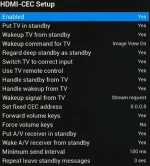
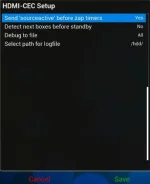
I have enabled HDMI-ARC in the Zgemma and set all the settings as follows:
2022-04-09 09_23_00-Zgemma H7 - OpenWebif.webp
2022-04-09 09_23_57-Zgemma H7 - OpenWebif.webp

- When I turn off the Zgemma (Standby) the TV and Soundbar turns off - Good
- When I turn on the Zgemma the TV and Soundbar turn on - Good
- When I select Power -> Deep Standby the Zgemma goes to Deep Standby fine after displaying "Your Zgemma is Shutting down" on teh TV for about 10 seconds but, crucially, the TV and Soundbar remain on. I have to manually power off the TV using the TV remote
- When I power on the Zgemma from Deep Standby the Zgemma wakes up the TV and Soundbar - Good

I checked the logs of HDMI CEC in openvix and the Standby action was logged (see below) but the Deep Standby action did not log anything at all. I prefer to use Deep Standby at night to save power overnight (no recordings overnight) but at the moment the issue is causing me to accidentally leave the TV on all night as the screen goes black when the zgemma goes to deep standby and the TV does not warn you for some time (with an image saying "HDMI no Input Source" and by the time it shows that I may have already left the room.

Can HDMI-CEC be made to work when using Deep Standby via the settings or is this a bug??
I'm on Openvix 5.4.016 (not planing to go to v6 just now as its a big job for me) but am happy to make any little mods as needed to backport any fix if possible...

Many thanks
Paul

HDMI-CEC Log for regular standby:
Tx: 08:59:27 <Give Device Power Status> > 8F [0x0F]
Tx: 08:59:28 <Standby> > 36 [0x00]
Tx: 08:59:28 > 44 6C [0x05]
Tx: 08:59:29 <Standby> > 36 [0x05]
Rx: 08:59:29 <Set System Audio Mode> < 72 00
Rx: 08:59:29 <Report Physical Address> < 84 40 00 05
Rx: 08:59:29 <Standby> < 36
Rx: 08:59:30 <Standby> < 36
Rx: 08:59:30 <Set Menu Language> < 32 eng
Rx: 08:59:30 <Device Vendor ID> < 87 00 00 F0
Tx: 08:59:37 <Image View On> > 04 [0x00]
Tx: 08:59:37 <Active Source> > 82 41 00 [0x0F]
Tx: 08:59:37 <Menu Status> > 8E 00 [0x00]
Tx: 08:59:37 > 44 6D [0x05]
Tx: 08:59:37 <System Mode Audio Request> > 70 41 00 [0x05]
Rx: 08:59:38 <Routing Change> < 80 40 00 41 00
Rx: 08:59:38 <Set System Audio Mode> < 72 01
Rx: 08:59:38 <Set Menu Language> < 32 eng
Rx: 08:59:38 <Device Vendor ID> < 87 00 00 F0
Rx: 08:59:38 < 1A 01
Rx: 08:59:39 <Device Vendor ID> < 87 00 00 F0
Rx: 08:59:39 <Report Physical Address> < 84 40 00 05
Rx: 08:59:39 <Device Vendor ID> < 87 00 00 F0
Rx: 08:59:40 <Report Physical Address> < 84 40 00 05
Tx: 08:59:41 <Image View On> > 04 [0x00]
Tx: 08:59:41 <Active Source> > 82 41 00 [0x0F]
Tx: 08:59:41 <Menu Status> > 8E 00 [0x00]
Tx: 08:59:41 > 44 6D [0x05]
Tx: 08:59:41 <System Mode Audio Request> > 70 41 00 [0x05]
Rx: 08:59:41 <Set System Audio Mode> < 72 01
Rx: 08:59:45 <Give Device Power Status> < 8F
Tx: 08:59:45 <Report Power Status> > 90 00 [0x58]
 
Perhaps use a power timer to select deep standby.

During normal usage I turn off my box by simply pressing the on/off button which puts the box into standby.
A power timer then kicks in and puts the box into deep standby 10 minutes later.

From what you have written this intermediate standby state would turn off your TV and sound bar

See post 6 and 8
https://www.world-of-satellite.com/showthread.php?63922-startup-to-standby#6
 
Last edited:
Hi all,

I have my Zgemma connected to my Soundbar via HDMI (done like this due to older TV creating lip sync issues when zgemma is connected to that)
The TV is connected to the soundbar via HDMI-ARC

I have enabled HDMI-ARC in the Zgemma and set all the settings as follows:
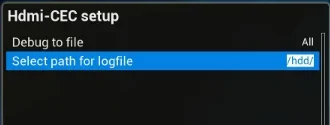
View attachment 63643
View attachment 63644

- When I turn off the Zgemma (Standby) the TV and Soundbar turns off - Good
- When I turn on the Zgemma the TV and Soundbar turn on - Good
- When I select Power -> Deep Standby the Zgemma goes to Deep Standby fine after displaying "Your Zgemma is Shutting down" on teh TV for about 10 seconds but, crucially, the TV and Soundbar remain on. I have to manually power off the TV using the TV remote
- When I power on the Zgemma from Deep Standby the Zgemma wakes up the TV and Soundbar - Good

I checked the logs of HDMI CEC in openvix and the Standby action was logged (see below) but the Deep Standby action did not log anything at all. I prefer to use Deep Standby at night to save power overnight (no recordings overnight) but at the moment the issue is causing me to accidentally leave the TV on all night as the screen goes black when the zgemma goes to deep standby and the TV does not warn you for some time (with an image saying "HDMI no Input Source" and by the time it shows that I may have already left the room.

Can HDMI-CEC be made to work when using Deep Standby via the settings or is this a bug??
I'm on Openvix 5.4.016 (not planing to go to v6 just now as its a big job for me) but am happy to make any little mods as needed to backport any fix if possible...

Many thanks
Paul

HDMI-CEC Log for regular standby:
Tx: 08:59:27 <Give Device Power Status> > 8F [0x0F]
Tx: 08:59:28 <Standby> > 36 [0x00]
Tx: 08:59:28 > 44 6C [0x05]
Tx: 08:59:29 <Standby> > 36 [0x05]
Rx: 08:59:29 <Set System Audio Mode> < 72 00
Rx: 08:59:29 <Report Physical Address> < 84 40 00 05
Rx: 08:59:29 <Standby> < 36
Rx: 08:59:30 <Standby> < 36
Rx: 08:59:30 <Set Menu Language> < 32 eng
Rx: 08:59:30 <Device Vendor ID> < 87 00 00 F0
Tx: 08:59:37 <Image View On> > 04 [0x00]
Tx: 08:59:37 <Active Source> > 82 41 00 [0x0F]
Tx: 08:59:37 <Menu Status> > 8E 00 [0x00]
Tx: 08:59:37 > 44 6D [0x05]
Tx: 08:59:37 <System Mode Audio Request> > 70 41 00 [0x05]
Rx: 08:59:38 <Routing Change> < 80 40 00 41 00
Rx: 08:59:38 <Set System Audio Mode> < 72 01
Rx: 08:59:38 <Set Menu Language> < 32 eng
Rx: 08:59:38 <Device Vendor ID> < 87 00 00 F0
Rx: 08:59:38 < 1A 01
Rx: 08:59:39 <Device Vendor ID> < 87 00 00 F0
Rx: 08:59:39 <Report Physical Address> < 84 40 00 05
Rx: 08:59:39 <Device Vendor ID> < 87 00 00 F0
Rx: 08:59:40 <Report Physical Address> < 84 40 00 05
Tx: 08:59:41 <Image View On> > 04 [0x00]
Tx: 08:59:41 <Active Source> > 82 41 00 [0x0F]
Tx: 08:59:41 <Menu Status> > 8E 00 [0x00]
Tx: 08:59:41 > 44 6D [0x05]
Tx: 08:59:41 <System Mode Audio Request> > 70 41 00 [0x05]
Rx: 08:59:41 <Set System Audio Mode> < 72 01
Rx: 08:59:45 <Give Device Power Status> < 8F
Tx: 08:59:45 <Report Power Status> > 90 00 [0x58]
1) I will have a look, but the hdmicec routines have been changed significantly for python 3, so changes to python 2(5.4) will take a retrofit perhaps.
2) what is holding you back from V6? - this is a multiboot receiver, so normally backup settings, flash new image to a different slot and restore settings when it finds the backup during initialisation is absolutely easy —— and if you have issues just reboot to the 5.4 image
 
Hi Both,

The power timer is a good backup option in case I forget to turn the TV off. I'll look in to that.

With regards v6 - the only thing holding me back at the moment is the fact that I have made a lot of my own little modifications to my EPG skin to get it "just so" for me. It took me an age (being a non-programmer). I know that most of the changes were incorporated into the new EPG code (button reassignments etc). but as it was (up to now) all working just fine I did not want to take the leap. I did some mods to fix IMDB and to get rid of the little clock icons either side of a scheduled recording and some changes to the button assignments prior to the above fixes/incorporations etc...

I will upgrade - Promise!! but .... I have to pick a period when the other family members will not mind as I know, from experience, that I will have some days of tweaking to get it "just so" with things like the EPG button updates, Channel 4 HD in the EPG, the Picons, the refreshing of the EPC process, etc.etc. etc.... Having a "window" during Covid and the new "working from home regime" has proved to be a bit tricky.

But - if there is any mod that can make HDMI-CEC kick in when doing deep standby (as a quick and dirty intermin measure) then I would be really happy and grateful :-)

Thanks
Paul
 
Hi Both,

The power timer is a good backup option in case I forget to turn the TV off. I'll look in to that.

With regards v6 - the only thing holding me back at the moment is the fact that I have made a lot of my own little modifications to my EPG skin to get it "just so" for me. It took me an age (being a non-programmer). I know that most of the changes were incorporated into the new EPG code (button reassignments etc). but as it was (up to now) all working just fine I did not want to take the leap. I did some mods to fix IMDB and to get rid of the little clock icons either side of a scheduled recording and some changes to the button assignments prior to the above fixes/incorporations etc...

I will upgrade - Promise!! but .... I have to pick a period when the other family members will not mind as I know, from experience, that I will have some days of tweaking to get it "just so" with things like the EPG button updates, Channel 4 HD in the EPG, the Picons, the refreshing of the EPC process, etc.etc. etc.... Having a "window" during Covid and the new "working from home regime" has proved to be a bit tricky.

But - if there is any mod that can make HDMI-CEC kick in when doing deep standby (as a quick and dirty intermin measure) then I would be really happy and grateful :-)

Thanks
Paul
I have just tested on my current V6 lounge setup (GBuhd4K into LG TV and Sonos soundbar) and deep standby works perfectly - both TV and soundbar are placed in standby ... so perhaps an incentive to move to V6!
 
I have half a feeling it used to work fine when I had the Zgemma plugged into the TV but now I have it plugged into the Soundbar it seems to not be able to send the Standby signal to the TV (via the Soundbar) when Deep Standby is selected on the ZGemma - even though the Soundbar to the TV is HDMI-ARC. I think the soundbar cannot handle the "DeepStandBy" in the py and simply drops it ... but does handle and forward the "Standby" in the py to the TV. The TV could (can) obviously understand both and worked in both scenarios.

If that be the case I have 3 choices:
1) Upgrade to v6 and hope that it works (maybe it will - maybe it won't with the soundbar as the "Hub" - but I can test for sure and will report back at some point).
2) Have a spare button to turn off the TV (And Soundbar) - This is what I will do whenever I remember (99.9% of the time - with suitable training for the rest of the household) until I can go to V6.
3) Plug the zgemma back into the TV and suffer some lip-sync problems caused by the TV sending the Audio to the Soundbar after the picture is displayed - This I can't live with and does not happen with the soundbar as the Hub of the operation so will stick to 2) above for now.

I will also activate (reduce) the power saving feature of the TV (to turn itself to standby) if no HDMI signal is recieved for 15 minutes (insead of the Zgemma/OpenVIX power timer) as I think that will work better in my situation. It is 2 hours currently.

Promise to go to v6 as soon as :-)


Thanks
Paul
 
Last edited:
Sorry fat fingers - please remove this post (not the whole thread).
 
Last edited:
Hi twol.

OK took the plunge following your hint :-)
Did a backup of settings from 5.4, installed a fresh 6.1.004 onto a spare slot and then restored settings.
S**t that was easy.

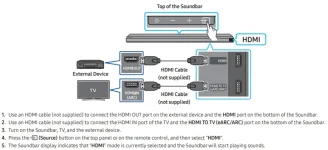
On the negative side. The HDMI-CEC is behaving the same. When selecting Deep Standby it is not turning off the Soundbar or the TV (TV's HDMI(ARC) connected to the Soundbar's HDMI(ARC); Zgemma HDMI connected to the Soundbar HDMI 2).

2022-04-11 23_47_58-AH81-14206A-00_FM_HW-Q700A_XU_ENG_210419.0.pdf.webp


I looked at the logs for HDMI-CEC and this was the output. Action 1 23:29:16 Deep Standby. Zgemma message saying Box was going to go into Deep Standby, Box turned off, TV and Soundbar left on.

Manually turned off TV which also turned off Soundbar and then......

Action 2: 23:29:51 Turn on Zgemma. Booted up and then turned on the TV and the Soundbar.

Tx: 23:29:16 <Give System Audio Mode Stat> 7D [0x05]
Tx: 23:29:16 <Menu Status> > 8E 00 [0x00]
Tx: 23:29:16 <Image View On> > 04 [0x00]
Tx: 23:29:16 <Active Source> > 82 41 00 [0x0F]
Tx: 23:29:16 <Menu Status> > 8E 00 [0x00]
Tx: 23:29:16 <User Control Pressed> > 44 6D [0x05]
Tx: 23:29:16 <System Audio Mode Request> > 70 41 00 [0x05]
Tx: 23:29:51 <Image View On> > 04 [0x00]
Tx: 23:29:51 <Active Source> > 82 41 00 [0x0F]
Tx: 23:29:51 <Menu Status> > 8E 00 [0x00]
Tx: 23:29:51 <User Control Pressed> > 44 6D [0x05]
Tx: 23:29:51 <System Audio Mode Request> > 70 41 00 [0x05]
Rx: 23:29:51 <System Audio Mode Status> < 7E 01
Rx: 23:29:52 <System Audio Mode Status> < 7E 01
Rx: 23:29:53 <System Audio Mode Status> < 7E 01
Rx: 23:29:54 <Set System Audio Mode> < 72 01
Rx: 23:29:56 <Set System Audio Mode> < 72 01
 
Last edited:
Hi twol.

OK took the plunge following your hint :-)
Did a backup of settings from 5.4, installed a fresh 6.1.004 onto a spare slot and then restored settings.
S**t that was easy.

On the negative side. The HDMI-CEC is behaving the same. When selecting Deep Standby it is not turning off the Soundbar or the TV (TV's HDMI(ARC) connected to the Soundbar's HDMI(ARC); Zgemma HDMI connected to the Soundbar HDMI 2).

View attachment 63654


I looked at the logs for HDMI-CEC and this was the output. Action 1 23:29:16 Deep Standby. Zgemma message saying Box was going to go into Deep Standby, Box turned off, TV and Soundbar left on.

Manually turned off TV which also turned off Soundbar and then......

Action 2: 23:29:51 Turn on Zgemma. Booted up and then turned on the TV and the Soundbar.

Tx: 23:29:16 <Give System Audio Mode Stat> 7D [0x05]
Tx: 23:29:16 <Menu Status> > 8E 00 [0x00]
Tx: 23:29:16 <Image View On> > 04 [0x00]
Tx: 23:29:16 <Active Source> > 82 41 00 [0x0F]
Tx: 23:29:16 <Menu Status> > 8E 00 [0x00]
Tx: 23:29:16 <User Control Pressed> > 44 6D [0x05]
Tx: 23:29:16 <System Audio Mode Request> > 70 41 00 [0x05]
Tx: 23:29:51 <Image View On> > 04 [0x00]
Tx: 23:29:51 <Active Source> > 82 41 00 [0x0F]
Tx: 23:29:51 <Menu Status> > 8E 00 [0x00]
Tx: 23:29:51 <User Control Pressed> > 44 6D [0x05]
Tx: 23:29:51 <System Audio Mode Request> > 70 41 00 [0x05]
Rx: 23:29:51 <System Audio Mode Status> < 7E 01
Rx: 23:29:52 <System Audio Mode Status> < 7E 01
Rx: 23:29:53 <System Audio Mode Status> < 7E 01
Rx: 23:29:54 <Set System Audio Mode> < 72 01
Rx: 23:29:56 <Set System Audio Mode> < 72 01

Great!: ... but bad!

Now in my setup, both sat receiver (hdmi1) and soundbar(hdmi-ARC) are attached to the TV directly, your diagram indicateś everything goes via the soundbar, so that seems to be the issue.

Just noticed that you have detect next boxes before standby - can you disable, that's possibly why its not sending the power off (in standby it doesn't check this)

To be honest I hate the hdmicec log, but anyway I need to see the debug log, from power up (from deep standby), to return to deep standby - so if you could post that and lets see if the disable will fix the issue.

If not can you stop the box (init 4 in putty), rename /usr/lib/enigma2/python/Components/HdmiCec.pyc to something and copy attachment over, then init 6 in putty........ post debug log
 

Attachments

Last edited:
Hi there, Is it the same log I have been sending that you need? If not then please let me know what log and if any extra debugging settings need to be turned on. I agree - the log from HDMI-CEC is a little "odd" and I could not make any sense of it at all :-)

If so I will do that asap.

You are right - the setup is not the most common (using the Soundbar as the hub of the operation) but I attahed the image just to demonstrate that it is meant to be a valid setup.

Bit of history as to why I am where I am....
What this setup does is allow the sound to be processed by the "sound processor" without letting the TV touch and mess up / do a poor job of passthrough / downmix / screw with the audio (which, amongst other worse things, can add delay/advance to the sound and affect the sync of the video and audio). We are only talking a few ms of issue with the TV forwarding the sound to the bar (when the TV is the hub of the operation) but I was noticing issues as the audio track from the Zgemma differs depending on whether its a downloaded file/stream (any of DTS,EC3/DD E-EC-3/DD+), a satellite broadcast (AC3) or a Freeview broadcast (PCM) some were perfectly in sync and some had a negative delay (which the TV and soundbar cant control as you can only delay the autio and not advance it) which was driving me nuts.

As soon as the soundbar was made the hub it all went away. All set to "passthrough" of course. The soundbar then does a fine job of sending the Video to the TV and keeping it all in sync (mostly). Having just spent a big "bag of sand" on a new soundbar I was not going to put up with crappy downmixed PCM all the time (with a fixed advance on the sound using the Audio settings on the Zgemma).
 
I hope this helps. This is prior to swapping the pyc with the py.

All cases.... detect next boxes before standby DISABLED
-------------------------------------------------------------------------------------

Normal Resume from Standby.... Go to Standby - ALL WORKING FINE TV turns off and Soundbar turns off

Tx: 09:40:56 <User Control Pressed> > 44 43 [0x05]
Tx: 09:40:56 <User Control Released> > 45 [0x05]
Tx: 09:41:00 <Give Device Power Status> > 8F [0x0F]
Tx: 09:41:01 <Standby> > 36 [0x00]
Tx: 09:41:01 <User Control Pressed> > 44 6C [0x05]
Tx: 09:41:01 <Standby> > 36 [0x05]
Rx: 09:41:01 <Set System Audio Mode> < 72 00
Rx: 09:41:02 <Standby> < 36 00
Rx: 09:41:02 <Report Physical Address> < 84 40
Rx: 09:41:02 <Standby> < 36 40
Tx: 09:41:36 <Image View On> > 04 [0x00]
Tx: 09:41:36 <Active Source> > 82 41 00 [0x0F]
Tx: 09:41:36 <Menu Status> > 8E 00 [0x00]
Tx: 09:41:36 <User Control Pressed> > 44 6D [0x05]
Tx: 09:41:36 <System Audio Mode Request> > 70 41 00 [0x05]
Rx: 09:41:37 <Report Physical Address> < 84 40
Rx: 09:41:38 <Routing Change> < 80 40
Rx: 09:41:38 <Set System Audio Mode> < 72 01
Rx: 09:41:38 <Set Menu Language> < 32 65
Rx: 09:41:38 <Reporting Device Vendor ID>< 87 00
Tx: 09:41:39 <Image View On> > 04 [0x00]
Tx: 09:41:39 <Active Source> > 82 41 00 [0x0F]
Tx: 09:41:39 <Menu Status> > 8E 00 [0x00]
Tx: 09:41:39 <User Control Pressed> > 44 6D [0x05]
Tx: 09:41:39 <System Audio Mode Request> > 70 41 00 [0x05]
Rx: 09:41:41 <Set System Audio Mode> < 72 01
Rx: 09:41:45 <Give Device Power Status> < 8F 00
Tx: 09:41:45 <Report Power Status> > 90 00 [0x00]
Rx: 09:41:46 <Report Physical Address> < 84 40
Rx: 09:41:47 <Set System Audio Mode> < 72 01
Rx: 09:41:49 <Vendor Command With ID> < A0 00
Rx: 09:41:54 <Reporting Device Vendor ID>< 87 00
Rx: 09:41:55 <Report Physical Address> < 84 40
Tx: 09:42:00 <Give Device Power Status> > 8F [0x0F]
Tx: 09:42:01 <Standby> > 36 [0x00]
Tx: 09:42:01 <User Control Pressed> > 44 6C [0x05]
Tx: 09:42:01 <Standby> > 36 [0x05]
Rx: 09:42:01 <Set System Audio Mode> < 72 00
Rx: 09:42:02 <Report Physical Address> < 84 40
Rx: 09:42:02 <Standby> < 36 00


Resume from Deep Standby (All devices off at beginning) then into Deep Standby - NOT WORKING TV & Soundbar left on:

Tx: 09:49:28 <Give System Audio Mode Stat> 7D [0x05]
Tx: 09:49:28 <Menu Status> > 8E 00 [0x00]
Tx: 09:49:28 <Image View On> > 04 [0x00]
Tx: 09:49:28 <Active Source> > 82 41 00 [0x0F]
Tx: 09:49:28 <Menu Status> > 8E 00 [0x00]
Tx: 09:49:28 <User Control Pressed> > 44 6D [0x05]
Tx: 09:49:28 <System Audio Mode Request> > 70 41 00 [0x05]
Tx: 09:52:05 <Image View On> > 04 [0x00]
Tx: 09:52:05 <Active Source> > 82 41 00 [0x0F]
Tx: 09:52:05 <Menu Status> > 8E 00 [0x00]
Tx: 09:52:05 <User Control Pressed> > 44 6D [0x05]
Tx: 09:52:05 <System Audio Mode Request> > 70 41 00 [0x05]
Rx: 09:52:08 <Routing Change> < 80 40
Rx: 09:52:09 <Set System Audio Mode> < 72 01
Rx: 09:52:09 <Give Deck Status> < 1A 01
Rx: 09:52:09 <Set System Audio Mode> < 72 01
Rx: 09:52:10 <Reporting Device Vendor ID>< 87 00
Rx: 09:52:10 <Set Menu Language> < 32 65
Rx: 09:52:10 <Reporting Device Vendor ID>< 87 00
Rx: 09:52:11 <Set System Audio Mode> < 72 01
Rx: 09:52:14 <Give Device Power Status> < 8F 00
Tx: 09:52:14 <Report Power Status> > 90 00 [0x00]
Rx: 09:49:46 <Vendor Command With ID> < A0 00
Rx: 09:49:52 <Reporting Device Vendor ID>< 87 00
Rx: 09:49:52 <Report Physical Address> < 84 40
Tx: 09:49:52 <Standby> > 36 [0x00]
Tx: 09:49:52 <User Control Pressed> > 44 6C [0x05]
Tx: 09:49:52 <Standby> > 36 [0x05]
 
I have now replaced the pyc with the py and here is the HDMI-CEC log (attached)View attachment hdmi-CEC.log
also attached the full enigma2 debug log (if it helps in any way) View attachment Enigma2_debug_2022-04-12_10-08-53.log

Just in case it is relevant. The TV is a Samsung (UE49MU7000) and the Soundbar is a Samsung (HW-Q700A)
I know --- I'm not a samsung Fanboy - Honest - It was a really really good offer for the Q700A and my naive assumption was that it would all work together "better" if it was all Samsung. This is despite no end of little niggles with the TV over the years... Turns out that Samsung are a law unto themselves.

Both are on the latest Firmware.
 
Last edited:
OK, many thanks.
1. can you change debug log default to local time ... much more readable for old guy like me!
2. the debug log shows boot up from standby? deepstandby? ..............upto just loading up from epgcache , there is no termination of any description.
3. the box at boot up sees the hdmicec address change and automatically resets it, so can you try resetting the address in hdmicec setup to 0.0.0.0 and just check it all still works - I don't expect that to fix the issue, but .....

So can you give me a debug log (local time), from out of standby or deepstandby -------> to deep standby
Lastly did you reset the detect next boxes before standby to No in setup?? I should see in the debug log, but never hurts to ask!
 
Hi there.

Originals were Going to Deep Standby to start the test then from Deep Standby to ON and then from ON to Deep Standby
I did reset the "detect next boxes before standby" to No in setup
Time now set to real..
The logs below are without any change to address of HDMI-CEC 0.0.0.0 ( I will do that in a little while and can test again).


With this log I went into deep standby (to get to the start of the testing cycle (start the test from Deep Standby). Turned the TV off and Soundbar off.
I then from the Box in DS turned the box on (approx 12:57)
TV Came on, Soundbar came on all Good....

Gave it a few minutes and then at approx. 13:02 with everything on, I selected Deep Standby from the Power menu. Box told me it was going to DS but TV left on and Soundbar left on. I then powerd off the TV with its remote and the TV and Soundbar both turned off. View attachment 63660
Here are the Debug logs from the same time.
View attachment 63661View attachment 63662

Hope that all makes sense??

Thanks
Paul
 
Last edited by a moderator:
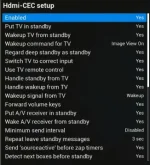
For completeness. Here are my current CEC settings. I have been fiddling with them to try and get it working but this is how they are right now. Set address to 0.0.0.0 as well.
2022-04-12 13_22_17-Zgemma H7 - OpenWebif.webp2022-04-12 13_22_47-Zgemma H7 - OpenWebif.webp
 
As an aside this is not good from Samsung
13:03:36.5808 [HdmiCec][messageReceived0]: msgaddress=112 CECcmd=<Standby>, cmd=36, ctrl0=0, length=1
13:03:36.5817 [HdmiCec][messageReceived1a]: msgaddress > 15 reset to 0
Should be between 0 ---> 15

Also can you copy attachment ConfigEntryTest.py to /usr/lib/enigma2/python/Components/Converter (please rename existing .pyc first as I haven't tested this change ... but its causing a crash)
... and hdmicec.py to /usr/lib/enigma2/python/Components
If you have the time and patience can you do debugs going into Standby and also deepStandby

thanks
 

Attachments

Last edited:
I will do this tomorrow twol of that is okay. My wife is getting a bit irate at the lack of TV :-)
I also had a new broadband router/hub today so have been taking the internet off and on all day.

I am not popular in the smipx household but tomorrow is another day and it will all be forgiven overnight ;-)

When I copy these over and reboot does the statement "but its causing a crash" mean that my machine will crash ??

Cheers
Paul
 
Hi,

Did the py changes (both of them) rebooted and did some more tests.
Wife getting really annoyed now so going to stop further tests tonight and will pick up again 2mo :-)


Timeline (approx times):

Zgemma Action
16:48 Zgemma to Standby - TV and Soundbar both turned off GOOD
16:49 Zgemma Power on - TV and Soundbar both turned on GOOD

Put soundbar into mute using TV remote

16:50 Zgemma to Deep Standby - Zgemma turned off, clock dissapeared and hard drive stopeed spinning - TV and Soundbar both remained on
16:51 Used TV remote control to turn off TV (Zgemma still in deep standby at this stage)
Noticed that the Zgemma HDD span up for about 10 seconds and then went off again

16:52 Power On Zgemma from DS - TV and Soundbar both turned on GOOD

Hope that all makes sense.

View attachment Enigma2_debug_2022-04-12_16-50-23.logView attachment Enigma2_debug_2022-04-12_16-37-23.logView attachment hdmicec.log
 

OpenViX Feeds Status

Back
Top