Superb quality and spec AB-Com PULSe 4K SE. Crazy offer! Only £99! FREE UK DELIVERY! 4K UHD, Enigma 2, Multiboot 4 images & more!...
Superb quality and spec AB-Com PULSe 4K Rev II Twin Satellite tuner only £149! FREE UK DELIVERY! 4K UHD, Enigma 2, SATA HDD facility, Multiboot 4 images & more!...

openvix dev build instructions

satteliter

Forum Supporter
Donated Member
Joined
Feb 20, 2021
Messages
108
Reaction score
0
Points
16
12 - Update build-enviroment

make update

After following all steps up to and including step 12 (https://github.com/OpenViX/enigma2),I'm now stuck at 13 as site.conf does not exist (yet?)

13 - Update site.conf

- BB_NUMBER_THREADS, PARALLEL_MAKE set to number of threads supported by the CPU
- add/modify DL_DIR = " location for build sources " to point to a location where you can save derived build sources,
this will reduce build time in fetching these sources again.

site.conf does not exist yet in either the current dir (:~/openvix/build-enviroment) or in 'builds' dir (builds dir doesnt exist yet either)
After grepping, I see that BB_NUMBER_THREADS text exists in 'Makefile'

from there, I see site.conf being referenced as $(TOPDIR)/conf/site.conf which equals $(BUILD_DIR)/conf/site.conf
but also a reference to $(CURDIR)/site.conf:

Now, I can see in that Makefile that it (Makefile) writes out to $(CURDIR)/site.conf

Code:
$(CURDIR)/site.conf:
        @echo 'SCONF_VERSION = "1"' >> $@
        @echo 'BB_NUMBER_THREADS = "$(BB_NUMBER_THREADS)"' >> $@
        @echo 'PARALLEL_MAKE = "$(PARALLEL_MAKE)"' >> $@
        @echo 'BUILD_OPTIMIZATION = "-O2 -pipe"' >> $@
        @echo 'DL_DIR = "$(DL_DIR)"' >> $@
        @echo 'SSTATE_DIR = "$(SSTATE_DIR)"' >> $@
        @echo 'INHERIT += "rm_work"' >> $@
        @echo 'BB_GIT_SHALLOW_DEPTH = "1"' >> $@
        @echo 'BB_GIT_SHALLOW = "1"' >> $@

So, I can create this file myself but just wondering whether there's a step missing or should site.conf have been spat out after I ran 'make update'?
 
Start the build and stop it after a few seconds - a default site.conf will be built and you can edit it yourself
 
cool. ended up doing that and got error:

ERROR: The following required tools (as specified by HOSTTOOLS) appear to be unavailable in PATH, please install them in order to proceed:
lz4c

installed liblz4-tool to fix
 
i just had en_GB.utf8 installed as locale.

had error:

ERROR: OE-core's config sanity checker detected a potential misconfiguration.
Either fix the cause of this error or at your own risk disable the checker (see sanity.conf).
Following is the list of potential problems / advisories:

Your system needs to support the en_US.UTF-8 locale.

ran
Code:
 sudo locale-gen en_US en_US.UTF-8
to fix
 
After following all steps up to and including step 12 (https://github.com/OpenViX/enigma2),I'm now stuck at 13 as site.conf does not exist (yet?)

So, I can create this file myself but just wondering whether there's a step missing or should site.conf have been spat out after I ran 'make update'?

Yes, there seems to be a 12.5 step missing in the instructions! There is no site.conf to edit after running 'make update' in step 12.

The missing step is:
Code:
MACHINE=vuultimo4k DISTRO=openvix DISTRO_TYPE=release make

This will create the site.conf, so that you can edit it without starting any build instructions.
 
will try that.

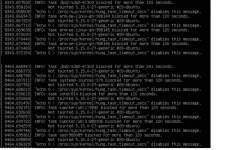
i kicked off a build using Ubuntu Server 22.04 in a virtuallbox VM (windows host) with 10GB ram, 4 cpus and dedicated 250GB SSD for OS, but server is hanging.

Not responding to local console commands and ssh sessions hung.

Seeing a lot of 'task blocked for more than 120 seconds' output (attached)

Is this expected behaviour?openvix build virtualbox vm 10gb ram 4 cpu server non responsive.webp
 
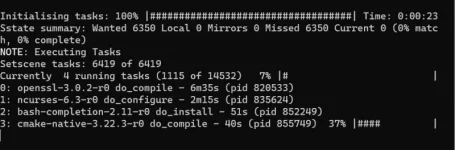
This was the last ssh output from the 'MACHINE=gbtrio4k DISTRO=openvix DISTRO_TYPE=release make image' command before it stopped getting updates.

Looking at host machine CPU and memory usage, things are still working away.last ssh output .webp
 
Last edited:
The build is cpu intensive and also with the newer OE-A‘s (5.0 or 5.1) very heavy on memory. Even without nodejs, qt and kodi - builds can hit 24GB memory, so I would suggest over 16GB, possibly more. I have hit 34GB when building everything and nodejs & QT steps running (only!)
Try using a swap, also how many threads are you using … is it reasonable for your CPU and under VM
 
Last edited:
The build is cpu intensive and also with the newer OE-A‘s (5.0 or 5.1) very heavy on memory. Even without nodejs, qt and kodi - builds can hit 24GB memory, so I would suggest over 16GB, possibly more. I have hit 34GB when building everything and nodejs & QT steps running (only!)
Try using a swap, also how many threads are you using … is it reasonable for your CPU and under VM

Hmm, only have 16GB on host total for now.

As for threads,I didn't set that. My thought was just to let it go wild.

CPU is Intel(R) Xeon(R) CPU E3-1231 v3 @ 3.40GHz, 3401 Mhz, 4 Core(s), 8 Logical Processor(s)

Bit dated but still powerful - https://www.cpubenchmark.net/cpu.php?cpu=Intel+Xeon+E3-1231+v3+@+3.40GHz&id=2246

A comparison between it and new i7 1265U:

https://www.cpubenchmark.net/compare/Intel-Xeon-E3-1231-v3-vs-Intel-i7-1265U/2246vs4766

I'll leave it running and see when it comes back.
If it fails, I'll stop using VM and just install & boot straight to ubuntu giving it the whole 16GB.


I used your instructions from https://www.world-of-satellite.com/...ntrol-IR-codes&p=524637&viewfull=1#post524637 about using the exclusions by Huevos so it should be skippingKodi and QT etc..

Do you know how long does the build normally take from scratch? It's coming up on 5 hours for me now..
Will give it another couple hours before killing it and booting in to Ubuntu direct.
 
Hmm, only have 16GB on host total for now.

As for threads,I didn't set that. My thought was just to let it go wild.

CPU is Intel(R) Xeon(R) CPU E3-1231 v3 @ 3.40GHz, 3401 Mhz, 4 Core(s), 8 Logical Processor(s)

Bit dated but still powerful - https://www.cpubenchmark.net/cpu.php?cpu=Intel+Xeon+E3-1231+v3+@+3.40GHz&id=2246

A comparison between it and new i7 1265U:

https://www.cpubenchmark.net/compare/Intel-Xeon-E3-1231-v3-vs-Intel-i7-1265U/2246vs4766

I'll leave it running and see when it comes back.
If it fails, I'll stop using VM and just install & boot straight to ubuntu giving it the whole 16GB.


I used your instructions from https://www.world-of-satellite.com/...ntrol-IR-codes&p=524637&viewfull=1#post524637 about using the exclusions by Huevos so it should be skippingKodi and QT etc..

Do you know how long does the build normally take from scratch? It's coming up on 5 hours for me now..
Will give it another couple hours before killing it and booting in to Ubuntu direct.
Hard to compare as I normally have minimal new fetches, don,t build Kodi/qt … and no memory constraint, but new complete build is about 2 1/2 hours running across all 16 cores at 100% most of the time
 
I would forget about using a VM. You should still use at least 8GB swap along with the 16GB ram. It will still take few hours to build the first time. After that it's pretty quick.
 
Just for INFO:

My VmWare Virtul Machine: AMD Athlon(tm) II X4 620 Processor 2.60 GHz, 4 cores, 4 threads, 4GB ram!!!

First build takes about 48 hours :)
Update builds take about 30 mins.

I can just about get away with 4GB ram on the VM and add second 16GB swapfile which i edited into fstab so it is setup at startup.
Building nodejs uses 8GB ram on one thread during linking stage alone.

I sometimes also run 'top' in a second terminal during a build to monitor memory and what is going on if any limits are reached.

This was a recent new virtual machine setup and build bash log as an example:
Code:
sudo apt-get install -y autoconf automake bison bzip2 chrpath coreutils cpio curl cvs debianutils default-jre default-jre-headless diffstat flex g++ gawk gcc gcc-8 gcc-multilib g++-multilib gettext git git-core gzip help2man info iputils-ping java-common libc6-dev libegl1-mesa libglib2.0-dev libncurses5-dev libperl4-corelibs-perl libproc-processtable-perl libsdl1.2-dev libserf-dev libtool libxml2-utils make ncurses-bin patch perl pkg-config psmisc python3 python3-git python3-jinja2 python3-pexpect python3-pip python-setuptools qemu quilt socat sshpass subversion tar texi2html texinfo unzip wget xsltproc xterm xz-utils zip zlib1g-dev zstd 
sudo update-alternatives --install /usr/bin/python python /usr/bin/python2 1
sudo update-alternatives --install /usr/bin/python python /usr/bin/python3 2
sudo update-alternatives --config python
sudo dpkg-reconfigure dash
echo fs.inotify.max_user_watches=524288 | sudo tee -a /etc/sysctl.conf
sudo sysctl -n -w fs.inotify.max_user_watches=524288
git clone https://github.com/oe-alliance/build-enviroment.git -b 5.1
make update
free -h
swapon --show
sudo fallocate -l 16G /oe-a-swapfile
sudo chmod 600 /oe-a-swapfile
sudo mkswap /oe-a-swapfile
sudo swapon /oe-a-swapfile
free -h
swapon --show
sudo cp /etc/fstab /etc/fstab.back
sudo nautilus
sudo swapoff /oe-a-swapfile
swapon --show
free -h
sudo swapon /oe-a-swapfile
swapon --show
MACHINE=xpeedlx3 DISTRO=openvix DISTRO_TYPE=developer make
cd /home/lraizer/openvix/build-enviroment/builds/openvix/developer/inihdp
source env.source
bitbake openvix-image --runall=fetch
MACHINE=xpeedlx3 DISTRO=openvix DISTRO_TYPE=developer make
cd /home/lraizer/openvix/build-enviroment/builds/openvix/developer/inihdp
source env.source
bitbake openvix-image
top
make update
MACHINE=xpeedlx3 DISTRO=openvix DISTRO_TYPE=developer make
cd /home/lraizer/openvix/build-enviroment/builds/openvix/developer/inihdp
source env.source
bitbake openvix-image
top
make update
MACHINE=xpeedlx3 DISTRO=openvix DISTRO_TYPE=release make
MACHINE=xpeedlx3 DISTRO=openvix DISTRO_TYPE=release make image
top
 
Last edited:
installed fresh ubuntu server 22.02 on raw machine - no vm
kicked off build overnight using the kodi/qt exclusions from here [1]

total time for build command was 232m55.226s = 3hrs 52 mins

box specs:
Intel(R) Xeon(R) CPU E3-1231 v3 @ 3.40GHz
16GB swap
16GB RAM=2 * 8GB DDR3 1600Mhz
250 GB Samsung 840 SSD

i can then see the zip images(incl. openvix-6.2.001.release-gbtrio4k_mmc.zip) in ~/openvix/build-enviroment/builds/openvix/release/gbmv200/tmp/deploy/images/gbmv200

[1] https://www.world-of-satellite.com/...ntrol-IR-codes&p=524637&viewfull=1#post524637
 
installed fresh ubuntu server 22.02 on raw machine - no vm
kicked off build overnight using the kodi/qt exclusions from here [1]

total time for build command was 232m55.226s = 3hrs 52 mins

box specs:
Intel(R) Xeon(R) CPU E3-1231 v3 @ 3.40GHz
16GB swap
16GB RAM=2 * 8GB DDR3 1600Mhz
250 GB Samsung 840 SSD

i can then see the zip images(incl. openvix-6.2.001.release-gbtrio4k_mmc.zip) in ~/openvix/build-enviroment/builds/openvix/release/gbmv200/tmp/deploy/images/gbmv200

[1] https://www.world-of-satellite.com/...ntrol-IR-codes&p=524637&viewfull=1#post524637

The feed ipks are also there (deploy/ipk) so you need to set that up so you pick up your feeds in the image
 
The feed ipks are also there (deploy/ipk) so you need to set that up so you pick up your feeds in the image

I don't understand this sentence. Are they not bundled in already cos of that build stage I ran?
I ran step 14
14 - Building image with feeds e.g.:-

MACHINE=vuultimo4k DISTRO=openvix DISTRO_TYPE=release make image

Code:
/home/openvixbuilder/openvix/build-enviroment/builds/openvix/release/gbmv200/tmp/deploy/ipk
total 856
drwxr-xr-x 8 openvixbuilder openvixbuilder   4096 Apr 30 04:33 .
drwxr-xr-x 5 openvixbuilder openvixbuilder   4096 Apr 30 03:18 ..
drwxr-xr-x 2 openvixbuilder openvixbuilder   4096 Apr 30 04:33 3rdparty
drwxr-xr-x 2 openvixbuilder openvixbuilder  45056 Apr 30 04:33 all
drwxr-xr-x 2 openvixbuilder openvixbuilder 651264 Apr 30 04:34 cortexa15hf-neon-vfpv4
drwxr-xr-x 2 openvixbuilder openvixbuilder 131072 Apr 30 04:33 gbmv200
drwxr-xr-x 2 openvixbuilder openvixbuilder   4096 Apr 30 04:33 gbmv200_3rdparty
drwxr-xr-x 2 openvixbuilder openvixbuilder  20480 Apr 30 04:33 gbtrio4k
-rw-r--r-- 1 openvixbuilder openvixbuilder      0 Apr 30 04:33 Packages
 
In Openvix.conf you have to specify your own feeds url otherwise feeds won't point towards your server.
 
In Openvix.conf you have to specify your own feeds url otherwise feeds won't point towards your server.

Ah ok, before I kicked off the build, I should have updated DISTRO_FEED_URI in '/meta-oe-alliance/meta-oe/conf/distro/openvix.conf' to point to $myserver/home/openvixbuilder/openvix/build-enviroment/builds/openvix/release/gbmv200/tmp/deploy/ipk/gbtrio4k?
 
Just update the domain. Then afterwards you make a feeds folder in your web server root and symlink to the ipk folders. I'll post my link creation command later.
 
As an aside, I put my changes in site.conf so there are problems doing 'make update.
 

OpenViX Feeds Status

Back
Top