Superb quality and spec AB-Com PULSe 4K SE. Crazy offer! Only £99! FREE UK DELIVERY! 4K UHD, Enigma 2, Multiboot 4 images & more!...
Superb quality and spec AB-Com PULSe 4K Rev II Twin Satellite tuner only £149! FREE UK DELIVERY! 4K UHD, Enigma 2, SATA HDD facility, Multiboot 4 images & more!...

Sf8008 Vix Night Hd Skin issue

mp1978

New member
Joined
Oct 13, 2013
Messages
3
Reaction score
0
Points
0
I switched from Vu+ Solo2 which was running Openvix 6.3 to Octagan Sf8008.

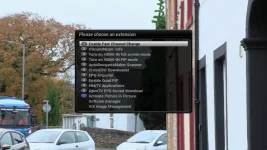
I always use Vix Night Hd Skin. But on Octagon Sf8008, the words are over lapping. Please see image.

I have tried osd positioning. I have put openvix on 2 slots and tried different settings but with no luck.

Any suggestions please.
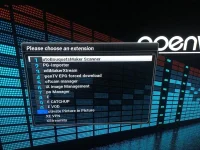
AEC9EE9F-F550-44B8-89B1-814E7C5C3498.webp
 
Might you have tried another skin like simple 1080.
 
I switched from Vu+ Solo2 which was running Openvix 6.3 to Octagan Sf8008.

I always use Vix Night Hd Skin. But on Octagon Sf8008, the words are over lapping. Please see image.

I have tried osd positioning. I have put openvix on 2 slots and tried different settings but with no luck.

Any suggestions please.

View attachment 65063

This is because you switched from a 1080 skin to a 720 skin without doing a full reboot.

Just do a full reboot and it will be fine.
 
not right.I have the same problem and skin was always 1080p 50hz .Also on night HD.
 
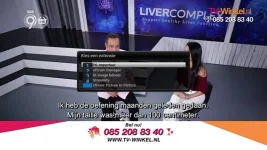
and this is vix night HD 1080p

vixnight HD1080.webp
 
skin is vix night Hd and setup box is on 1080p and shows like picture and same as topic starter.This started a few images ago on SF8008 .On my duo 2 all is fine with same skin
 
Last edited:
1080p has nothing to do with the skin. Do a full reboot.
 
1080p has nothing to do with the skin. Do a full reboot.

I am sorry to ask a silly question but what is a full reboot?

I switched off the receiver few times and turn it back on and pressed start and reboot options few times. with no luck.

Do u mean do a factory reset on vix image?
 
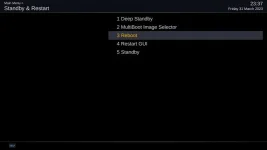
Reboot = Reboot receiver (what is meant above by full reboot)
Restart GUI = Restart Enigma2

restart menu.webp

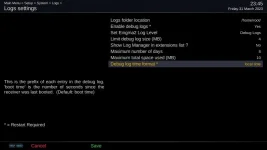
If you have rebooted the box, best you attach your debug log.
Menu > Setup > System > Logs > Settings

debug.webp

You will need to restart your receiver (GUI restart is fine) for change to take effect. If you have IPTV or wi-fi password, remove them from your logs before attaching/posting to forum.

To attach items (if you need the guide):
https://www.world-of-satellite.com/showthread.php?44054-How-to-take-screen-shots-How-to-attach-files
 
Last edited:
skin is vix night Hd and setup box is on 1080p and shows like picture and same as topic starter.This started a few images ago on SF8008 .On my duo 2 all is fine with same skin

I have the same problem on Zgemma 9hs, and the progressbar in videoplayer shows only half the bar. started at same time a few images back.
 
just done full reboot and no change
 
Hi, Gigablue UHD UE 4K, same here. Rebooted, Restarted GUI, same thing, sometimes OK, other times menu as in post no7.Plus Jedi Maker Xtream acting strange (Playlist>playlist name>continue>info>screen locks. Have to reboot and after start, menu as in post no7. Tried back vix 6.3.002 same results. Gone back again to 6.3.005.
 

Attachments

Half the time, you ask for the logs if we have a query.
 
the box is working fine but the image is bad showing as in photo.Whats the point off logs then ???????????
 
I can't reproduce it so tracking down the problem is going to be difficult.
 
on a duo2 the numbers are simple but on the octagon they are with the bleu box.That is probably the problem.Image on duo2 is also not 4K
 

OpenViX Feeds Status

Back
Top