Superb quality and spec AB-Com PULSe 4K SE. Crazy offer! Only £99! FREE UK DELIVERY! 4K UHD, Enigma 2, Multiboot 4 images & more!...
Superb quality and spec AB-Com PULSe 4K Rev II Twin Satellite tuner only £149! FREE UK DELIVERY! 4K UHD, Enigma 2, SATA HDD facility, Multiboot 4 images & more!...

[GiGaBlue UHD UE 4K] Recording problem

avalon65

New member
Joined
Dec 4, 2016
Messages
380
Reaction score
0
Points
0
Location
Leeds
My receiver came with twin satellite tuners, and twin terrestrial tv tuners so I could record 3 programs and watch another program . This has worked well , but more recently ince I flashed the receiver with the latest image , the receiver doesn't see the twin TV tuners, and will only record 1 program if we want to watch another.
I have checked the cable connections, unplugged and replugged , also checked the settings so that the local tv transmitter is selected, it wasn't after the initial image upgrade.

I don't know what else to do or check in the tuner settings.
Help please
 
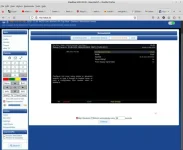
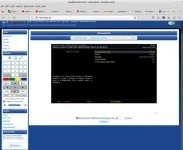
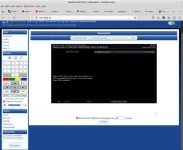
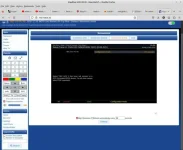
Post a picture /screenshot if the following page:
Menu, Information, Devices

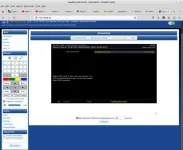
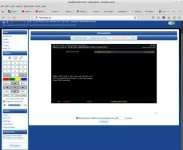
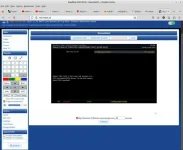
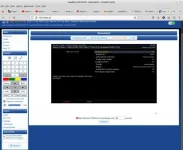
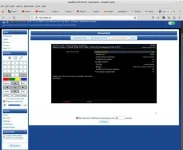
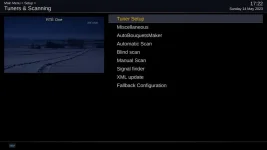
And also screenshots of all the 10 tuner configuration pages.
 
It would have been better to right click and save the screenshot. They are not very clear and we have to zoom in. Please bear in mind for future screenshot requests.

Your first picture shows Tuners I&J are present.

Tuner I. You have enabled both Terrestrial and Cable (Virgin). Best to disable the Cable one.
Tuner J. You have enabled both Terrestrial and Cable (Virgin). Best to disable the Cable one.

Q1. For your satellite tuners, are you using a Unicable LNB or Universal LNB?
Q2. When you scan for Emley Moor, do you get all the channels?
Q3. Is your problem for satellite channels or Terrestrial channels
Q4. How are you making your bouquets? Are you using AutoBoquetsMaker?


I would recommend:
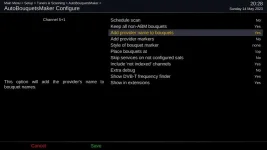
In ABM, you enable the option to "Add provider name to bouquets" It will allow you to easily distinguish between Terrestrial and Satellite bouquets
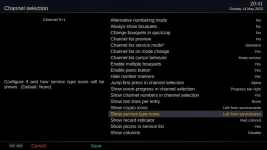
In the Channel selection menu, enable "Show service type icons"
 
Yes i could not make it out either as it needs to be seen more clearly
 

Attachments

  • screenshot.webp
    screenshot.webp
    14.5 KB · Views: 13
oops, yes , Sorry about that I didn't realise how they would turn out .Doh!
I'll do them again by right click you want me to

For Q1, All I know that it is 1 LNB with 2 cables attached
For Q2, yes I get all channels as far as I am aware
For Q3, I'm not sure either way , but probably just Terrestrial channels
For Q4, Yes I am or did use Autobiographer

I have already added provider name, ie Service name. I have service number, then picon, then service name, eg 101 BBC One
Yes already showing services type icons.

Thanks
 
Terrestrial channels are those that you get from an aerial. You can access two Terrestrial frequencies on your hardware setup. With one tuner, you can record BBC one HD, BBC 2 HD, itv 1 HD, channel 4 HD, channel 5 HD.

Please enable the options I suggested to remove any confusion as to whether you are selecting Terrestrial or Satellite channels.

There is a bug with the FBC tuners and using universal LNBs. You get conflict warnings when you can actually select services.
 
Yes I am aware that you get terrestrial channels from a TV aerial.
The receiver does have twin satellite tuner as well a twin TV tuners.

I have changed what need to be changed , ie Disabled cable for both Tuner I and J

Pardon me for asking this, but how do I know if I am selecting Terrestrial or Satellite channels.

Thanks
 
Yes I am aware that you get terrestrial channels from a TV aerial.
Okay, thanks for confirming. Some people think BBC1, 2, ITV1, CH 4 and Ch 5 on satellite are Terrestrial channels. I am glad you don't fall into this.


Pardon me for asking this, but how do I know if I am selecting Terrestrial or Satellite channels.
That is why I suggested that you enabled the Service type icon in channel list menu and also add provider name to bouquet in ABM's menu. I should also add, ensure that you have Freeview above Sky in the ABM providers order. The bouquet ill be named to discern between Freeview and Sky. There will be little pictures next to the channel name, an aerial and a satellite.
 
Ok, I have enabled Freeview, Emly Moor for Terretrial TV channels, and moved it up above FreeSAT in provider order

Where do I enable the service type icon, a I can't see where to do it. I have Service name in Grid EPG,, but can't see where to add service type.

Thanks
 
Have you enabled "Add provider name to bouquets"? In ABM's configure menu. Be sure to run ABM again. This will make it so much easier for you to tell difference.

ABM provider name to bouquets.webp

EDIT:
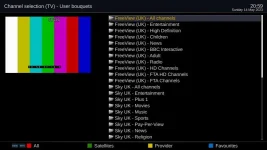
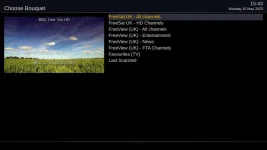
Picture with the bouquets. If the provider names are not added, you would not know whether you are accessing the Sky or Freeview bouquet.
boquets with provider names.webp

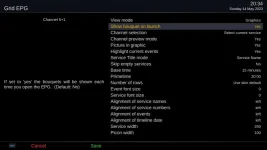
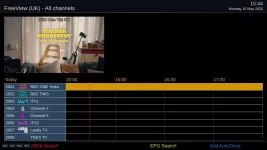
In the Grid EPG, there isn't an option to show service type. But your bouquets should be named (hence previous advice). You would normally press the TV button to show bouquets. But the Gigablue has TV/Rad button which will get your system confused. Might be better to for you to enable the option "show bouquet on launch". That way you will choose the boquet. Just press menu when the grid EPG is open to show the menu options.

grid epg - show bouquets.webp


For the service type icons, activate the channel list by pressing up next to OK (nothing to do with Grid EPG or any of the EPG screens), then press menu, then menu again for configuration
Enable the "Show service type icons".

channel list service type.webp


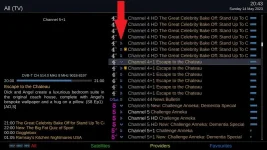
The arrow below shows the service type icons
channel list service type 2.webp
 
Last edited:
Thanks for that, but when I enabled FreeView and set it above FreeSAT, then started a scan, I received and error message. It said it couldn't read the data for FreeView. Also before starting a scan, the FreeView channel list in the EPG was blank, which was to be expected I suppose. Then when I selected FreeSAT bouquet, the channel list started at 1001 instead of 101 for BBC One W.Yorks.
Have I missed something ?

Thanks
 
If you have two providers, they both can't start at 1. Unless you enable Alternate numbering. The idea is for you to use the Freeview more than Freesat. You will have fewer clashes. If this is not to your liking, please swap the provider order back, then run AutoBouquetsMaker again.

I am a bit puzzled about your comments about the error. You said you thought you get all the channels, so you should not be getting any errors. But you saying the Freesat bouquets start at 1001 implies ABM worked fine. Can you please check the Freeview bouquets and check if the channels work.
 
Oops, yes my error. I forgot to select the actual TV area under FreeView, but have done that now. I did another scan and although FreeViewUK was scanned and I have show service name selected, there doesn't appear to be any FreeView channels , unless they are duplicated and saved to just 1 . IE BBC One , x2 becomes just BBC One x1

I swapped the provider order so that it starts at 101 in the grid epg, and apart from checking recordings, it appears to be working fine.
Thank
 
Restart your receiver using menu and check again please. Post a clear screenshot of the bouquets.
 
List of bouquets
[
ATTACH=CONFIG]65408[/ATTACH]

Then when I select FreeView (UK)

1_0_19_18E3_7FD_2_11A0000_0_0_0_20230515154441.webp
 

Attachments

  • 1_0_19_18E3_7FD_2_11A0000_0_0_0_20230515154331.webp
    1_0_19_18E3_7FD_2_11A0000_0_0_0_20230515154331.webp
    21.7 KB · Views: 12
Great work on screenshots. Nice and clear!

I am not understanding what the current problem is. The only issue I can see is that you do not have any EPG for the terrestrial channels. This is normal if you have not been on one for a while. Select the Freeview bouquet, select a channel and the EPG will be absorbed.
 
Thanks that did it by selecting a channel.

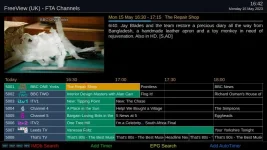
This what I see now:

1_0_1_104A_104A_233A_EEEE0000_0_0_0_20230515164222.webp

I find that if I don't select 'Show Bouquets at launch' when I select the EPG it defaults to FreeView (UK), that is even after I last selected FreeSAT in the bouquet list when Show Bouquets at launch was enabled
 
Last edited:
You will generally be in the last bouquet/method you had selected. When in the Grid EPG, pressing the "FAV", "favourites" or "TV button" will show you the bouquets, you can then select one you want. < and > will go through the bouquets. Some remotes do not have the TV button and some remotes change function of remote so it controls the TV instead of Receiver.

There is coding/programming to do with "selecting channels". There is programming to do with "showing EPG". The "show EPG" programming sometimes loses focus. A large number of users always go to the EPG button for selecting channels even thouhg this is not the primary goal of those screens. In my opinion, better to use the channel selecting code to begin with, then go to grid EPG when you are more comfortable.

More reading here
https://www.world-of-satellite.com/showthread.php?63049-Bouquets-EPG-amp-Channel-navigation

Before you next run ABM, maybe you can disable the the FTA bouquet for Freeview. They are all FTA, the days of "ON Digital" are long gone!
 
Thanks, yes I have disabled the FTA bouquet for FreeView. The new remote I bought for the receiver has a TV and a TV/Rad button, and if I press either of those the remote doesn't work with the receiver and I have to pres the Giga button
I did press the said buttons to see what would happen, and one time it brought up the bouquet menu, but another time the TV/Rad button brought up a Favorite radio station, which didn't play, and I couldn't get back to a TV bouquet for what seemed like ages.

When you say to use the channel selecting code , is that the actual channel number like 101, 102 etc.

Thanks
 

OpenViX Feeds Status

Back
Top