Superb quality and spec AB-Com PULSe 4K SE. Crazy offer! Only £99! FREE UK DELIVERY! 4K UHD, Enigma 2, Multiboot 4 images & more!...
Superb quality and spec AB-Com PULSe 4K Rev II Twin Satellite tuner only £149! FREE UK DELIVERY! 4K UHD, Enigma 2, SATA HDD facility, Multiboot 4 images & more!...

[GiGaBlue UHD UE 4K] Recording problem

When you say to use the channel selecting code , is that the actual channel number like 101, 102 etc.
What I am saying is: Don't use the EPG button for selecting channels until you are comfortable with navigating around.

With no menus showing, press the Up or Down button (next to OK on middle of remote). What do you see?
 
Aah, I know what you mean now. using the up / down button changes the channel or tv station. I sometimes also press the numbers for the channel if I know what they are, like 101, 102 etc

I see there is a FAV button on the OpenWebIf remote, but not one on the actual remote, and pressing the TV/Rad button is a nightmare to get back to the TV channel, as it brings up Favourite radio from user.bouquet.

Thanks
 
Favourites can be selected by pressing BLUE after pressing the UP/DOWN button. The GIGA/TV/AUX/DVD buttons are for switching between different devices. It's a universal remote.
 
Tv / Radio button changes source from tv channels to radio .

Blue button while in your list of channels should be favourites ?

Look down on Webif page look at the blue button ?
 
The remote I have is the GigaBlue V3 Remote.

The Blue button on the remote just brings up an extension window, ie Pleae choose an extensions, as does the Context button
Yellow button is EPG search and green is Timer list

Even after pressing the Up / Down button then pressing the Blue button does not bring up Favourites

I don't recall having to do any of this when I first got the receiver, apart from setting up FreeSAT and FreeView.

Thank anyway
 
Did you set up AutoBouquetsmaker ABM to use your Bouquets for channel choices i wonder?

Wonder if that is why you cant see it.
 
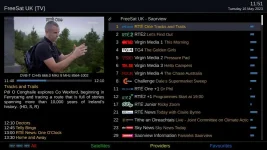
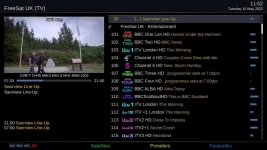
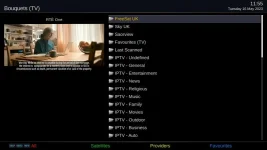
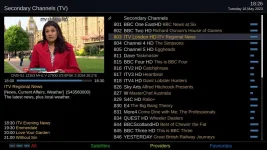
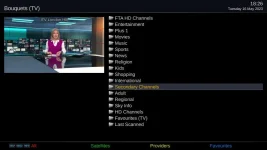
BLUE button on its own (when in normal programme watching) does bring up the extension window. If you press UP/DOWN (to bring up the channel list) you should see the options listed at the bottom of the screen (BLUE for Favourites). These are favourites bouquets created by AutoBouquetsMaker as referenced by @cactikid in his reply. See my screenshots. In case of confusion in what you're seeing in my screenshots, my terrestrial (Saorview) and Freesat bouquets are combined, but named as "Freesat UK - Saorview", so I've shown the first two pages of my channel list. The bouquets list is shown when I press BLUE.
 

Attachments

  • channel_list.webp
    channel_list.webp
    50.9 KB · Views: 7
  • channel_list_2.webp
    channel_list_2.webp
    47.5 KB · Views: 6
  • Favourites_list.webp
    Favourites_list.webp
    26.7 KB · Views: 7
The GB3 remote should also have the Context menu mapped to favourites.

We are referring to the up/down next to okay in middle of remote. Please read the pdf in that thread I linked to if you need to. We are just repeating what is in there. (The only thing missing is button customisations.)
 
Last edited:
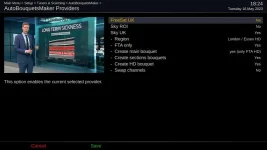
Have you setup your ABM settings and location to use and scanned to bring up different sections
 

Attachments

  • ABM.webp
    ABM.webp
    26.5 KB · Views: 3
  • favourites.webp
    favourites.webp
    61.3 KB · Views: 3
  • Bouquets.webp
    Bouquets.webp
    25.6 KB · Views: 3
The GB3 remote should also have the Context menu mapped to favourites.

We are referring to the up/down next to okay in middle of remote. Please read the pdf in that thread I linked to if you need to. We are just repeating what is in there. (The only thing missing is button customisations.)

I have printed that pdf and will read through it in time.
The 2nd page says the same thing twice, is that intentional.

Thanks
 
I have printed that pdf and will read through it in time.
The 2nd page says the same thing twice, is that intentional.
Thanks
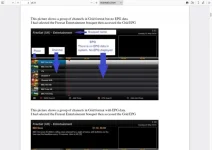
I am not seeing the duplication. If I have made an error, please post a screenshot and highlight it and I will endeavour to correct it.
 
It is only the text that is the same , as the 2 picture are different.

Screenshot 2023-05-16 at 19-52-09 EPG bouquet guide 2020.06.28.pdf.webp
 
Have you setup your ABM settings and location to use and scanned to bring up different sections

If I knew how to I would do it, but in the meantime I will read the linked pdf

Out of curiosity I tried to map the BLUE button to the bouquets or favourites in Button Setup, but neither was showing up in the listing. It was the same listfor every button.
 
Last edited:
If I knew how to I would do it, but in the meantime I will read the linked pdf

Out of curiosity I tried to map the BLUE button to the bouquets or favourites in Button Setup, but neither was showing up in the listing. It was the same listfor every button.

The ABM settings are pretty self-explanatory. You just choose your region (for satellite) and possibly down to your local transmitter (for Freeview) and save with the GREEN button, then run ABM. After ABM runs you will have a bouquet (or several) with a list of channels(services) that you picked in the ABM setup.
 
It is only the text that is the same , as the 2 picture are different.

View attachment 65423
The text is different. One picture EPG, the other does not have EPG.
I selected the same bouquet in both examples, so that text is the same.

You do not need to do any mapping. While no Menus are showing on your screen, press the Context button, your list of bouquets will be shown.
 
The text is different. One picture EPG, the other does not have EPG.
I selected the same bouquet in both examples, so that text is the same.

You do not need to do any mapping. While no Menus are showing on your screen, press the Context button, your list of bouquets will be shown.

Apologies, my error , again!

I wish it would happen as you say, but it doesn't, and I don't know why.. I will perservere when I have the time to do so, as it is difficult when other family members are watching TV when I am not
Thanks
 
Which image are you using? Please provide full details: image name, version and date. You can access this by Menu > Information > About. Some people just say "latest" which is not helpful at all

So what happens when you press context key? Anything shown on screen?

And for time being, make sure nothing is on screen, press up next to OK, you will see the picture joe provided and what is in that pdf, you can then press blue to show favourites.
If that is not happening, you have made a change in button setup somewhere.

Alternatively,
Menu > Setup > User Interface > Channel > Selection >
Enable the "always show bouquets" option.
 

OpenViX Feeds Status

Back
Top