Superb quality and spec AB-Com PULSe 4K SE. Crazy offer! Only £99! FREE UK DELIVERY! 4K UHD, Enigma 2, Multiboot 4 images & more!...
Superb quality and spec AB-Com PULSe 4K Rev II Twin Satellite tuner only £149! FREE UK DELIVERY! 4K UHD, Enigma 2, SATA HDD facility, Multiboot 4 images & more!...

[SX988] Client Mode is unreliable

paul4ow

New member
Joined
Dec 13, 2021
Messages
22
Reaction score
0
Points
0
Hello,

I have a Vu+ Uno4KSE configured for satellite reception and acting as a server, and an Octagon SX988 acting as a network streaming client. Both are running OpenViX 6.4.009.

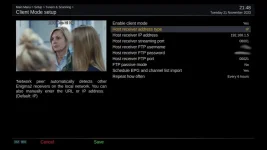
The client is setup in client mode with the following settings ("Schedule EPG and channel list import" is enabled):
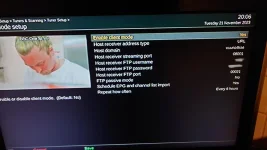
20231121_200604.webp

This works well most of the time, however, sporadically the client will not show any channels on the channel list after boot and I just get a blank black screen.

If I disable Client Mode and instead only use the "Fallback Configuration" option under the Tuners menu of the client then the streaming works reliably on every boot, however, the problem with this method is that I do not get the EPG updates, nor an up-to-date channel list whenever a channel changes frequency etc.

What could be causing this reliability problem with Client Mode? I am not familiar with how to debug or the code, but one guess of mine is could it be that the FTP connection sometimes fails? Is the code that deals with this robust enough to deal with a failed FTP connection and stream anyway with existing EPG/channel list data?

Thanks,

Paul
 
Last edited:
I assume other box ip has not changed and does that box need a reboot to clear any bugs.
 
I assume other box ip has not changed and does that box need a reboot to clear any bugs.

The server box has a static IP, and I've had this problem sporadically for almost a year now (so many reboots of the server in-between).
 
choose ip adress instead of url. Be shure you have a free tuner on main box
 
choose ip adress instead of url. Be shure you have a free tuner on main box

I will try an IP instead of URL and report back, but that still wouldn't explain why when I set a "Fallback Configuration" using an auto-detected "Network Peer" it works reliably.

I have 8 tuners available on the server and I don't think they have ever been used all at once!
 
Last edited:
I will try an IP instead of URL and report back, but that still wouldn't explain why when I set a "Fallback Configuration" using an auto-detected "Network Peer" it works reliably.

I have 8 tuners available on the server and I don't think they have ever been used all at once!

OK, I tried by setting the receiver address by IP on the client as follows:
1_0_19_1B1F_802_2_11A0000_0_0_0_20231121214838.webp

This initially worked, but after 5 or so boots later of the client it stopped working again (same problem as described in OP).

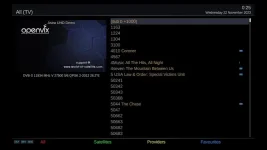
To elaborate with some more screenshots, when this problem occurs, on boot of the client I just get the following blank screen. Typing a 3-digit channel number into the remote does nothing:
screenshot_20231120121159.webp

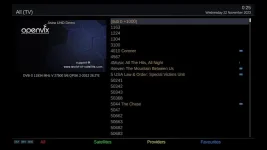
If I press up or down on the remote control to get the channel list I get a blank black screen with no channels listed. If I press the red "All" button I get the complete list of unsorted channels (not in a bouquet) and I can stream them by tediously manually selecting as in this screenshot:
1_0_1F_1CE9_7F6_2_11A0000_0_0_0_20231122002545.webp

However, my main "Freesat UK - All Channels" bouquet is not present if I press the blue button for "Favourites", with only some minor bouquets present.

If I disable client mode to rely on the "Fallback Configuration" and reboot everything works as expected (except no automatic EPG and channel list updates).
 

Attachments

  • 1_0_1F_1CE9_7F6_2_11A0000_0_0_0_20231122002545.webp
    1_0_1F_1CE9_7F6_2_11A0000_0_0_0_20231122002545.webp
    17.6 KB · Views: 10
Last edited:
OK, I tried by setting the receiver address by IP on the client as follows:
View attachment 65838

This initially worked, but after 5 or so boots later of the client it stopped working again (same problem as described in OP).

To elaborate with some more screenshots, when this problem occurs, on boot of the client I just get the following blank screen. Typing a 3-digit channel number into the remote does nothing:
View attachment 65839

If I press up or down on the remote control to get the channel list I get a blank black screen with no channels listed. If I press the red "All" button I get the complete list of unsorted channels (not in a bouquet) and I can stream them by tediously manually selecting as in this screenshot:
View attachment 65840

However, my main "Freesat UK - All Channels" bouquet is not present if I press the blue button for "Favourites", with only some minor bouquets present.

If I disable client mode to rely on the "Fallback Configuration" and reboot everything works as expected (except no automatic EPG and channel list updates).

turn on debug logs (menu/setup/system/logs/settings ---> select hdd/usb, set local time, show in extensions(helpful - use blue button)) and post when issue arises
 
turn on debug logs (menu/setup/system/logs/settings ---> select hdd/usb, set local time, show in extensions(helpful - use blue button)) and post when issue arises

OK, here is the log from the SX988 client when Client Mode failed:
View attachment Enigma2_debug_2023-11-22_15-39-57.log


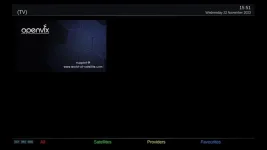
And a screenshot of the blank channel list:
screenshot_20231122155107.webp

I thought this section from the log was maybe appropriate:
Code:
15:40:02.4756 [ClientModeScheduler][ClientModeautostart] AutoStart Enabled
15:40:02.4758 [ChannelsImporter] Fetch bouquets.tv and bouquets.radio
15:40:02.4758 [ChannelsImporter][fetchRemoteBouquets] Downloading channel indexes...
15:40:02.4759 [ChannelsImporter][fetchRemoteBouquets] 1/2
15:40:02.4759 [ChannelsImporter] Downloading remote file 'bouquets.tv'
15:40:02.5087 [ChannelsImporter][FTPdownloadFile] Error: [Errno 101] Network is unreachable
15:40:02.5088 [ChannelsImporter][fetchRemoteBouquets] Error fetching. Stopping script.

It seems the FTP transfer indeed fails. It says "network unreachable", however, by the time the boot is completed I can use the network fine. I am using a USB WLAN module - maybe the network has not had time to initialise fully before this script executes??? If indeed the FTP transfer fails, why not just use the locally stored bouquet data that is already there, rather than seemingly wiping it?
 
strange you have client mode failed.Have masterbox vu duo2 (4 tuners ) here and 2 remote boxes duo2 and SF8008 and never a failed .Something wrong with your network ? My boxes only go in stb and all boxes view recordings from master also.
Ps: your box has only 2 effective tuners.Maybe thats the problem.
 
strange you have client mode failed.Have masterbox vu duo2 (4 tuners ) here and 2 remote boxes duo2 and SF8008 and never a failed .Something wrong with your network ? My boxes only go in stb and all boxes view recordings from master also.

I don't think there is anything wrong with my network (Kodi clients stream flawlessly). Are your client devices connected wired or wireless? I suspect the problem may be the delay caused to authenticate the WLAN. I am using the WLAN module as at: https://www.octagon-germany.eu/produkte/zubehor/wl618blister/ connected to a 5GHz network.


Ps: your box has only 2 effective tuners.Maybe thats the problem.
How do you figure that? My Vu+ Uno4KSE server has 8 tuners configured with a Unicable II FBC:
Screenshot 2023-11-22 at 17-36-44 Vu Uno4K SE - OpenWebif.webp

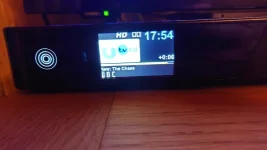
Here is the front panel showing 3 streams on tuners A, B, C:
20231122_175428.webp
 
Last edited:
Sometimes for testing having long rolls of lan cable come in handy.
 
my network is fully cabled an 1 GB reliable with cisco switch
 
I can confirm that with wired Ethernet I had no problems over days. Upon switching back to WiFi the problem reappeared almost instantly.

Otherwise WiFi streams with no problems. Therefore, I suspect this is a bug related to the fact that WiFi takes longer to initialise than wired Ethernet. Does the OpenViX code explicitly check and wait for a network connection before running "ChannelsImporter"?
 
I have had the same problem using wirles
 
I have watched this thread and kind of laid back on it.
If you have the options and assuming that you are running server/client on your own LAN only.
Disable DHCP on the receivers and give them a fixed IP and the router as the DHCP server. Give the 2 receivers a fixed IP a few numbers away like XXX.XXX.122, XXX.XXX.124.
Then in your router web interface you should be able to assign fixed IP's per MAC address.
Mind you the MAC will change depending on if you use wifi or the Ethernet port.
Saying that I'm experiencing 0 issues using server/client might be taken as bragging. But honestly, no issues at all. If there does happen to be a burp. A simple cold boot of the receivers fixes it.
You do realize that the server receiver has to be in standby. Else on the client you can only watch the channels on the transponder the server is tuned to.
 
I do wonder if its the router causing the issue as many on a certain provider did say wifi sucked and to put it into modem mode and use another router for better wifi performance ?
 

OpenViX Feeds Status

Back
Top