Superb quality and spec AB-Com PULSe 4K SE. Crazy offer! Only £99! FREE UK DELIVERY! 4K UHD, Enigma 2, Multiboot 4 images & more!...
Superb quality and spec AB-Com PULSe 4K Rev II Twin Satellite tuner only £149! FREE UK DELIVERY! 4K UHD, Enigma 2, SATA HDD facility, Multiboot 4 images & more!...

[ET10x00] How do I set automtimer so that it records strictly without fail??? Stumped

bmitie

Forum Supporter
Donated Member
Joined
Aug 10, 2010
Messages
447
Reaction score
15
Points
18
I have 2 boxes for SWMBO one an xtrend 10000 and the other a Zgemma h7s, as a spare but with same progs in automtimer. (cant be too careful)

All the programs are setup using AUTOMTIMER by pressing blue button and then green. All have a good time span and that's it. Works a treat EXCEPT for Strictly.

Is there any tweak I can make to the autotimer setting for Strictly that will ensure it records week in week in. I know the times keep changing but these are covered and there are no other recordings scheduled for that slot. A total mystery.

Tonight both boxes failed to start recording and I am stumped.

I use BBC1 London HD.
 
I have 2 boxes for SWMBO one an xtrend 10000 and the other a Zgemma h7s, as a spare but with same progs in automtimer. (cant be too careful)

All the programs are setup using AUTOMTIMER by pressing blue button and then green. All have a good time span and that's it. Works a treat EXCEPT for Strictly.

Is there any tweak I can make to the autotimer setting for Strictly that will ensure it records week in week in. I know the times keep changing but these are covered and there are no other recordings scheduled for that slot. A total mystery.

Tonight both boxes failed to start recording and I am stumped.

I use BBC1 London HD.

What is the autotimer searching for ? Does the listed title of the program change in certain weeks. For instance Strictly Come Dancing is not necessarily the same as Strictly Come Dancing: Halloween Special nor
Strictly Come Dancing : Results

Maybe edit the autotimer to only search for Strictly in the program title , and then set the option for a partial match and case insensitive match. The autotimer will then find all the above cases of different program titles.

The other gotcha sometimes is the autotimer option to check for uniqueness in the program title and short description. This can be used to avoid recording repeats UNLESS the broadcaster just uses the same generic short description each week . Once " Strictly Come Dancing: a dozen talentless Z list celebrities prance around a ballroom" has been recorded and the same program title and description is used the next week the autotimer will identify this as a repeat if you configure it to check for uniqueness in the program title and short description.

Press green to save the changes and then when in the autotimer top level press green again to save the fact that the list of autotimers has changed.
 
Well that explains why it failed, it had Blackpool special in the title!! I assumed, wrongly, that as long as it said strictly etc I was covered. I shall do as you suggest and at same time learn a bit more about autotimer.
 
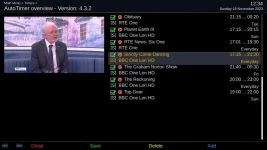
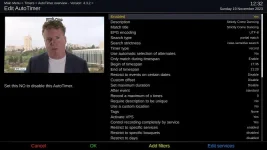
Here are my "Strictly" autotimers, both the summary page and the detail. You can see I do a "partial match" on the programme title, so that handles any variations (like Blackpool Special for example). It's set for any day between particular hours, so it records the main programme on Saturday and the results on Sunday.There is a service restriction to BBC1, so I don't record "Strictly It Takes Two" on BBC2 during weekdays. Hasn't failed me in the years I've been recording the programme. The only eventuality it wouldn't cover would be if BBC switched it to another channel, but I think that would have to be some kind of national emergency!:eek:
 

Attachments

  • Strictly_autotimer_summary.webp
    Strictly_autotimer_summary.webp
    36.1 KB · Views: 16
  • Strictly_autotimer_detail_page.webp
    Strictly_autotimer_detail_page.webp
    37.7 KB · Views: 23
The other gotcha sometimes is the autotimer option to check for uniqueness in the program title and short description. This can be used to avoid recording repeats UNLESS the broadcaster just uses the same generic short description each week . Once " Strictly Come Dancing: a dozen talentless Z list celebrities prance around a ballroom" has been recorded and the same program title and description is used the next week the autotimer will identify this as a repeat if you configure it to check for uniqueness in the program title and short description.

Correction
The other gotcha sometimes is the autotimer option to check for uniqueness in the program title and short description. This can be used to avoid recording repeats UNLESS the broadcaster just uses the same generic short description each week . Once " Strictly Come Dancing: a dozen talentless Z list celebrities prance around a ballroom" has been recorded and the same program title and description is used the next week the autotimer will NOT identify this as a repeat if you configure it to check for uniqueness in the program title and short description.
 
Thank goodness you won't have to deal with "Strictly" foolishness again until at least September @adm :D
 
Well all I have to add is much thanks as everything is spot on now and no qualms so delighted, nothing has been missed... yet:thumbsup:
 
Correction
The other gotcha sometimes is the autotimer option to check for uniqueness in the program title and short description. This can be used to avoid recording repeats UNLESS the broadcaster just uses the same generic short description each week . Once " Strictly Come Dancing: a dozen talentless Z list celebrities prance around a ballroom" has been recorded and the same program title and description is used the next week the autotimer will NOT identify this as a repeat if you configure it to check for uniqueness in the program title and short description.

Sorry brain fade - my correction is incorrect
If the title and description remains the same for multiple programs (even though they are actually different) the autotimer configuration will identify that it has already recorded it or a timer has already been set and will therefore ignore the second and subsequent occurrences.
 
Sorry brain fade - my correction is incorrect
If the title and description remains the same for multiple programs (even though they are actually different) the autotimer configuration will identify that it has already recorded it or a timer has already been set and will therefore ignore the second and subsequent occurrences.
But only of the previous recording still exists on the box.
If you watched it and (completely) deleted it then, as far as the box is concerned, it never existed and so you will get another recording.
 

OpenViX Feeds Status

Back
Top