Superb quality and spec AB-Com PULSe 4K SE. Crazy offer! Only £129! FREE UK DELIVERY! 4K UHD, Enigma 2, Multiboot 4 images & more!...
Superb quality and spec AB-Com PULSe 4K Rev II Twin Satellite tuner only £179! FREE UK DELIVERY! 4K UHD, Enigma 2, SATA HDD facility, Multiboot 4 images & more!...

WiFi does not start after reboot

Trial

Moderator
Joined
Jul 27, 2011
Messages
5,174
Reaction score
27
Points
48
Age
65
Location
germania
I have a couple of free days now and updated my 4 VUs with 3 times latest release and 1 with latest dev (OpenViX 6.7.020 (2025-10-05-Developer) ). At least 2 must be connected by WiFi and it works after setup. After a reboot WiFi is not active anymore. If I restart WiFi with the menu it is working again. What can I do that WiFi is active after reboot?

Ralf
 
I have a couple of free days now and updated my 4 VUs with 3 times latest release and 1 with latest dev (OpenViX 6.7.020 (2025-10-05-Developer) ). At least 2 must be connected by WiFi and it works after setup. After a reboot WiFi is not active anymore. If I restart WiFi with the menu it is working again. The old Duo2 is connected to WiFi right after boot. Solo4K is connected with cable. What can I do that WiFi is active after reboot?

Ralf
What was the initial release you updated from?
hopefully Joe90 will respond as he spent a lot of time testing on the Wifi setup post the change to udev.
One thing that sticks in my memory is ensure that the lan connection is disabled and wifi enabled in setup before going into standby/deep standby.
 
Last edited by a moderator:
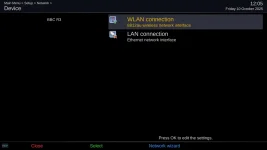
@Trial - just make sure that WiFi adapter is marked in the settings menu as being preferred (green tick icon) - otherwise it may revert to the ethernet connection. The ethernet icon should have an "X" through it.
On your wired devices make sure that WiFi has "X" and ethernet is "ticked".
 
Ultimo 4K was USB flashed with 6.7.019, Duo4K (NOT SE) Duo4K was flashed through images manager with download of 6.7.020.3. All boxed are restore from backup. Of couse WiFi is ticked and Ethernet is crossed. I create a boot log in a few minutes of my Ultimo4k.

I started the Ultimo4K, then I tried some things like installing plugin, looked in WiFi status and finally I restarted network without any changes in advance. In attached file are debug log and dmesg log.

Ralf
 

Attachments

The first 92 seconds of the log are missing, so I cannot see the initial start of enigma where the network interfaces are checked.
Later in the log (at 570 seconds) this line is printed:
Code:
 570.802439> 08:59:46.6469 [Console] finished: iwconfig wlan3
<   570.803958> 08:59:46.6484 [Wlan.py] apsresults2 {'essid': '', 'frequency': '2.412', 'accesspoint': False, 'bitrate': '400', 'encryption': False, 'quality': '5/5  ', 'signal': '0 dBm', 'channel': False, 'encryption_type': False, 'frequency_norm': False}
<   570.822644> 08:59:46.6671 [Console] finished: iwconfig wlan3

This looks like wlan3 is not configured for access to the wireless AP ( no SSID, no DHCP or fixed IP address set, no gateway etc.).

Later in the log after you have navigated to the config page in the menu presumably:

Code:
  582.908413> 08:59:58.7529 [Network] read configured interface: {'lo': {'dhcp': False}, 'eth0': {'dhcp': False}, 'wlan3': {'dhcp': False, 'address': [192, 168, 178, 223], 'netmask': [255, 255, 255, 0], 'gateway': [192, 168, 178, 1]}}

The address details are there and there is a successful connect to the Fritzbox router.

I can see some wifi issues in the dmesg log but not sure what they relate to.

This would appear to be a different issue to what I experienced after the introduction of udev. In my case what was happening on my AX61 HD was that the ethernet interface was being preferred by default and the wlan (in my case an external USB wifi dongle) was being ignored. Marking the wlan as the preferred interface did not survive a reboot as the code was assuming the eth0 as preferred. This was fixed at the time but some of the Vu+ models which had both interfaces built-in had subsequent issues where the wlan was preferred over the eth0 instead and you had to explicitly prefer the eth0 interface with the green "tick".

I will have a look to see the date of those changes but I think that you are having some other issue - either config or software / driver.
 
The changes to the interfaces handling was done by @birdman around the time of udev in 6.7.001. I can't find the posts on the forum as the new xenforo version was being set up at the same time. There have been occasional reports of issues with Vu+ boxes since but usually they have been resolved by going into the network settings and explicitly setting up from scratch. It may be that your settings restore has re-introduced an error in the lan config. See this thread - no wifi after reboot
 
The first 92 seconds of the log are missing, so I cannot see the initial start of enigma where the network interfaces are checked.
Later in the log (at 570 seconds) this line is printed:
My mistake. I only looked at the correct time but the time was set after 92sec. Here is the complete log.

Ralf
 

Attachments

The changes to the interfaces handling was done by @birdman around the time of udev in 6.7.001. I can't find the posts on the forum as the new xenforo version was being set up at the same time.
I'll try to track down what was done.
In the meantime, a quick look at /etc/udev/scripts/network.sh shows this:
Code:
# We get two "add" events for hostap cards due to wifi0
echo "$INTERFACE" | grep -q wifi && exit 0
which would seem to mean that any interface containing "wifi" will never get started by udev.
 
My mistake. I only looked at the correct time but the time was set after 92sec. Here is the complete log.

Ralf
Thanks Ralf. The log shows at timestamp 60.48 seconds:
Code:
<    60.487020> 17:40:22.3315 [Network] read configured interface: {'lo': {'dhcp': False}, 'eth0': {'dhcp': False, 'address': [192, 168, 178, 223], 'netmask': [255, 255, 255, 0], 'gateway': [192, 168, 178, 1]}, 'wlan3': {'dhcp': False}}
<    60.487146> 17:40:22.3316 [Network] self.ifaces after loading: {'eth0': {'up': False, 'dhcp': False, 'preup': False, 'predown': False, 'ip': [192, 168, 178, 223], 'netmask': [255, 255, 255, 0], 'gateway': [192, 168, 178, 1]}}
<    60.488760> 17:40:22.3332 [Network] read configured interface: {'lo': {'dhcp': False}, 'eth0': {'dhcp': False}, 'wlan3': {'dhcp': False, 'address': [192, 168, 178, 223], 'netmask': [255, 255, 255, 0], 'gateway': [192, 168, 178, 1]}}
<    60.488936> 17:40:22.3334 [Network] self.ifaces after loading: {'eth0': {'up': False, 'dhcp': False, 'preup': False, 'predown': False, 'ip': [192, 168, 178, 223], 'netmask': [255, 255, 255, 0], 'gateway': [192, 168, 178, 1]}, 'wlan3': {'up': True, 'dhcp': False, 'preup': '\tpre-up wl-config.sh -m wpa2 -k 6780723027308843 -s "RBFritz5G" \n', 'predown': '\tpost-down wl-down.sh\n', 'ip': [192, 168, 178, 223], 'netmask': [255, 255, 255, 0], 'bcast': [192, 168, 178, 223], 'mac': 'bc:14:ef:bb:e9:32', 'gateway': [192, 168, 178, 1]}}

This shows eth0 as "up" (and also wlan3 as "up"). It would seem that eth0 must be marked as "auto" in the interfaces file and is being brought up in preference to the wifi. Usually marking the wlan interface in the network settings menu as preferred (and the eth0 interface as "X") will resolve that. It does on my GB quad Plus and AX 61HD boxes. My Vu Uno 4k SE has eth0 as preferred as it is connected by ethernet cable.
 
Ralf. Here's the equivalent section of my enigma log:
Code:
<    28.920929> 11:54:32.7502 [Network] read configured interface: {'lo': {'dhcp': False}, 'wlan0': {'dhcp': False, 'address': [192, 168, 0, 127], 'netmask': [255, 255, 255, 0], 'gateway': [192, 168, 0, 1]}, 'eth0': {'dhcp': True}}
<    28.921164> 11:54:32.7505 [Network] self.ifaces after loading: {'wlan0': {'up': True, 'dhcp': False, 'preup': '\tpre-up wpa_supplicant -iwlan0 -c/etc/wpa_supplicant.wlan0.conf -B -dd -Dnl80211 || true\n', 'predown': '\tpre-down wpa_cli -iwlan0 terminate || true\n', 'ip': [192, 168, 0, 127], 'netmask': [255, 255, 255, 0], 'bcast': [192, 168, 0, 127], 'mac': '00:e0:4c:f7:57:53', 'gateway': [192, 168, 0, 1]}}
<    28.922551> 11:54:32.7519 [Network] read configured interface: {'lo': {'dhcp': False}, 'wlan0': {'dhcp': False}, 'eth0': {'dhcp': True}}
<    28.922739> 11:54:32.7520 [Network] self.ifaces after loading: {'wlan0': {'up': True, 'dhcp': False, 'preup': '\tpre-up wpa_supplicant -iwlan0 -c/etc/wpa_supplicant.wlan0.conf -B -dd -Dnl80211 || true\n', 'predown': '\tpre-down wpa_cli -iwlan0 terminate || true\n', 'ip': [192, 168, 0, 127], 'netmask': [255, 255, 255, 0], 'bcast': [192, 168, 0, 127], 'mac': '00:e0:4c:f7:57:53', 'gateway': [192, 168, 0, 1]}, 'eth0': {'up': False, 'dhcp': True, 'preup': False, 'predown': False, 'ip': [0, 0, 0, 0], 'netmask': [0, 0, 0, 0], 'gateway': [0, 0, 0, 0]}}

You will note that my wlan interface comes before the eth0 interface in the sequence. This is because it is marked in the network menu settings as default.

Here is my /etc/network/interfaces file:

Code:
# automatically generated by enigma2
# do NOT change manually!

auto lo
iface lo inet loopback

auto wlan0
iface wlan0 inet static
  hostname $(hostname)
    address 192.168.0.127
    netmask 255.255.255.0
    gateway 192.168.0.1
    pre-up wpa_supplicant -iwlan0 -c/etc/wpa_supplicant.wlan0.conf -B -dd -Dnl80211 || true
    pre-down wpa_cli -iwlan0 terminate || true

iface eth0 inet dhcp
udhcpc_opts -T1 -t9
  hostname $(hostname)

You will note that wlan0 settings are preceded by "auto" and the eth0 settings just have "iface". udev should just activate the interface marked "auto".

This is because, when I set up my network initially I enabled the wifi interface and the wizard asked me if I wished to disable the ethernet adapter. This placed the wifi as first in the list (with a green tick mark) and the ethernet below it with a cross through it. You can try this by enabling both interfaces in the menu and then marking one as default and it should move to the top. Then just disable the unneeded interface.

net_device_menu.webp
 
My WLAN is on second place. My interfaces looks like this:

# automatically generated by enigma2
# do NOT change manually!

auto lo
iface lo inet loopback

auto wlan3
iface wlan3 inet static
hostname $(hostname)
address 192.168.178.223
netmask 255.255.255.0
gateway 192.168.178.1
pre-up wl-config.sh -m wpa2 -k secret-key -s "RBFritz5G"
post-down wl-down.sh

iface eth0 inet static
hostname $(hostname)
address 192.168.178.223
netmask 255.255.255.0
gateway 192.168.178.1
My WLAN settings were at the end I shifted it to the above eth0 but it did not change anything.

Ralf
 
I now made a factory reset to start from scratch with dev 6.7.20.003 and the first thing I noticed was that was no real factory reset because it still had my credentials stored.

I configured network (WiFi), tuner with scan, password and restarted a few times. It never connected to my WiFi automatically. Logs are attached.

My interfaces looks like

# automatically generated by enigma2
# do NOT change manually!

auto lo
iface lo inet loopback

auto wlan3
iface wlan3 inet static
hostname $(hostname)
address 192.168.178.226
netmask 255.255.255.0
gateway 192.168.178.1
pre-up wl-config.sh -m wpa2 -k 6780723027308843 -s "RBFritz5G"
post-down wl-down.sh

iface eth0 inet static
hostname $(hostname)
address 192.168.178.226
netmask 255.255.255.0
gateway 192.168.178.1

Ralf
 

Attachments

I now made a factory reset to start from scratch with dev 6.7.20.003 and the first thing I noticed was that was no real factory reset because it still had my credentials stored.

I configured network (WiFi), tuner with scan, password and restarted a few times. It never connected to my WiFi automatically. Logs are attached.

My interfaces looks like

# automatically generated by enigma2
# do NOT change manually!


Ralf
Factory reset is great for some code testing, but is not a “pure reset“ - so I know its a real pain, but flash a slot (hopefully you have multiboot) and set up afresh - you can always copy in settings later from a settings backup.
udev really caused some issues and maybe you have one we haven,t seen.
 
I now made a factory reset to start from scratch with dev 6.7.20.003 and the first thing I noticed was that was no real factory reset because it still had my credentials stored.

I configured network (WiFi), tuner with scan, password and restarted a few times. It never connected to my WiFi automatically. Logs are attached.

My interfaces looks like

# automatically generated by enigma2
# do NOT change manually!


Ralf
I'm totally out of ideas at this point. I was convinced that your config (interfaces) was preferring your eth0 and that is why your wireless was not starting automatically, but it seems not!
 
Hmmm....
Just realized that if I put a USB Wifi adaptor into my et8000 I could test this.
And yes, the WLAN does not start at boot, but does start if I go into the menu and Restart the Network.

(If I look at Adapter Settings before the restart I get a crash).

So I can look at this over the weekend (probably Sunday).
 
(If I look at Adapter Settings before the restart I get a crash).
Which is interesting....

Code:
<   169.547846> 01:11:58.9773 subprocess.CalledProcessError: Command '['/sbin/iwlist', 'wlan0', 'scan']' returned non-zero exit status 255.
<   169.548814> 01:11:58.9782
During handling of the above exception, another exception occurred:

<   169.549578> 01:11:58.9790 Traceback (most recent call last):
<   169.550578> 01:11:58.9800   File "/usr/lib/enigma2/python/Components/ActionMap.py", line 78, in action
<   169.550823> 01:11:58.9802   File "/usr/lib/enigma2/python/Components/ActionMap.py", line 58, in action
<   169.551076> 01:11:58.9805   File "/usr/lib/enigma2/python/Screens/NetworkSetup.py", line 903, in ok
<   169.551302> 01:11:58.9807   File "/usr/lib/enigma2/python/Screens/NetworkSetup.py", line 888, in queryWirelessDevice
<   169.551498> 01:11:58.9809   File "/usr/lib/python3.13/site-packages/wifi/scan.py", line 72, in all
<   169.551847> 01:11:58.9813 wifi.exceptions.InterfaceError: b"wlan0     Interface doesn't support scanning : Device or resource busy"
However, if I login to the system (once I've switched the Ethernet back on and rebooted - to get dropbear running....) then /sbin/iwlist wlan0 scan works fine, so it implies that the interface is down (which I suppose we already knew...)
 

OpenViX Feeds Status

Back
Top