Superb quality and spec AB-Com PULSe 4K SE. Crazy offer! Only £129! FREE UK DELIVERY! 4K UHD, Enigma 2, Multiboot 4 images & more!...
Superb quality and spec AB-Com PULSe 4K Rev II Twin Satellite tuner only £179! FREE UK DELIVERY! 4K UHD, Enigma 2, SATA HDD facility, Multiboot 4 images & more!...

Build my own Vix image

There seems to be some confusion as to what has happened and if an error worth fixing even exists. So let's go through it one step at a time.

The OpenVix turquoise skin exists in the OpenVix build here:

The Files/directories were installed but not shipped in any package error is set when this skin package is built. What the error means is basically what it says, files or directories that are supposed to be in this package are missing from this skin packages. Find the plugin in your built feeds, unpack it and note there are not any files in: /usr/lib/enigma2/python/Components/

So where is the problem? See line number 18 in the bitbake file:
FILES:${PN} += " ${datadir}/enigma2 ${libdir}/enigma2/python/Components/Converter/BTVInfo.pyo ${libdir}/enigma2/python/Components/Converter/BTVDevicesInfo.pyo ${libdir}/enigma2/python/Components/Converter/BTVCpuUsage.pyo ${libdir}/enigma2/python/Components/Converter/BTVRunning14Events.pyo ${libdir}/enigma2/python/Components/Renderer/DRRunningText.pyo ${libdir}/enigma2/python/Components/Renderer/poster.pyo"

But wait....We are building .pyc files and not .pyo files...So let's make a couple of edits and fix it.
Diff:
 SRC_URI = "git://github.com/norhap/Turquoise-HD.git;protocol=https;branch=master"
 
-FILES:${PN} += " ${datadir}/enigma2 ${libdir}/enigma2/python/Components/Converter/BTVInfo.pyo ${libdir}/enigma2/python/Components/Converter/BTVDevicesInfo.pyo ${libdir}/enigma2/python/Components/Converter/BTVCpuUsage.pyo ${libdir}/enigma2/python/Components/Converter/BTVRunning14Events.pyo ${libdir}/enigma2/python/Components/Renderer/DRRunningText.pyo ${libdir}/enigma2/python/Components/Renderer/poster.pyo"
+FILES:${PN} += "${datadir}/enigma2 ${libdir}/enigma2/python/Components"
 
 EXTRA_OECONF = "\
     BUILD_SYS=${BUILD_SYS} \
@@ -25,7 +25,6 @@
     "
 
 do_install() {
-    find ${S}/usr/lib/enigma2/python/Components/ -name "*.py" -exec rm -rf {} \;
     install -d ${D}/usr/share
     cp -r --preserve=mode,links ${S}/usr/share/* ${D}/usr/share/
     chmod -R a+rX ${D}/usr/share/enigma2/

The reason the error is not seen is the package has already been built wrong and stored. Clean the package and rebuild to se it. How this is done may vary. Here are my steps:
Go to the build directory: /OE-5.6/build-enviroment/builds/openvix/release/osmini4k ( ....Note there is an env.source file.) Open a terminal in this directory and enter the following commands:
source env.source
export MACHINE=osmini4k
(The correct machine for this directory)
#Remove the package
bitbake enigma2-plugin-skins-vix-turquoise-hd -c cleansstate
#Rebuild the package
bitbake enigma2-plugin-skins-vix-turquoise-hd

Next install or edit the enigma2-plugin-skins-vix-turquoise-hd.bb file to fix it. Clean-remove the package again, then rebuild the packages and check it. You will then see the error disappear and the files are placed in the plugin where they belong.

Some errors in image building can be ignored while others may need attention. The task-hash error mentioned earlier in this thread is sort of self-healing as the build sees a problem, flags it, then corrects it. The Files/directories were installed but not shipped in any package error is usually worth looking at because it points to something not being built correctly.

Another error I saw in this build is with dvdauthor and it will stop the build. Same thing exist: If you already have dvdauthor built and stored then you will not see the dvdauthor error. But it is there - or was for me, and it will stop the build if it is not fixed. We will see....
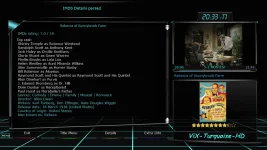
 
The Vix-Turquoise skin is now properly fixed in image feeds. So this problem no longer exists. A screencap is attached.

There is a lot of extra "weight" in the OpenVix feeds that the average user will never need. Consider as an example, zstd:
zstd_1.5.7-r0_cortexa15hf-neon-vfpv4.ipk
zstd-dbg_1.5.7-r0_cortexa15hf-neon-vfpv4.ipk
zstd-dev_1.5.7-r0_cortexa15hf-neon-vfpv4.ipk
zstd-doc_1.5.7-r0_cortexa15hf-neon-vfpv4.ipk
zstd-staticdev_1.5.7-r0_cortexa15hf-neon-vfpv4.ipk
The average user is not going to need all of that stuff and there is not much need for me to pay server space for it. I install an executable script in each .ipk folder and run it to get rid of some bloat, which makes the feeds more manageable. Every bit helps when paying for server space, and leaner feeds are easier to deal with period. The script I use is attached. Maybe someone will find it useful.

vix-turqoise-fixed_20251224203317.webp
 

Attachments

The Vix-Turquoise skin is now properly fixed in image feeds. So this problem no longer exists. A screencap is attached.

There is a lot of extra "weight" in the OpenVix feeds that the average user will never need. Consider as an example, zstd:
zstd_1.5.7-r0_cortexa15hf-neon-vfpv4.ipk
zstd-dbg_1.5.7-r0_cortexa15hf-neon-vfpv4.ipk
zstd-dev_1.5.7-r0_cortexa15hf-neon-vfpv4.ipk
zstd-doc_1.5.7-r0_cortexa15hf-neon-vfpv4.ipk
zstd-staticdev_1.5.7-r0_cortexa15hf-neon-vfpv4.ipk
The average user is not going to need all of that stuff and there is not much need for me to pay server space for it. I install an executable script in each .ipk folder and run it to get rid of some bloat, which makes the feeds more manageable. Every bit helps when paying for server space, and leaner feeds are easier to deal with period. The script I use is attached. Maybe someone will find it useful.

View attachment 68216
The whole reason we do split packages is so as not to install unnecessary stuff on the receiver, but it is there if needed. Typical feeds are around 2 GB per machine.

If it is for personal use you don't need a feeds server at all. Just put your feeds on a USB stick.
 
Thanks for the explanation Huevos. But I would guess at the end of the day there are maybe two handfuls of capable people that could actually use those ipks? I am running a web server and am not interested in bloat.

As group of three receivers, Edision osmini4k, osmio4k, and osmio4kplus, Over 2GB of space is saved when running the script. The script also allows foreign .ipk packages to be seen after it is ran, providing the foreign .ipk files are added to a folder before the script is ran inside it.

Here is what the script does for my three receivers that are listed above when ran in all of the .ipk folders:
Before: 12,149 items, totalling 3.8 GB
After: 9,944 items, totalling 1.5 GB
Much easier to manage and upload...

Also, why does sstate-cache reside in the OpenAtv folder? That is a heck of a place for it. I moved mine and deleted the unused OpenAtv folder.
 
why does sstate-cache reside in the OpenAtv folder? That is a heck of a place for it. I moved mine and deleted the unused OpenAtv folder.
OpenATV is the default distro in the makefile.
Code:
#!/usr/bin/make -f

# Adjust according to the number CPU cores to use for parallel build.
# Default: Number of processors in /proc/cpuinfo, if present, or 1.
NR_CPU := $(shell [ -f /proc/cpuinfo ] && grep -c '^processor\s*:' /proc/cpuinfo || echo 1)
BB_NUMBER_THREADS ?= $(NR_CPU)
PARALLEL_MAKE ?= -j $(NR_CPU)

XSUM ?= md5sum
DISTRO_TYPE ?= release
DISTRO ?= openatv
ONLINECHECK_URL ?= "https://github.com/"
ONLINECHECK_TIMEOUT ?= 2

BUILD_DIR = $(CURDIR)/builds/$(DISTRO)/$(DISTRO_TYPE)/$(MACHINE)
TOPDIR = $(BUILD_DIR)
DL_DIR = $(CURDIR)/sources
SSTATE_DIR = $(CURDIR)/builds/$(DISTRO)/sstate-cache
So if you init your build with the wrong or missing DISTRO argument sstate-cache will end up there.
Code:
MACHINE=zgemmah9combo DISTRO=openvix DISTRO_TYPE=release make init

Personally I init the build and then edit site.conf to reflect the location I want.
 
Building the 3 Edision 4K images results in 3 separate all .ipk folders, and 3 separate cortexa15hf-neon-vfpv4 .ipk. So the three images are set to output to the same tmp folder to solve that issue.

Then we want to automate the thing where it will build the images automatically. A script can be made for that. While we are at it, go ahead and strip the unwanted .ipk files and create a summary of warnings and errors encountered.

I will attach the script I am using along with the log file it generates as someone might find it useful. Set the script to run on cron to complete the automation. This system will work fine as long as the build does not stop, but it beats having to manually do these tasks.

You could go even further by automatically sending the completed products to your fta receiver or web server I guess...Anyway my image build system is now automated and should run to the best of its ability.
 

Attachments

Last edited:
Well in the old days we did shared feeds. I.e. "all" was shared by all machines.
 
In the old days you speak of, Did they also contain One satellite installer making a house call that contained one old man and a VCR? LOL

OK.
The transition of putting the three OpenVix Edision 4K receivers onto the web server seems to be 100% complete, with most of it automated.

We do not want to intrude into cloning the OpenVix enigma2 repository on GitHub, so adding files to to meta-local in the build environment was chosen. Only 2 Enigma2 type files needed edits, but the hardest part or the part that gave me the most grief was eliminating the static feeds. There seems to be some 11 feed files in /etc/opkg, and all of them have to return something when queried if you want the auto-install feature to work.

The feeds traffic light now functions. Images can be downloaded from the server and end up where the system can see them, along with a working autoinstall. All changes-edits are contained in meta-local, which allows the make update command to function without the warning of needing to stash your edits!

Job Complete! (I guess...)

Happy New Year (2026)
 

Attachments

Last edited:
Shared feeds is how PLi still do it. i.e. "all" is shared by all machines.

If you don't want static feeds just set STATIC_ARCH = "" in openvix.conf or site.conf. No need for all that mucking about.
 
Mucking about was an understatement! The openvix.conf I will not touch because it can cause issues when updating. The build is automated until it crashes, and this includes running the make update command. At some point you can expect to be asked to stash your changes if openvix.conf is manually changed or edited. Now the site.conf is fair game.... I should try that.

IMO, the shared feeds are the way to go here as all of these receivers are compatible sharing feeds. Total web server space consumed is around 680MB per image or about 2GB total for all three images. A small footprint it is.
 
IMO, the shared feeds are the way to go here as all of these receivers are compatible sharing feeds. Total web server space consumed is around 680MB per image or about 2GB total for all three images. A small footprint it is.
Well as you know we share the core so we need to stick with what the other distros want.
 
Hey! I know whose fingerprints are on some things. And they aint Yours!
Thanks for the assistance and observations!
 
I built 6.8.004.018 yesterday, it took much longer than normal and seemed to rebuild everything (previous was 6.8.004.015) Has their been major changes or was it just my build environment deciding to rebuild everything.
 
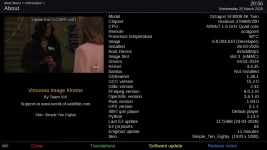
I had success building OpenVix SF8008 using the new Yocto Wrynose branch. It was not too bad of an ordeal. One thing I have not been able to solve is the unwanted text in /etc/issue:

Code:
Welcome to OpenViX \n \l
openvix 6.8 \n \l

Type 'root' to login with superuser privileges (no password will be asked).

Everything I have done to properly delete that text has failed, so I use a work-around of sorts. Maybe someone has the proper solution.

vix-wrynose_20260325205649.webp
 
I've been experimenting with building using OE6.0. Ive been getting failures building enigma2-plugin-softcams-oscam-pcscd-latest. Should the static version of the usb-1.0 library be installed as part of the build recipe as suggested in the log ?

I've added a bbapend to skip building that Oscam package and the build appears to be continuing but only about halfway through so far.
 

Attachments

As a follow up looks like it's now failed due to an offline site, so I'll try again another day

Code:
ERROR: wakelan-1.1-r0 do_fetch: Fetcher failure: Fetch command export PSEUDO_DISABLED=1; export DBUS_SESSION_BUS_ADDRESS="unix:path=/run/user/1001/bus"; export PATH="/media/vix/oe60/build-enviroment/builds/openvix/Developer/vuultimo4k/tmp/sysroots-uninative/x86_64-linux/usr/bin:/media/vix/oe60/build-enviroment/openembedded-core/scripts:/media/vix/oe60/build-enviroment/builds/openvix/Developer/vuultimo4k/tmp/work/cortexa15hf-neon-vfpv4-oe-linux-gnueabi/wakelan/1.1/recipe-sysroot-native/usr/bin/arm-oe-linux-gnueabi:/media/vix/oe60/build-enviroment/builds/openvix/Developer/vuultimo4k/tmp/work/cortexa15hf-neon-vfpv4-oe-linux-gnueabi/wakelan/1.1/recipe-sysroot/usr/bin/crossscripts:/media/vix/oe60/build-enviroment/builds/openvix/Developer/vuultimo4k/tmp/work/cortexa15hf-neon-vfpv4-oe-linux-gnueabi/wakelan/1.1/recipe-sysroot-native/usr/sbin:/media/vix/oe60/build-enviroment/builds/openvix/Developer/vuultimo4k/tmp/work/cortexa15hf-neon-vfpv4-oe-linux-gnueabi/wakelan/1.1/recipe-sysroot-native/usr/bin:/media/vix/oe60/build-enviroment/builds/openvix/Developer/vuultimo4k/tmp/work/cortexa15hf-neon-vfpv4-oe-linux-gnueabi/wakelan/1.1/recipe-sysroot-native/sbin:/media/vix/oe60/build-enviroment/builds/openvix/Developer/vuultimo4k/tmp/work/cortexa15hf-neon-vfpv4-oe-linux-gnueabi/wakelan/1.1/recipe-sysroot-native/bin:/media/vix/oe60/build-enviroment/bitbake/bin:/media/vix/oe60/build-enviroment/builds/openvix/Developer/vuultimo4k/tmp/hosttools"; export HOME="/home/openvixbuilder"; /usr/bin/env wget --tries=2 --timeout=100 --output-document=/media/vix/oe60/build-enviroment/sources/wakelan-1.1.tar.gz.tmp --continue --directory-prefix=/media/vix/oe60/build-enviroment/sources 'http://www.ibiblio.org/pub/Linux/system/network/misc/wakelan-1.1.tar.gz' --progress=dot --verbose failed with exit code 4, see logfile for output
ERROR: wakelan-1.1-r0 do_fetch: Bitbake Fetcher Error: FetchError('Unable to fetch URL from any source.', 'http://www.ibiblio.org/pub/Linux/system/network/misc/wakelan-1.1.tar.gz')
ERROR: Logfile of failure stored in: /media/vix/oe60/build-enviroment/builds/openvix/Developer/vuultimo4k/tmp/work/cortexa15hf-neon-vfpv4-oe-linux-gnueabi/wakelan/1.1/temp/log.do_fetch.3756617
ERROR: Task (/media/vix/oe60/build-enviroment/meta-oe-alliance/meta-oe/recipes-connectivity/wakelan/wakelan_1.1.bb:do_fetch) failed with exit code '1'
 
@lincsat - bypassing pcscd-latest for the moment is a good idea, again have forgotten about that issue! The configure finds libusb but the compiler doesn,t - needs resolving when I have the patience…. Or somebody else has.
 
@lincsat,
The softcam issue can be aggravating, so I just let the CLI AI fix it. Easier for me.
See the attached zip file which has my meta-local along with instructions generated when it was fixed. Now no softcam issues.

And also note /etc/issue has some extra characters that are not needed which may or may not cause problems:
Code:
Welcome to OpenViX \n \l
openvix 6.9 \n \l

Type 'root' to login with superuser privileges (no password will be asked).
I do not see an easy way to fix the /etc/issue properly, but it can be gotten around if needed. For a single personal build, just open /etc/issue and delete the unwanted characters.

Your offline site is actually online and working, or at least it is here. The Wrynose build is a bit more intensive at least it seems on my older computer. This may be why the site appeared to be offline. I always try to check them and see if they are actually dead or if the problem is in my build machine.
VIX-2026-04-03 14-03-07.webp
 

Attachments

OpenViX Feeds Status

Back
Top