Superb quality and spec AB-Com PULSe 4K SE. Crazy offer! Only £99! FREE UK DELIVERY! 4K UHD, Enigma 2, Multiboot 4 images & more!...
Superb quality and spec AB-Com PULSe 4K Rev II Twin Satellite tuner only £149! FREE UK DELIVERY! 4K UHD, Enigma 2, SATA HDD facility, Multiboot 4 images & more!...

Dreambox dm900/dm920 multiboot facility

yes, but shouldnt slot1 be displayed in my case as well?
So the code tries mounting the slot (X) root (linuxrootfsX) and then checks for the enigma2 binary.
It obviously doesn,t find either that path /mmcblk0p2/linuxrootfs1 or no enigma2 binary
If you go to imagemanager and then start to flash an image it will list the slots and occupancy (then back out of the flash) - see what it says.
 
image manager slot selection only shows slot2 as well, although i had an image flashed in slot1 before i flashed one in slot2. strange...
 
image manager slot selection only shows slot2 as well, although i had an image flashed in slot1 before i flashed one in slot2. strange...
Mount the partition and check whats there - if you have linuxrootfs1 on the volume just check that enigma2 is in /usr/bin

If there will have to look at situation with you.

Also I would flash latest image into slot 3 with ImageManager, restore settings backup on reboot and check that slots 2 & 3 are filled.
 
well, last night i managed to mess up my box again. wont boot anymore.
here's the recovery i used to get it boot again:
- use recovery loader to flash the "dreamos recovery image"
- boot dreamos and install the latest flash scripts
- delete all the /data/linuxrootfsx files
- use recovery manager to flash openvix image 6.8.003.
- box boots.

if i recall correctly, a selection enable bootmanger or so appeared in the power menu when i tried this the first time. but now only select image appears. doesnt bootmanager need to be initialized or is this done automatically under the hood? there are no linuxrootfs on / or /data.
 
i guess the reason is that the STARTUP files are already/still there:
Code:
root@dm900:/tmp/m2# ls -la
drwxr-xr-x    2 root     root           512 Jan  1  1970 .
drwxrwxrwt    3 root     root           180 Jan 23 09:34 ..
-rwxr-xr-x    1 root     root            66 Jan  1  1980 STARTUP
-rwxr-xr-x    1 root     root            66 Jan 22 23:20 STARTUP_1
-rwxr-xr-x    1 root     root            66 Jan 22 23:20 STARTUP_2
-rwxr-xr-x    1 root     root            66 Jan 22 23:20 STARTUP_3
-rwxr-xr-x    1 root     root            66 Jan 22 23:20 STARTUP_4
-rwxr-xr-x    1 root     root            66 Jan 22 23:20 STARTUP_5
-rwxr-xr-x    1 root     root            66 Jan 22 23:20 STARTUP_6
root@dm900:/tmp/m2# cat START*
kernel=/dev/mmcblk0p1 root=/dev/mmcblk0p2 rootsubdir=linuxrootfs1
kernel=/dev/mmcblk0p1 root=/dev/mmcblk0p3 rootsubdir=linuxrootfs2
kernel=/dev/mmcblk0p1 root=/dev/mmcblk0p3 rootsubdir=linuxrootfs3
kernel=/dev/mmcblk0p1 root=/dev/mmcblk0p3 rootsubdir=linuxrootfs4
kernel=/dev/mmcblk0p1 root=/dev/mmcblk0p3 rootsubdir=linuxrootfs5
kernel=/dev/mmcblk0p1 root=/dev/mmcblk0p3 rootsubdir=linuxrootfs6
root@dm900:/tmp/m2#
and the kernel looks correct as well.
but no linuxrootfses are there.
 
i guess the reason is that the STARTUP files are already/still there:
Code:
root@dm900:/tmp/m2# ls -la
drwxr-xr-x    2 root     root           512 Jan  1  1970 .
drwxrwxrwt    3 root     root           180 Jan 23 09:34 ..
-rwxr-xr-x    1 root     root            66 Jan  1  1980 STARTUP
-rwxr-xr-x    1 root     root            66 Jan 22 23:20 STARTUP_1
-rwxr-xr-x    1 root     root            66 Jan 22 23:20 STARTUP_2
-rwxr-xr-x    1 root     root            66 Jan 22 23:20 STARTUP_3
-rwxr-xr-x    1 root     root            66 Jan 22 23:20 STARTUP_4
-rwxr-xr-x    1 root     root            66 Jan 22 23:20 STARTUP_5
-rwxr-xr-x    1 root     root            66 Jan 22 23:20 STARTUP_6
root@dm900:/tmp/m2# cat START*
kernel=/dev/mmcblk0p1 root=/dev/mmcblk0p2 rootsubdir=linuxrootfs1
kernel=/dev/mmcblk0p1 root=/dev/mmcblk0p3 rootsubdir=linuxrootfs2
kernel=/dev/mmcblk0p1 root=/dev/mmcblk0p3 rootsubdir=linuxrootfs3
kernel=/dev/mmcblk0p1 root=/dev/mmcblk0p3 rootsubdir=linuxrootfs4
kernel=/dev/mmcblk0p1 root=/dev/mmcblk0p3 rootsubdir=linuxrootfs5
kernel=/dev/mmcblk0p1 root=/dev/mmcblk0p3 rootsubdir=linuxrootfs6
root@dm900:/tmp/m2#
and the kernel looks correct as well.
but no linuxrootfses are there.
Yes - looks correct ref STARTUP,s .
Try flashing via imagemangrr into a slot but make sure you have debug log, so if issues would like to see it
 
Yes - looks correct ref STARTUP,s .
Try flashing via imagemangrr into a slot but make sure you have debug log, so if issues would like to see it
before i continue... currently i only have a flashimage... no linuxrootfs1. will multiboot be able to handle that? or do i need to flash the same image into slot1 with image manager to make multiboot happy?
 
before i continue... currently i only have a flashimage... no linuxrootfs1. will multiboot be able to handle that? or do i need to flash the same image into slot1 with image manager to make multiboot happy?
Imagemanger will tell ofgwrite to flash a specific slot with the root - on the dm9x0 it doesn,t (uniquely) flash the kernel.
On return from ofgwrite, it will check the return code which hopefully will be 0 and ask you if you want to reboot.
Whether the slot is occupied or not, is not considered (users choice)
 
yes, but last time i had a flashimage installed with rescue loader and flashed an image with image manager into slot 2. it asked me to reboot and then hung.
i then had to reflash with rescue loader.
if i recall correctly the sequence when i tried it the first time was:
i flashed 001 with rescue loader
then i flashed 002 with the image manager into slot1. and it didnt hang.
afterwards i flashed oatv into slot2 and it didnt hang either... it hung later (i guess) when i wanted to return to openvix (but that was the frame buffer story, it think).
so, i suspect that the image manager needs a defined start state... that probably is not there after you have just flashed an image with rescue loader.
 
So do as before and flash slot 1 ..and lets see what happens.
 
i think i'm going to pause multiboot debug for a while. new setup of the box is no fun, and i had to do it a few times already. when 004 comes out i will flash it into slot1.
 
i think i'm going to pause multiboot debug for a while. new setup of the box is no fun, and i had to do it a few times already. when 004 comes out i will flash it into slot1.
When its no fun, then you are taking correct decision to take a break
 
sounds like oatv 7.6 users have the same problems i experienced as well:
- after flashing doesnt boot
- boots, but restarts continuously
there must be a big conceptual bug somewhere.
again: i'm not an expert but people like gutemine claim that open uses outdated flash scripts on dm9xx which might prevent the box from booting. in my experiments this seems reasonable because i had to load dreamos and update the flash scripts before i could boot open image again.

this one is on dm900:
this one is on vu (has nothing to do with dream flash scripts):
 
Last edited:
sounds like oatv 7.6 users have the same problems i experienced as well:
- after flashing doesnt boot
- boots, but restarts continuously
there must be a big conceptual bug somewhere.
again: i'm not an expert but people like gutemine claim that open uses outdated flash scripts on dm9xx which might prevent the box from booting. in my experiments this seems reasonable because i had to load dreamos and update the flash scripts before i could boot open image again.

this one is on dm900:
this one is on vu (has nothing to do with dream flash scripts):
Well the Vu+ could be anything, but more likely an openatv change. Vu multiboot has been rock solid since it was created by openbh/ openvix developers……. and is a different implementation frim the dm9x0 multiboot.
Openatv, produce overnight images with latest changes , openvix has 1st developer images tested by a group and then release images to try and prevent code issues.
dm9x0 on my box was absolutely trying to setup from scratch with the framebuffer change installed. I had to first flash with older version. Since then it has been absolutely solid .
I haven,t looked at the scripts - can you give me a link ?
 
Last edited:
Well the Vu+ could be anything, but more likely an openatv change. Vu multiboot has been rock solid since it was created by openbh/ openvix developers……. and is a different implementation frim the dm9x0 multiboot.
Openatv, produce overnight images with latest changes , openvix has 1st developer images tested by a group and then release images to try and prevent code issues.
dm9x0 on my box was absolutely trying to setup from scratch with the framebuffer change installed. I had to first flash with older version. Since then it has been absolutely solid .
I haven,t looked at the scripts - can you give me a link ?
i like openvix because of the pretesting approach...
here's a link for the dm900 flash scripts i use: https://feed.newnigma2.to/daily/oe2.5/deb/dm900/flash-scripts_1.1+git2+236c3921a1-r0.0_armhf.deb
there are other sources but they are all the same.
 
because i accidentially deleted some system files i decided to flash a backup image into slot 1 using image-manager. worked fine, box boots.
 
because i accidentially deleted some system files i decided to flash a backup image into slot 1 using image-manager. worked fine, box boots.
Great hope it continues OK

scripts - can you give me a link ?
 
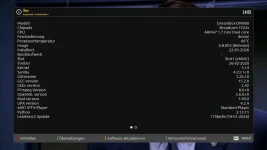
btw the about screen still doesnt show a boot device.
the startup files look good:
Code:
root@dm900:/tmp/m2# cat START*
kernel=/dev/mmcblk0p1 root=/dev/mmcblk0p2 rootsubdir=linuxrootfs1
kernel=/dev/mmcblk0p1 root=/dev/mmcblk0p3 rootsubdir=linuxrootfs2
kernel=/dev/mmcblk0p1 root=/dev/mmcblk0p3 rootsubdir=linuxrootfs3
kernel=/dev/mmcblk0p1 root=/dev/mmcblk0p3 rootsubdir=linuxrootfs4
kernel=/dev/mmcblk0p1 root=/dev/mmcblk0p3 rootsubdir=linuxrootfs5
kernel=/dev/mmcblk0p1 root=/dev/mmcblk0p3 rootsubdir=linuxrootfs6

Code:
root@dm900:/# df
Filesystem           1K-blocks      Used Available Use% Mounted on
none                    502652        80    502572   0% /dev
/dev/mmcblk0p2          983448    415484    500792  45% /
tmpfs                       64         0        64   0% /media
tmpfs                   510844       176    510668   0% /var/volatile
/dev/mmcblk0p3         6351776     94764   5911312   2% /data
/dev/sda1            975409576 118057200 857335992  12% /media/hdd
/dev/sdb1            229648680   1091948 228540348   0% /media/usb
none                    510844         0    510844   0% /dev/shm
none                    502652        80    502572   0% /media/usb/ubuntu/dev
/dev/mmcblk0p2          983448    415484    500792  45% /media/usb/ubuntu/run
/dev/sdb1            229648680   1091948 228540348   0% /media/usb/ubuntu/root/git
/dev/mmcblk0boot1         4017         4      4013   0% /var/volatile/tmp/m2
 

Attachments

  • About.webp
    About.webp
    43.4 KB · Views: 4

OpenViX Feeds Status

Back
Top