
Let me have a look maybe its a mod on my GitHub to convert from a generic name to actual device namebtw the about screen still doesnt show a boot device.
the startup files look good:
Code:root@dm900:/tmp/m2# cat START* kernel=/dev/mmcblk0p1 root=/dev/mmcblk0p2 rootsubdir=linuxrootfs1 kernel=/dev/mmcblk0p1 root=/dev/mmcblk0p2 rootsubdir=linuxrootfs1 kernel=/dev/mmcblk0p1 root=/dev/mmcblk0p3 rootsubdir=linuxrootfs2 kernel=/dev/mmcblk0p1 root=/dev/mmcblk0p3 rootsubdir=linuxrootfs3 kernel=/dev/mmcblk0p1 root=/dev/mmcblk0p3 rootsubdir=linuxrootfs4 kernel=/dev/mmcblk0p1 root=/dev/mmcblk0p3 rootsubdir=linuxrootfs5 kernel=/dev/mmcblk0p1 root=/dev/mmcblk0p3 rootsubdir=linuxrootfs6
Code:root@dm900:/# df Filesystem 1K-blocks Used Available Use% Mounted on none 502652 80 502572 0% /dev /dev/mmcblk0p2 983448 415484 500792 45% / tmpfs 64 0 64 0% /media tmpfs 510844 176 510668 0% /var/volatile /dev/mmcblk0p3 6351776 94764 5911312 2% /data /dev/sda1 975409576 118057200 857335992 12% /media/hdd /dev/sdb1 229648680 1091948 228540348 0% /media/usb none 510844 0 510844 0% /dev/shm none 502652 80 502572 0% /media/usb/ubuntu/dev /dev/mmcblk0p2 983448 415484 500792 45% /media/usb/ubuntu/run /dev/sdb1 229648680 1091948 228540348 0% /media/usb/ubuntu/root/git /dev/mmcblk0boot1 4017 4 4013 0% /var/volatile/tmp/m2

Superb quality and spec AB-Com PULSe 4K SE. Crazy offer! Only £99! FREE UK DELIVERY! 4K UHD, Enigma 2, Multiboot 4 images & more!...
Superb quality and spec AB-Com PULSe 4K Rev II Twin Satellite tuner only £149! FREE UK DELIVERY! 4K UHD, Enigma 2, SATA HDD facility, Multiboot 4 images & more!...
You are using an out of date browser. It may not display this or other websites correctly.
You should upgrade or use an alternative browser.
You should upgrade or use an alternative browser.
Dreambox dm900/dm920 multiboot facility
- Thread starter twol
- Start date

2stein
ViX Beta Tester
thanks ..... so it finds boot devicesure...
15:39:19.5914 [multiboot][getMultibootslots] STARTUP:kernel=/dev/mmcblk0p1 root=/dev/mmcblk0p2 rootsubdir=linuxrootfs1
15:39:19.5919 [Multiboot][[getMultibootslots]2 *** Bootdevice found: mmcblk0boot1 CHKROOTMB:True MBbootdevice:/dev/mmcblk0boot1
so can you copy attachment to /usr/lib/enigma2/python/Screens, restart and post debug log.
Attachments
2stein
ViX Beta Tester
crashes because i dont have a edvbcsaengine or so.thanks ..... so it finds boot device
15:39:19.5914 [multiboot][getMultibootslots] STARTUP:kernel=/dev/mmcblk0p1 root=/dev/mmcblk0p2 rootsubdir=linuxrootfs1
15:39:19.5919 [Multiboot][[getMultibootslots]2 *** Bootdevice found: mmcblk0boot1 CHKROOTMB:True MBbootdevice:/dev/mmcblk0boot1
so can you copy attachment to /usr/lib/enigma2/python/Screens, restart and post debug log.
oops --- removed (is latest code)crashes because i dont have a edvbcsaengine or so.
Attachments
2stein
ViX Beta Tester

2stein
ViX Beta Tester
i'm on a dm900.

abu baniaz
Moderator
In my opinion, until the mounting processes for both images is aligned, there will always be problems. As an example, if the startup files are created by ViX in one partition, and ATV do not allow Enigma2 to see/use it, its doomed to fail. Barring a minor tweak still needed, ViX is almost perfect following twol and dimitars last changes. Maybe we need to convince ATV of the changes they could make.
OK try this - as debug shows there in Abouthere we go... still doesnt show boot device.
Attachments
2stein
ViX Beta Tester
Code:
root@dm900:~/logs# grep About Enigma2_debug_2026-02-02_14-30-13.log
14:30:57.9099 [About] SystemInfo['BootDevice']:mmcblk0boot1 bootDevice:mmcblk0boot1  mtdbootfs: len mtdbootfs:0
14:30:57.9100 [About] AboutText1:Modell:        Dreambox DM900
14:30:57.9291 [About] AboutText2:Modell:        Dreambox DM900
14:30:57.9300 [Skin] Processing screen 'AboutOE', position=(0, 0), size=(1920 x 1080) for module 'About'.
looks like About knows the boot device. but both skins simple_ten_eighty and darkos dont show it.
p.s.
len mtdbootfs:0 seems strange.
the last About.py will show in debug what happens to the About text - which is why I would like to see itCode:root@dm900:~/logs# grep About Enigma2_debug_2026-02-02_14-30-13.log 14:30:57.9099 [About] SystemInfo['BootDevice']:mmcblk0boot1 bootDevice:mmcblk0boot1 mtdbootfs: len mtdbootfs:0 14:30:57.9100 [About] AboutText1:Modell: Dreambox DM900 14:30:57.9291 [About] AboutText2:Modell: Dreambox DM900 14:30:57.9300 [Skin] Processing screen 'AboutOE', position=(0, 0), size=(1920 x 1080) for module 'About'.
looks like About knows the boot device. but both skins simple_ten_eighty and darkos dont show it.
p.s.
len mtdbootfs:0 seems strange.
boxinfo (that shows the image build parameters) - mtdbootfs is for most boxes not defined hence I expect 0 but when it calls /tools/multiboot and its a multiboot receiver it returns slots and the found boot device(which it does)
2stein
ViX Beta Tester
so this is the final About text and its there as Bootlaufwerk.......
15:15:24.6511 [About] AboutText2:
Modell: Dreambox DM900
Chipsatz: Broadcom 7252s
CPU: ARMv7 1.7 GHz Dual core
Fernbedienung: dmm2
Prozessortemperatur: 68°C
Image: 6.8.003 (Release)
Installiert: 22-01-2026
Bootlaufwerk:: mmcblk0boot1
Slot: Slot1 (eMMC)
Treiber: 26-02-2020
Kernel: 3.14
Samba: 4.23.1-r0
GStreamer: 1.26.10
GCC version: 15.2.0
Glibc version: 2.42
FFmpeg Version: 8.0-r0
OpenSSL version: 3.6.0-r0
Rust version: 1.90.0
UPX version: 4.2.4
4097 IPTV-Player: Standard-Player
Python: 3.13.11
Letztes E2 Update: 779b64b (19-01-2026)
E2 Starts: 453
Enigma2 Laufzeit: 13 Sekunden
Skins: E2-DarkOS (1920 x 1080)
15:15:24.6511 [About] AboutText2:
Modell: Dreambox DM900
Chipsatz: Broadcom 7252s
CPU: ARMv7 1.7 GHz Dual core
Fernbedienung: dmm2
Prozessortemperatur: 68°C
Image: 6.8.003 (Release)
Installiert: 22-01-2026
Bootlaufwerk:: mmcblk0boot1
Slot: Slot1 (eMMC)
Treiber: 26-02-2020
Kernel: 3.14
Samba: 4.23.1-r0
GStreamer: 1.26.10
GCC version: 15.2.0
Glibc version: 2.42
FFmpeg Version: 8.0-r0
OpenSSL version: 3.6.0-r0
Rust version: 1.90.0
UPX version: 4.2.4
4097 IPTV-Player: Standard-Player
Python: 3.13.11
Letztes E2 Update: 779b64b (19-01-2026)
E2 Starts: 453
Enigma2 Laufzeit: 13 Sekunden
Skins: E2-DarkOS (1920 x 1080)
2stein
ViX Beta Tester
i detected a strang menu behavior:
multiboot is not enabled
i select enable multiboot on the power screen
i get a screen that allows you to activate and deactivate mb: as mb is not activated you cant deactivate it, so the selection should not appear.
but: you cant deactivate mb at all, because when mb is activated there is no no selection activate mb but only select slot. so you cant reach the deactivate selection.
this is probably a general problem not just dreambox.
multiboot is not enabled
i select enable multiboot on the power screen
i get a screen that allows you to activate and deactivate mb: as mb is not activated you cant deactivate it, so the selection should not appear.
but: you cant deactivate mb at all, because when mb is activated there is no no selection activate mb but only select slot. so you cant reach the deactivate selection.
this is probably a general problem not just dreambox.
2stein
ViX Beta Tester
after a long break i thought i restart my multiboot testing on dm900. but still no success... box would hang on reboot after installation of an image in a multiboot slot. so, my advisor and i started investigation of the problem. after a while my buddy came to the conclusion that ofgwrite had a bug that caused corruption of the installed slot image. long story short: with the bug-fix multiboot now works perfectly with 5 slot images on my dm900.
if you want, you can download the fixed ofgwrite_bin here: https://github.com/xcentaurix/BaseSetup/blob/master/src/bin/ofgwrite_bin
do a raw download into /usr/bin (the fix is not dm900 specific)
i would save the original ofgwrite_bin as ofgwrite_bin.org in case you want to revert the change later for whatever reason.
if you want, you can download the fixed ofgwrite_bin here: https://github.com/xcentaurix/BaseSetup/blob/master/src/bin/ofgwrite_bin
do a raw download into /usr/bin (the fix is not dm900 specific)
i would save the original ofgwrite_bin as ofgwrite_bin.org in case you want to revert the change later for whatever reason.
2stein
ViX Beta Tester
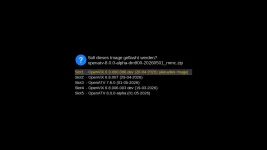
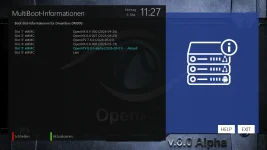
i have noticed one difference between openvix and oatv: openvix shows 5 slots in image manager, oatv shows 6 in multiboot information.
also: the 5 images only use up about 40% of my /data partition. so theoretically i could install 10 slots or so.
also: the 5 images only use up about 40% of my /data partition. so theoretically i could install 10 slots or so.
Attachments
Last edited:
I set it to 5 because other people use the partition for data…..and I am not a fan of endless slots.i have noticed one difference between openvix and oatv: openvix shows 5 slots in image manager, oatv shows 6 in multiboot information.
also: the 5 images only use up about 40% of my /data partition. so theoretically i could install 10 slots or so.
If you want more just add the STARTUP file
2stein
ViX Beta Tester
not a problem. was just wondering...
Similar threads

- Replies
- 0
- Views
- 785
- Replies
- 15
- Views
- 1K

- Replies
- 4
- Views
- 552
[Mut@nt HD2400]
feeds and status-message.php for self built 6.8.007 ?
- Replies
- 6
- Views
- 619