Hi all,
As a new member here I hope this is the right place to share this kind of project, and that the tone and level of detail are appropriate for the forum.
I'd like to share a fun side project I've been working on called Xanadu. It's a Plex / Kodi style VOD system integrated directly into Enigma2 - without using a plugin.
The goal wasn't to replace existing VOD plugins (I know there are good ones available). The real motivation was the build itself: tailoring Enigma2 exactly to my preferences and learning more about how everything fits together under the hood. I used a lot of information posted here to help build this. Hence, sharing back.
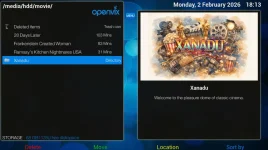
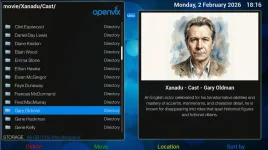
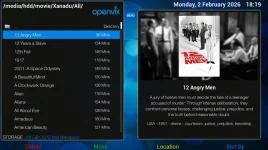
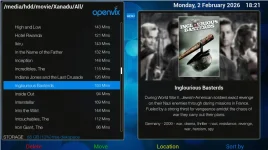
Over the years I've built up a fairly large DVD collection, and that became the content corpus for this project. Xanadu presents the library directly inside the standard PVR view, with rich metadata and visual navigation:
The tools I used were:
I'm really pleased with how it turned out. Having a fully browsable, metadata-rich library inside the native Enigma2 interface is surprisingly satisfying.
If there's interest, I'm happy to share more details.
As a new member here I hope this is the right place to share this kind of project, and that the tone and level of detail are appropriate for the forum.
I'd like to share a fun side project I've been working on called Xanadu. It's a Plex / Kodi style VOD system integrated directly into Enigma2 - without using a plugin.
The goal wasn't to replace existing VOD plugins (I know there are good ones available). The real motivation was the build itself: tailoring Enigma2 exactly to my preferences and learning more about how everything fits together under the hood. I used a lot of information posted here to help build this. Hence, sharing back.
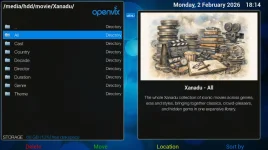
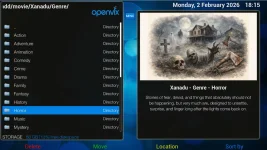
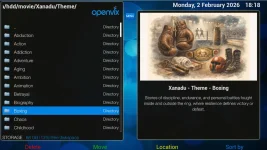
Over the years I've built up a fairly large DVD collection, and that became the content corpus for this project. Xanadu presents the library directly inside the standard PVR view, with rich metadata and visual navigation:
- Cover and folder artwork
- Cast and director views (with portraits)
- Genre and theme-based navigation
- Duration, resolution, aspect ratio
- Multiple navigation paths to the same content
- No duplicated disk space
- Consistent resume points regardless of where playback is started
The tools I used were:
- ffmpeg – DVD ripping to mp4 and conversion to ts
- ffprobe – metadata extraction (duration, resolution, aspect ratio, etc)
- LLaMA 3.1 – generating consistent synopsis, bios, tagging, etc
- Custom Python – generation of .ts.meta, .eit, .cuts
- Custom Python – automated navigation folder creation
- ImageMagick – compositing cover art over backgrounds
- Dola – actor and director portraits
- ChatGPT5.2 - folder artwork
- Samba – transfer to STB (1TB storage)
- Custom Engima2 Renderer - to show art work on folders
- Custom Engima2 Formatters - to show synopsis and meta information
I'm really pleased with how it turned out. Having a fully browsable, metadata-rich library inside the native Enigma2 interface is surprisingly satisfying.
If there's interest, I'm happy to share more details.