Superb quality and spec AB-Com PULSe 4K SE. Crazy offer! Only £99! FREE UK DELIVERY! 4K UHD, Enigma 2, Multiboot 4 images & more!...
Superb quality and spec AB-Com PULSe 4K Rev II Twin Satellite tuner only £149! FREE UK DELIVERY! 4K UHD, Enigma 2, SATA HDD facility, Multiboot 4 images & more!...

[SF8008] Small issue with fstrim on my internal SSD - It doesn't work

smipx

Forum Supporter
Donated Member
Joined
Nov 30, 2019
Messages
475
Reaction score
9
Points
18
What type of support thread are you creating?
Support question
What OpenViX Image build number are you using?
6.8.003
Have you tried re-flashing WITHOUT settings restore?
NO
Have you tried re-flashing WITH a settings restore?
NO
Hi All,

I have been running my SF8008 for some time now and have taken a look at my cron job for trimming the internal M.2 SSD and it seems not to be working. I have a similar script on an SSD on my Zgemms H7S with a SATA SSD and it works fine on that.

Given the amount of writes on the SF8008 SSD I would like to get this working but at my amateur look at the logs it looks like the M.2 internal SSD may be being mounted as a USB driveand this could be the cause.

I have attached the latest log for someone more knowlegable to take a look (please)...

My job runs a simple fstrim using the following:

55 10 * * 5 { printf "\%s: " "$(date "+\%F \%T")"; fstrim -v /media/hdd ; } >> /media/hdd/OctagonTrim.log

If I try to run the fstrim using putty I get:
fstrim: /media/hdd: the discard operation is not supported

The SSD is a Crucial P310 1TB SSD M.2 2280 NVMe PCIe Gen4, CT1000P310SSD801

If I do an lsblk -D I get:
NAME DISC-ALN DISC-GRAN DISC-MAX DISC-ZERO
sdd 0 0B 0B 0
└─sdd1 0 0B 0B 0

a lsblk shows:
root@sf8008:~# lsblk
NAME MAJ:MIN RM SIZE RO TYPE MOUNTPOINTS
sdd 8:48 0 931.5G 0 disk
└─sdd1 8:49 0 931.5G 0 part /media/hdd

The enigma2 log shows:
22:28:48.4726 [Harddisk] Enumerating hotplug devices.
22:28:48.4740 [Harddisk][enumerateBlockDevices] Enumerating block devices...
22:28:48.4905 [Harddisk][getUserfriendlyDeviceName] device:sdd physicalDevice:/sys/devices/platform/soc/f9890000.ehci/usb1/1-1/1-1.4/1-1.4:1.0/host0/target0:0:0/0:0:0:0
22:28:48.4907 [Harddisk][splitDeviceName] devName = 'sdd', device = 'sdd', partition = '0'
22:28:48.4920 [Harddisk][enumerateBlockDevices] len partitions = 1, device = sdd
22:28:48.4921 [Harddisk][enumerateBlockDevices]2 Found storage device 'sdd' (Removable=False) Number of Partitions = 1.
22:28:48.4922 [Harddisk][enumerateBlockDevices]1 SystemInfo['HasUsbhdd']= {}
22:28:48.4933 [Harddisk][runCommand]: 'hdparm -S0 /dev/sdd'.

/dev/sdd:
setting standby to 0
(off)
hdparm: HDIO_DRIVE_CMD: Invalid argument
22:28:48.5263 [Harddisk][Init] Device 'sdd' (Internal (SSD) - JMicron (Generic)) -> '/dev/sdd' -> '/dev/sdd' (Start Idle).
22:28:48.5264 [Harddisk][getUserfriendlyDeviceName] device:sdd1 physicalDevice:/sys/devices/platform/soc/f9890000.ehci/usb1/1-1/1-1.4/1-1.4:1.0/host0/target0:0:0/0:0:0:0
22:28:48.5265 [Harddisk][splitDeviceName] devName = 'sdd1', device = 'sdd', partition = '1'
22:28:48.5277 [Harddisk][enumerateBlockDevices]### Found partition 'sdd1', description='Generic (Partition 1)', device='/sys/devices/platform/soc/f9890000.ehci/usb1/1-1/1-1.4/1-1.4:1.0/host0/target0:0:0/0:0:0:0' mountpoint=/media/hdd/.
22:28:48.5284 [Harddisk][enumerateBlockDevices]### MTDBLACK:sdd1
22:28:48.5291 [Harddisk][enumerateBlockDevices] Enumerating block devices complete.


​


Attachments

Given the amount of writes on the SF8008 SSD I would like to get this working but at my amateur look at the logs it looks like the M.2 internal SSD may be being mounted as a USB driveand this could be the cause.
Hmm... I have an Intel NUC with an internal M2 SSD, an internal SATA SSD and two external USB devices.

If I look in /sys/class/scsi_disk I see:
Code:
lrwxrwxrwx  1 root root 0 Feb 15 02:31 1:0:0:0@ -> ../../devices/pci0000:00/0000:00:17.0/ata2/host1/target1:0:0/1:0:0:0/scsi_disk/1:0:0:0
lrwxrwxrwx  1 root root 0 Feb 15 02:31 2:0:0:0@ -> ../../devices/pci0000:00/0000:00:17.0/ata3/host2/target2:0:0/2:0:0:0/scsi_disk/2:0:0:0
lrwxrwxrwx  1 root root 0 Feb 15 02:31 3:0:0:0@ -> ../../devices/pci0000:00/0000:00:14.0/usb2/2-4/2-4:1.0/host3/target3:0:0/3:0:0:0/scsi_disk/3:0:0:0
lrwxrwxrwx  1 root root 0 Feb 15 02:31 4:0:0:0@ -> ../../devices/pci0000:00/0000:00:1c.4/0000:02:00.0/0000:03:02.0/0000:06:00.0/usb4/4-1/4-1:1.0/host4/target4:0:0/4:0:0:0/scsi_disk/4:0:0:0

fstrim: /media/hdd: the discard operation is not supported
That might be something different.
For some reason the correct setting isn't always set when you plug in an external disk, but it can be set "manually".
But the setting is done by udev, and I don't think that Vix system have udev running(?). Which might be the issue.

Install sg3-utils, then look for:
  • lbpme in sg_readcap -l /dev/sdd
  • Unmap command supported in sg_vpd -a /dev/sdd
  • Data Set Management TRIM supported in hdparm -I /dev/sdd
 
Works ok for me on Vix - not sure why you were testing on an Intel NUC @birdman?

Here's the output from my ax61hd which has a 1TB internal SSD (SATA - not M2 or NVME)

Code:
Welcome to OpenViX for ax61
openvix 6.8 ax61

ax61 login: root
Password:
root@ax61:~# fstrim -v /media/hdd
/media/hdd: 982123216896 bytes trimmed
root@ax61:~#

It worked on my Vu Uno also, which has a similar fanxiang 1TB SSD.

I'm not sure that there is a scheduled job in Vix which runs fstrim on a schedule. I know my standard desktop Linux Mint runs the fstrim service each Monday, though.
 
Hmm... I have an Intel NUC with an internal M2 SSD, an internal SATA SSD and two external USB devices.

If I look in /sys/class/scsi_disk I see:
Code:
lrwxrwxrwx  1 root root 0 Feb 15 02:31 1:0:0:0@ -> ../../devices/pci0000:00/0000:00:17.0/ata2/host1/target1:0:0/1:0:0:0/scsi_disk/1:0:0:0
lrwxrwxrwx  1 root root 0 Feb 15 02:31 2:0:0:0@ -> ../../devices/pci0000:00/0000:00:17.0/ata3/host2/target2:0:0/2:0:0:0/scsi_disk/2:0:0:0
lrwxrwxrwx  1 root root 0 Feb 15 02:31 3:0:0:0@ -> ../../devices/pci0000:00/0000:00:14.0/usb2/2-4/2-4:1.0/host3/target3:0:0/3:0:0:0/scsi_disk/3:0:0:0
lrwxrwxrwx  1 root root 0 Feb 15 02:31 4:0:0:0@ -> ../../devices/pci0000:00/0000:00:1c.4/0000:02:00.0/0000:03:02.0/0000:06:00.0/usb4/4-1/4-1:1.0/host4/target4:0:0/4:0:0:0/scsi_disk/4:0:0:0


That might be something different.
For some reason the correct setting isn't always set when you plug in an external disk, but it can be set "manually".
But the setting is done by udev, and I don't think that Vix system have udev running(?). Which might be the issue.

Install sg3-utils, then look for:
  • lbpme in sg_readcap -l /dev/sdd
  • Unmap command supported in sg_vpd -a /dev/sdd
  • Data Set Management TRIM supported in hdparm -I /dev/sdd
…… OE-A openatv/openvix images have udev
 
@twol - do you know if there is an fstrim job scheduled on boxes with SSD? The manual fstrim worked for me as per post #3 above.
 
Hmm... I have an Intel NUC with an internal M2 SSD, an internal SATA SSD and two external USB devices.

If I look in /sys/class/scsi_disk I see:
Code:
lrwxrwxrwx  1 root root 0 Feb 15 02:31 1:0:0:0@ -> ../../devices/pci0000:00/0000:00:17.0/ata2/host1/target1:0:0/1:0:0:0/scsi_disk/1:0:0:0
lrwxrwxrwx  1 root root 0 Feb 15 02:31 2:0:0:0@ -> ../../devices/pci0000:00/0000:00:17.0/ata3/host2/target2:0:0/2:0:0:0/scsi_disk/2:0:0:0
lrwxrwxrwx  1 root root 0 Feb 15 02:31 3:0:0:0@ -> ../../devices/pci0000:00/0000:00:14.0/usb2/2-4/2-4:1.0/host3/target3:0:0/3:0:0:0/scsi_disk/3:0:0:0
lrwxrwxrwx  1 root root 0 Feb 15 02:31 4:0:0:0@ -> ../../devices/pci0000:00/0000:00:1c.4/0000:02:00.0/0000:03:02.0/0000:06:00.0/usb4/4-1/4-1:1.0/host4/target4:0:0/4:0:0:0/scsi_disk/4:0:0:0


That might be something different.
For some reason the correct setting isn't always set when you plug in an external disk, but it can be set "manually".
But the setting is done by udev, and I don't think that Vix system have udev running(?). Which might be the issue.

Install sg3-utils, then look for:
  • lbpme in sg_readcap -l /dev/sdd
  • Unmap command supported in sg_vpd -a /dev/sdd
  • Data Set Management TRIM supported in hdparm -I /dev/sdd
Hi birdman,

for my M.2 SSD ......

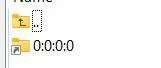
If I look in /sys/class/scsi_disk I see one folder shortcut called 0:0:0:0
2026-03-01 16_57_03-scsi_disk – Octagon Slave Box in Lounge pp – WinSCP.webp
and that points to : /sys/devices/platform/soc/f9890000.ehci/usb1/1-1/1-1.4/1-1.4:1.0/host0/target0:0:0/0:0:0:0/scsi_disk/0:0:0:0


That seems odd?!?!

Thanks
Paul
 
doing some googling I ran udevadm info -a -n /dev/sdd and it came back with that attached output:

root@sf8008:~# udevadm info -a -n /dev/sdd

Udevadm info starts with the device specified by the devpath and then
walks up the chain of parent devices. It prints for every device
found, all possible attributes in the udev rules key format.
A rule to match, can be composed by the attributes of the device
and the attributes from one single parent device.

looking at device '/devices/platform/soc/f9890000.ehci/usb1/1-1/1-1.4/1-1.4:1.0/host0/target0:0:0/0:0:0:0/block/sdd':
KERNEL=="sdd"
SUBSYSTEM=="block"
DRIVER==""
ATTR{ro}=="0"
ATTR{size}=="1953525168"
ATTR{stat}==" 15886 32 3873114 280944 16910 10086 8410064 1177061 0 747605 1457960"
ATTR{range}=="16"
ATTR{discard_alignment}=="0"
ATTR{events}==""
ATTR{ext_range}=="256"
ATTR{events_poll_msecs}=="-1"
ATTR{alignment_offset}=="0"
ATTR{inflight}==" 0 0"
ATTR{removable}=="0"
ATTR{capability}=="50"
ATTR{events_async}==""

looking at parent device '/devices/platform/soc/f9890000.ehci/usb1/1-1/1-1.4/1-1.4:1.0/host0/target0:0:0/0:0:0:0':
KERNELS=="0:0:0:0"
SUBSYSTEMS=="scsi"
DRIVERS=="sd"
ATTRS{rev}=="0214"
ATTRS{type}=="0"
ATTRS{scsi_level}=="7"
ATTRS{model}=="Generic "
ATTRS{state}=="running"
ATTRS{queue_type}=="simple"
ATTRS{iodone_cnt}=="0x916c"
ATTRS{iorequest_cnt}=="0x916c"
ATTRS{device_busy}=="0"
ATTRS{evt_capacity_change_reported}=="0"
ATTRS{timeout}=="30"
ATTRS{evt_media_change}=="0"
ATTRS{ioerr_cnt}=="0x1"
ATTRS{queue_depth}=="30"
ATTRS{vendor}=="JMicron "
ATTRS{evt_soft_threshold_reached}=="0"
ATTRS{device_blocked}=="0"
ATTRS{evt_mode_parameter_change_reported}=="0"
ATTRS{evt_lun_change_reported}=="0"
ATTRS{evt_inquiry_change_reported}=="0"
ATTRS{iocounterbits}=="32"
ATTRS{inquiry}==""
ATTRS{vpd_pg80}==""
ATTRS{vpd_pg83}==""
ATTRS{eh_timeout}=="10"

looking at parent device '/devices/platform/soc/f9890000.ehci/usb1/1-1/1-1.4/1-1.4:1.0/host0/target0:0:0':
KERNELS=="target0:0:0"
SUBSYSTEMS=="scsi"
DRIVERS==""

looking at parent device '/devices/platform/soc/f9890000.ehci/usb1/1-1/1-1.4/1-1.4:1.0/host0':
KERNELS=="host0"
SUBSYSTEMS=="scsi"
DRIVERS==""

looking at parent device '/devices/platform/soc/f9890000.ehci/usb1/1-1/1-1.4/1-1.4:1.0':
KERNELS=="1-1.4:1.0"
SUBSYSTEMS=="usb"
DRIVERS=="uas"
ATTRS{bInterfaceClass}=="08"
ATTRS{bInterfaceSubClass}=="06"
ATTRS{bInterfaceProtocol}=="62"
ATTRS{bNumEndpoints}=="04"
ATTRS{authorized}=="1"
ATTRS{supports_autosuspend}=="0"
ATTRS{bAlternateSetting}==" 1"
ATTRS{bInterfaceNumber}=="00"

looking at parent device '/devices/platform/soc/f9890000.ehci/usb1/1-1/1-1.4':
KERNELS=="1-1.4"
SUBSYSTEMS=="usb"
DRIVERS=="usb"
ATTRS{bDeviceSubClass}=="00"
ATTRS{bDeviceProtocol}=="00"
ATTRS{devpath}=="1.4"
ATTRS{idVendor}=="152d"
ATTRS{speed}=="480"
ATTRS{bNumInterfaces}==" 1"
ATTRS{bConfigurationValue}=="1"
ATTRS{bMaxPacketSize0}=="64"
ATTRS{busnum}=="1"
ATTRS{devnum}=="3"
ATTRS{configuration}==""
ATTRS{bMaxPower}=="500mA"
ATTRS{authorized}=="1"
ATTRS{bmAttributes}=="80"
ATTRS{bNumConfigurations}=="1"
ATTRS{maxchild}=="0"
ATTRS{bcdDevice}=="0214"
ATTRS{avoid_reset_quirk}=="0"
ATTRS{quirks}=="0x0"
ATTRS{serial}=="0123456789ABCDEF"
ATTRS{version}==" 2.10"
ATTRS{urbnum}=="140127"
ATTRS{ltm_capable}=="no"
ATTRS{manufacturer}=="JMicron"
ATTRS{removable}=="unknown"
ATTRS{idProduct}=="0583"
ATTRS{bDeviceClass}=="00"
ATTRS{product}=="USB to PCIE Bridge"

looking at parent device '/devices/platform/soc/f9890000.ehci/usb1/1-1':
KERNELS=="1-1"
SUBSYSTEMS=="usb"
DRIVERS=="usb"
ATTRS{bDeviceSubClass}=="00"
ATTRS{bDeviceProtocol}=="01"
ATTRS{devpath}=="1"
ATTRS{idVendor}=="05e3"
ATTRS{speed}=="480"
ATTRS{bNumInterfaces}==" 1"
ATTRS{bConfigurationValue}=="1"
ATTRS{bMaxPacketSize0}=="64"
ATTRS{busnum}=="1"
ATTRS{devnum}=="2"
ATTRS{configuration}==""
ATTRS{bMaxPower}=="100mA"
ATTRS{authorized}=="1"
ATTRS{bmAttributes}=="e0"
ATTRS{bNumConfigurations}=="1"
ATTRS{maxchild}=="4"
ATTRS{bcdDevice}=="8536"
ATTRS{avoid_reset_quirk}=="0"
ATTRS{quirks}=="0x0"
ATTRS{version}==" 2.00"
ATTRS{urbnum}=="29"
ATTRS{ltm_capable}=="no"
ATTRS{removable}=="unknown"
ATTRS{idProduct}=="0608"
ATTRS{bDeviceClass}=="09"
ATTRS{product}=="USB2.0 Hub"

looking at parent device '/devices/platform/soc/f9890000.ehci/usb1':
KERNELS=="usb1"
SUBSYSTEMS=="usb"
DRIVERS=="usb"
ATTRS{bDeviceSubClass}=="00"
ATTRS{bDeviceProtocol}=="00"
ATTRS{devpath}=="0"
ATTRS{idVendor}=="1d6b"
ATTRS{speed}=="480"
ATTRS{bNumInterfaces}==" 1"
ATTRS{bConfigurationValue}=="1"
ATTRS{bMaxPacketSize0}=="64"
ATTRS{authorized_default}=="1"
ATTRS{busnum}=="1"
ATTRS{devnum}=="1"
ATTRS{configuration}==""
ATTRS{bMaxPower}=="0mA"
ATTRS{authorized}=="1"
ATTRS{bmAttributes}=="e0"
ATTRS{bNumConfigurations}=="1"
ATTRS{maxchild}=="2"
ATTRS{interface_authorized_default}=="1"
ATTRS{bcdDevice}=="0404"
ATTRS{avoid_reset_quirk}=="0"
ATTRS{quirks}=="0x0"
ATTRS{serial}=="f9890000.ehci"
ATTRS{version}==" 2.00"
ATTRS{urbnum}=="38"
ATTRS{ltm_capable}=="no"
ATTRS{manufacturer}=="Linux 4.4.35 ehci_hcd"
ATTRS{removable}=="unknown"
ATTRS{idProduct}=="0002"
ATTRS{bDeviceClass}=="09"
ATTRS{product}=="EHCI Host Controller"

looking at parent device '/devices/platform/soc/f9890000.ehci':
KERNELS=="f9890000.ehci"
SUBSYSTEMS=="platform"
DRIVERS=="ehci-platform"
ATTRS{companion}==""
ATTRS{driver_override}=="(null)"
ATTRS{uframe_periodic_max}=="100"

looking at parent device '/devices/platform/soc':
KERNELS=="soc"
SUBSYSTEMS=="platform"
DRIVERS==""
ATTRS{driver_override}=="(null)"

looking at parent device '/devices/platform':
KERNELS=="platform"
SUBSYSTEMS==""
DRIVERS==""
 

Attachments

Google is further suggesting:

B. Create a Udev Rule to Mask "Removable"
If the system still insists on marking the drive as removable, you can create a udev rule to override this attribute.
  1. Identify the device: Run udevadm info -a -n /dev/sdb (replace /dev/sdb with your device) to find the unique ID (e.g.ATTRS{serial}).
  2. Create a rule: Create a file /etc/udev/rules.d/99-internal-ssd.rules.
  3. Add the rule:
    text
    <span>ACTION=="add|change", KERNEL=="sd?", ATTRS{serial}=="YOUR_DRIVE_SERIAL", ATTR{removable}="0"<br></span>
  4. Reload rules: sudo udevadm control --reload-rules &amp;&amp; sudo udevadm trigger

BUT......
I am too scared and too ignorant to venture down this road without expert guidance :-)

Thanks
Paul
 
FYI lsusb shows:

Bus 001 Device 002: ID 05e3:0608 USB2.0 Hub
Bus 001 Device 004: ID 0bda:c82c Realtek 802.11ac NIC
Bus 001 Device 001: ID 1d6b:0002 Linux 4.4.35 ehci_hcd EHCI Host Controller
Bus 002 Device 001: ID 1d6b:0001 Linux 4.4.35 ohci_hcd Generic Platform OHCI controller
Bus 003 Device 001: ID 1d6b:0002 Linux 4.4.35 xhci-hcd xHCI Host Controller
Bus 004 Device 001: ID 1d6b:0003 Linux 4.4.35 xhci-hcd xHCI Host Controller
Bus 001 Device 003: ID 152d:0583 JMicron USB to PCIE Bridge
 
Is this something that can be fixed by the dev team or is this something that I have to tweak / try / break and fup my drive all by myself ??
Needless to say the drive is not backed up at this point (but it can be as I have a USB HDD that I can copy it over to if required.

Thanks all,
Paul
 
I would assume the receiver M2 interface is SATA, surely? So, it should work like any SATA internal disk. It does on my receivers. I would doubt that any of these receivers support NVME, M2 is just a physical interface, the underlying access is SATA.

I'm just curious why @smipx is having issues running fstrim. Works fine for me on two other boxes although the SSDs actually have the traditional SATA hardware interface, not M2. My newer desktop runs two M2 SSDs, but the access is NVMe not SATA - different controllers on the SSD.
 
I would assume the receiver M2 interface is SATA, surely? So, it should work like any SATA internal disk. It does on my receivers. I would doubt that any of these receivers support NVME, M2 is just a physical interface, the underlying access is SATA.
Except his box has a USB to PCIe connexion, which seems to be how the disk is accessed.

However, TRIM over USB can work anyway, I have several external USB SSDs (some SATA, some NVMe) all of which can be trimmed (and are once a month).
However, I do need to configure udev for the specific adaptors I have. See attached udev script.
I also need to run:
Code:
udevadm trigger --verbose --subsystem-match=scsi_disk
after plugging them in, as for some reason this doesn't happen automatically (it did until ~3 years ago)
 

Attachments

Hi, Just for clarification. My SSD is M.2 NVME and the interface is the same on my Octagon SF8008 V3 Supreme with an M.2 NVME slot as purchased from WoS a few months back.

I wonder if the image for the sf8008 may need to be split into a version for the V3 Supreme/NVME and a seperate version for the V1 and V2 non-NVME variants (or the logic may need a tweak to determine that a given sf8008 has nvme and mount the drive in a different way) ????

Thanks
Paul
 
A couple of things.
OpenATV have a cron script that runs every hour to trim anything in mounts - I can take that over to OpenViX.

I can trim my SSD HDD's no issue.

I have a miscellaneous bunch of M.2 NVME's on one of my PC's .... everything update to date and running Ubuntu - fstrim doesn't not work on any of the M.2 NVME's but google says....
"Be aware that TRIM often does not work over USB-to-NVMe enclosures unless the enclosure supports the required protocols (e.g., UASP) and is correctly configured" so thats probably why
 
@smipx - take note of what @twol posted. I'm not sure why the receiver has NVMe as it's hardly needed in the particular enigma environment which does not require high disk throughput. Maybe NVMe was available to the manufacturer at the same price as SATA, but generally NVMe is used in high-performance disk environments. It sure seems to complicate things for you, when a regular SATA SSD will trim just fine in enigma.
 
A couple of things.
OpenATV have a cron script that runs every hour to trim anything in mounts - I can take that over to OpenViX.
@twol - I don't think an hourly trim would be warranted, but a weekly trim might be appropriate as it happens on ubuntu and derivatives like linux mint each Monday.
 
@twol - I don't think an hourly trim would be warranted, but a weekly trim might be appropriate as it happens on ubuntu and derivatives like linux mint each Monday.
well i am guessing thats fine just change to crom-weekly or monthly
 
Hi guys, thanks for the update. The bottom line is that the box has nvme m2 and my drive is direct connected to the m2 slot (and not via a USB enclosure). With that in mind don't you feel that the system should be configuring the drive correctly. I appreciate that nvme is overkill but that's what the box has and the drive will at some point want to be trimmed?

Thanks
Paul
 

OpenViX Feeds Status

Back
Top