Superb quality and spec AB-Com PULSe 4K SE. Crazy offer! Only £129! FREE UK DELIVERY! 4K UHD, Enigma 2, Multiboot 4 images & more!...
Superb quality and spec AB-Com PULSe 4K Rev II Twin Satellite tuner only £179! FREE UK DELIVERY! 4K UHD, Enigma 2, SATA HDD facility, Multiboot 4 images & more!...

OpenViX 6.8 Release discussion thread

Status
Not open for further replies.
You can build on Windows in a VM.

According to our feeds use the most popular boxes among the OpenViX line-up are the Zgemma H7, the Octagon SF8008, along with the Vu Uno 4k. All currently available from WoS. The OpenViX image use for the PULSE is much smaller but that model was only added to the line-up this year so will probably expand.
 
Thanks but in fairness looking at the GitHub repo it looks like for starters you need a Linux buildserver which I do not have. As I said in my post, thanks anyway for all of the contributions over the years.
Linux buildserver …….Just dualboot windows and ubuntu… very simple
 
OpenViX does not have any direct or indirect financial support from the manufacturers. Currently, with one week left in the year, we are still £800 short in the donations we need to cover our costs for hosting the forum, downloads, feeds, and build machines. So, yes, cutting back to the 50 machines that we currently support was necessary. The decision on which machines to remove was based on feeds use. So we stopped building machines that are only used by a handful of users. Obviously if a user or group of users offered to sponsor a particular machine it is possible it would be reconsidered.

But anyway those older machines are still supported, you just need to build them. There are instructions how at the enigma repo. You can even build them on a Windows PC in a VM.
@Huevos, I have benefited for years on the efforts you guys have made. Sent over a donation that should help make a dent. Thanks folks - just a user
OpenViX does not have any direct or indirect financial support from the manufacturers. Currently, with one week left in the year, we are still £800 short in the donations we need to cover our costs for hosting the forum, downloads, feeds, and build machines. So, yes, cutting back to the 50 machines that we currently support was necessary. The decision on which machines to remove was based on feeds use. So we stopped building machines that are only used by a handful of users. Obviously if a user or group of users offered to sponsor a particular machine it is possible it would be reconsidered.

But anyway those older machines are still supported, you just need to build them. There are instructions how at the enigma repo. You can even build them on a Windows PC in a VM.
In response to your link above , @Huevos, I have benefited for years on the efforts you guys have made. Sent over a donation that should help make a fair dent, hopefully more will follow from others. Thanks folks - just a user, let me know if Edision 4K OS Mio+ is ever resurrected. Happy Christmas. No worries either way, just wanted to support you folks
 
Hello everyone, Merry Christmas!
I just wanted to know if it will be possible to support GiGaBlue UHD Trio 4K Pro with your image in the future.
Bye!
 
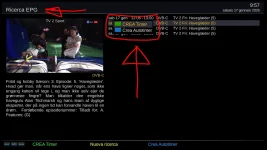
Hi, I have a question about the "add timer" function because it seems to work in two different ways:
If I activate it with the green button from the EPG guide, the "edit timer" window opens (as usual) where I can modify everything... before giving the OK...
But if I select "add timer" with the green button from the "history search", the "edit timer" window doesn't open...An additional selection/window opens, and I have to give the OK to "add timer" again to actually schedule a recording. The timer is recorded automatically without giving me the option to modify it (start-end time, channel, day, etc.). I have to select the timer again and then -> change timer -> edit timer.
I was wondering what I could do to get the green "add timer" button on the EPG search to work as it does on the EPG, i.e., like an "edit timer".
"Fix" a line from some file?
Thanks in advance for your help!!
 
Hi, I have a question about the "add timer" function because it seems to work in two different ways:
If I activate it with the green button from the EPG guide, the "edit timer" window opens (as usual) where I can modify everything... before giving the OK...
But if I select "add timer" with the green button from the "history search", the "edit timer" window doesn't open...An additional selection/window opens, and I have to give the OK to "add timer" again to actually schedule a recording. The timer is recorded automatically without giving me the option to modify it (start-end time, channel, day, etc.). I have to select the timer again and then -> change timer -> edit timer.
I was wondering what I could do to get the green "add timer" button on the EPG search to work as it does on the EPG, i.e., like an "edit timer".
"Fix" a line from some file?
Thanks in advance for your help!!
When you are in the EPG you have two choices.
  • Highlight a program and press GREEN. This opens the timer edit screen.
  • Highlight a program and press RECORD. This opens the instant record dialogue box.
 

Attachments

  • 1.webp
    1.webp
    92.1 KB · Views: 7
Hi, I have a question about the "add timer" function because it seems to work in two different ways:
If I activate it with the green button from the EPG guide, the "edit timer" window opens (as usual) where I can modify everything... before giving the OK...
But if I select "add timer" with the green button from the "history search", the "edit timer" window doesn't open...An additional selection/window opens, and I have to give the OK to "add timer" again to actually schedule a recording. The timer is recorded automatically without giving me the option to modify it (start-end time, channel, day, etc.). I have to select the timer again and then -> change timer -> edit timer.
I was wondering what I could do to get the green "add timer" button on the EPG search to work as it does on the EPG, i.e., like an "edit timer".
"Fix" a line from some file?
Thanks in advance for your help!!

I change lines 281 and 282 in EpgSelectionBase.py

'addAutotimerFromEventSilent' change to 'addAutotimerFromEvent'

Copy to \usr\lib\enigma2\python\Screens\ and restart GUI.
 
Hi,
"Add timer" from the EPG guide works as I want, but
I'd like it to work the same way from the "Search EPG" too, that is, by pressing the green button, you can directly access "Timer Edit" without having to double-click "Add Timer" and then "Edit Timer."
PS #Willo3092 I'll try it now.
 

Attachments

  • screenshot_TV-2-Sport_20260117_095727~2.webp
    screenshot_TV-2-Sport_20260117_095727~2.webp
    69.4 KB · Views: 8
I change lines 281 and 282 in EpgSelectionBase.py

'addAutotimerFromEventSilent' change to 'addAutotimerFromEvent'

Copy to \usr\lib\enigma2\python\Screens\ and restart GUI.
Hi and thanks...
I looked, but:
I don't have .py files, but .pyc files.
...Can I do something with just an Android tablet?
P.S. When I try to open it as a text file, I see that there's only one line with "addAutotimerFromEventSilent" and not two (and I don't know if it's line 281 or 282).
 

Attachments

EPG Search is a plugin used by all distros, so we can't change that behaviour.
 
EPG Search is a plugin used by all distros, so we can't change that behaviour.
Hi and thanks...
Yes, exactly, I didn't understand why it behaved this way with Openvix... I'll have to adapt once again... and anyway, the important thing is to have answers, understand how things work, and find solutions!!!!
Thanks for your support.
P.S. I downloaded and modified the .py file, but I couldn't get the GUI to work (I'm a creative person with no experience, so I only tried substitutions/renamings, but here, with just my imagination, I can't get very far).
 
Hello, maybe this is a very specific question I have but I have no clue how to solve my problem.

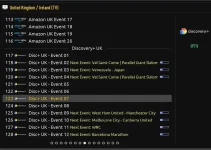
I'm watching via IPTV on my vuuno4kse and newest openvix image. My provider offers some "event channels" with epg for it (find it attached). For some reason whenever the event starts like now for football the EPG vanishes. This never happend before. Is this a special setting on the image or a problem on providers site? On other apps (macbook, phone...) its working so I assume some settings has been changed in openvix?

Thanks for any help!epg.webp
 
For all those who are waiting for new features like OpenCSA and the working Pluto plugin, and much more, don't forget to donate towards the build server expenses. So far this year only 140 quid out of 2500 is covered.
 
Status
Not open for further replies.

OpenViX Feeds Status

Back
Top