Superb quality and spec AB-Com PULSe 4K SE. Crazy offer! Only £129! FREE UK DELIVERY! 4K UHD, Enigma 2, Multiboot 4 images & more!...
Superb quality and spec AB-Com PULSe 4K Rev II Twin Satellite tuner only £179! FREE UK DELIVERY! 4K UHD, Enigma 2, SATA HDD facility, Multiboot 4 images & more!...

Openvix 6.8.007 - Resurrection of Grog68's Movieorganisor plugin - working but not logging anything

smipx

Forum Supporter
Donated Member
Joined
Nov 30, 2019
Messages
477
Reaction score
10
Points
18
Hi All,

I have been using grog68's Movieorganisor plugin for many years and have been very happy with it. I know there is a way to automatically view recordings in virtual folders on OpenVix but I have tried that on more than one occasion and just didn't get on with it.

So to the question. I have upgraded to 6.8.007 and installed the last known version 3.6 (as I have done for the last 5 or 6 releases of OpenVIX and, while it appears to be working and moving recordings into their own folders, it is not logging its activity in the system log anymore. I worry that because it is not doing this that other issues may be present and was wondering of anyone else with 6.8.007 and who is still using the Movieorganisor plugin could check to see if it is logging stuff for them?

Just for Information: To make sure I had a clean build - I installed 6.8.007 and did not do any restore of settings. I setup the box from scratch as I was having some other issues with a restore of settings making the box behave very erratically with network connectivity and streaming and the box freezing at regular intervals. These issues were fixed with a clean build.

All I get in the log is the following:

09:06:13.5950 [MovieOrganisor] AutoStart Enabled
09:06:13.5955 [MovieOrganisor] MovieOrganisor Schedule Enabled at Thu 07 May 2026 09:06:13 BST
..
..
09:07:19.8540 [MovieOrganisor][MovieOrganisorSetupScreen] g64url=http://91.121.192.18/movieorganisorversion.txt
09:07:19.8547 [MovieOrganiser] you have new_version available blue button update= 0

None of the actual moving activity is logged. It used to be.

To test - I moved multiple series back into the root of movie and ran movieorganisor. It correctly identified and put into folders all of the recordings.
Very odd!

Anyone still interested in maintaining this plugin (e.g. the folk who added python 3 support some time back) care to take a look?? I am not able to code python myself sadly.

Thanks
Paul
 
I can't remember if I'm completely honest. All I know is that I tried it twice (about a year apart) and there was something I didn't like. Possibly something to do with the removal of the word "New" but I am guessing at this point.
 
I can't remember if I'm completely honest. All I know is that I tried it twice (about a year apart) and there was something I didn't like. Possibly something to do with the removal of the word "New" but I am guessing at this point.
I'll give it another test (in the interests of helping the community) and let you know what made me stick with movieorganisor. If I do then maybe you'll consider a small tweak (depending on what it was) 🤞😁
 
What is the problem with virtual folders?
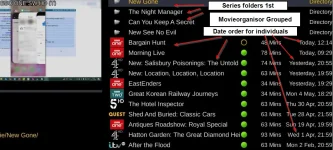
Hi, So I have moved all my files into the root of movie and enabled "automatic collections". I now remember the issues and why I stuck with movieorganisor. This is the way I curently see things (and the way myself and the family are used to:
1778162064460.webp

The issue are as follows:

1) I use my box to store recordings from the box and also a few series collections that I want to dip in and out of over the years. The downloaded content does not get picked up by "automatic collections". Now - I can easily fix this by popping these programs in some folders of thier own - not a big issue at all and they are shown at the top with a different folder icon. Happy with that.

but.......

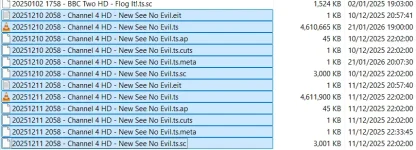
2) Sometimes I record some of a series on one tuner type (Terrestrial) and sometimes another Tuner type (Satellite). Ine the case below both were streamed from another openvix box (as all of my recordings are). I do this from time-to-time when there is a conflict and I have to resort to a different tuner type. "automatic collections" does not handle this. A case in point. I have two recordings of a program called "New: See No Evil" One was on Channel 4 Terrestrial and the other was on Channel 4 Satellite. They didn't get grouped but in MovieOrganisor they do as it only considers the names of the files. I think its the tuner that is causing the non grouping but it may be that there was a configuration change inbetween program 1 and program 2 of this series (as it was at a time when I was doing a lot of experimenting).

Program file name screen print:
1778161829688.webp

Program 1 meta =
1:0:0:0:0:0:0:0:0:0:
New See No Evil
1765400280
345561965
4721320516
188
0

Program 2 meta =
1:0:19:206C:808:2:11A0000:0:0:0::Channel 4 HD
New: See No Evil
A forensic exploration of prolific abuser John Smyth and the Church of England's biggest ever scandal. Smyth's cruel reign of abuse and the cover-ups continue in Zimbabwe. (Ep2/2)
1765486680
New:_See_No_Evil
345535099
4722585568
f:0
188
0

3) Now... the most important issue of all:

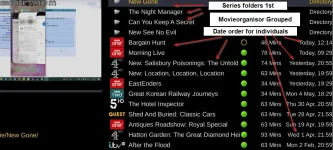
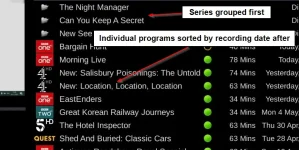
I like to see my series groupings first (or last) and then all individual programs underneath (or above) with the newest individual programs in date order

e.g.:

1778162504435.webp

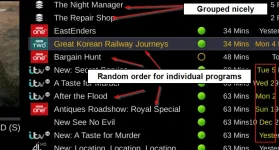
In "automatic collections" there is no sort order that can acheive this view. The closest I can get is sort order "Short-Long" or "Long Short" which groups all of the series together at the top or bottom but all of the individual programs at the bottom (or top) are not in date order. there is no other sort type that groups the series apart from these two.

This is as close as I can get:
1778161579424.webp


You did ask Huevos :-)
There is no right or wrong way to want to see things and I get that you cannot cover all tastes and whims. This is why I have resolutely stuck with Movieorganisor and not whinged about it for the last 4 years. I know your time (and the whole development teams time) is taken up with more pressing matters. All was well until the Movieorganisor stopped logging its actions in the system log. and....... movieorganisor does still work apart from that little issue - FOR NOW!!)....

thanks
Paul
 

Attachments

  • 1778161256971.webp
    1778161256971.webp
    44.3 KB · Views: 2
Hi All,

I have been using grog68's Movieorganisor plugin for many years and have been very happy with it.... it is not logging its activity in the system log anymore.
Is it actually doing anything?
The logging is just a print() statement, so if there are none of these it isn't running the nearby code.
 
I will have to look into the collection logic. Maybe we can solve at least some of those.
 
Is it actually doing anything?
The logging is just a print() statement, so if there are none of these it isn't running the nearby code.
Hi yes it is all working fine apart from the logging.
 
I will have to look into the collection logic. Maybe we can solve at least some of those.
If a new sort could be created to do your own folders & collections first and then all of the individual programs sorted by date that would be great. I wonder if the non sorting of the program I was talking about could be related to no epg data being streamed from satellite streams but being transmitted with terrestrial streams???
 
Is it actually doing anything?
The logging is just a print() statement, so if there are none of these it isn't running the nearby code.
I just turned off the collections option and re-enabled the Movieorganisor. It is working and has popped all the programs (including the "New: See No Evil" ) into folders. Am an almost certina it is meant to put a line in the log for every move it does but it is not anymore (or maybe i'm having a moment and it never did but.... I think it did).
 
The print function changed when migrating to python3, that is what probably needs adjusting in the plugin. Not directly related to your plugin issue, I use "Event Name first" for the composition of recording filenames.
 
The print function changed when migrating to python3, that is what probably needs adjusting in the plugin. Not directly related to your plugin issue, I use "Event Name first" for the composition of recording filenames.
I did ask grog if he take a look but he's moved on and can't remember the plugin or make any further changes. In the interests of full disclosure I cannot make the changes myself as I don't program :-( Also.... if it helps, when I installed the plugin I noticed the following line in the log (which does not seem to have affected its operation in any other way - may be a red herring:

14:06:14.3002 /usr/lib/enigma2/python/Plugins/Extensions/MovieOrganisor/plugin.py:82: builtins.SyntaxWarning: invalid escape sequence '\:'

so maybe there is a typo in the code but.... I'm pretty certain it was working and logging in 6.8.003 and 6.7 which are python3 too right??

Thanks
Paul

ps abu..... It took me 10 minutes to find the flaming thread to update it as it was moved to a different place (quite rightly) - just saying :) :ROFLMAO: :ROFLMAO:
@birdman @Huevos take note (or please let them know with a PM in case they don't realize). I thought when a thread got moved it left a placeholder in the original location that says => Moved or something??
 
Last edited:
The print function changed when migrating to python3, that is what probably needs adjusting in the plugin.
No. It uses print_function and all of the print calls are in ()s.

I did find a copy of it (v3.90) via:
Code:
https://www.techkings.org/threads/movie-organisor-plugin-organise-your-series-recordings-into-folders.97690/
 
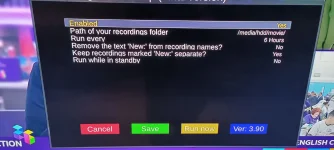
Hi, Sorry birdman I made a typo in my original post. It's 3.90 I'm already using and it is this version without any operational logging. I just double checked.... 1000017615.webp
Sorry about that 🙄
Paul
 
8 years old, and currently not python 3 compatible.
 
8 years old, and currently not python 3 compatible.
As @birdman said that isn't grogs git. I don't think he ever has used GitHub as when I asked him years ago about other plugins he said he didn't know how to use GitHub.

He just used Dropbox ipk files
I can't be sure of his latest version.
 

OpenViX Feeds Status

Back
Top