Superb quality and spec AB-Com PULSe 4K SE. Crazy offer! Only £129! FREE UK DELIVERY! 4K UHD, Enigma 2, Multiboot 4 images & more!...
Superb quality and spec AB-Com PULSe 4K Rev II Twin Satellite tuner only £179! FREE UK DELIVERY! 4K UHD, Enigma 2, SATA HDD facility, Multiboot 4 images & more!...

Openvix 6.8.007 - Resurrection of Grog68's Movieorganisor plugin - working but not logging anything

so.... I went to the GIT and downloaded the PY files. Deleted the PYC files on box and copied over the PY files and rebooted....

That sorted it..
Moved all recordings back into root of movie
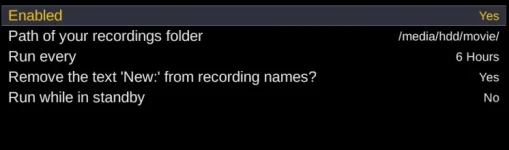
Configured to remove "New":
1778413860525.webp
Ran plugin
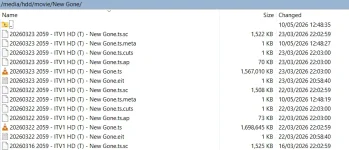
Results exactly the same. Some stuff renamed to remove the new, some stuff not:
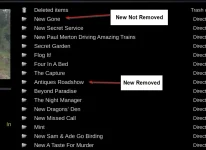
1778413896456.webp

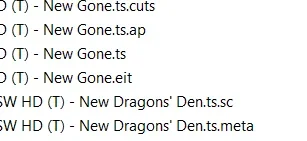
1778413948366.webp
1778414205688.webp

Log file attached with all the print statements.
 

Attachments

Moved all recordings back into root of movie
Configured to remove "New":
View attachment 68739
Ran plugin
Results exactly the same. Some stuff renamed to remove the new, some stuff not:
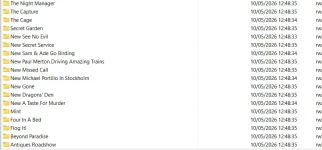
View attachment 68740

View attachment 68741
View attachment 68742

Log file attached with all the print statements.
Actually - Hold that thought. Just looked at my backup and the files that I thought had been renamed (removed NEW) never had "new" in thier file names.

So.... Sorry for the red herring... BUT the "New" removal logic is not working at all. Nothing that had "New" in its name had it removed.


:)
 
Actually - Hold that thought. Just looked at my backup and the files that I thought had been renamed (removed NEW) never had "new" in thier file names.

So.... Sorry for the red herring... BUT the "New" removal logic is not working at all. Nothing that had "New" in its name had it removed.


:)
This might not seem like a biggie but... on some channels on Satellite that are new can have "New" in the title but sometimes on Terrestrial they do not have the word "New" in the title. If you record one episode on Sat and the other on Terrestrial then this could cause mayhem (depending on the Channel). This is all EPG data taken from epgrefresh btw...

Just thought I would add that nugget.
 
seems to be removing the Colon but not the word "New". This may be because it has been run before and the files moved back to root of movie??? As none of my FileNames have New: Just New with a space:

1778415215704.webp
 
seems to be removing the Colon but not the word "New". This may be because it has been run before and the files moved back to root of movie??? As none of my FileNames have New: Just New with a space:

View attachment 68744
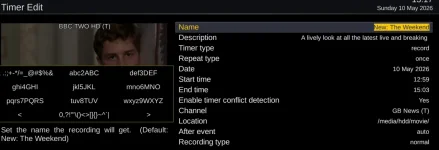
I just found a currently running show with the description of New: in the EPG:

1778415443568.webp

Set it to record:
1778415498837.webp

The resultant recording is saved as:

1778415566197.webp

So I think the PY logic is not quite right but not convinced it ever can be while the file is being saved to the file system without the colon as you would then change the code to look for "New" at the beginning but any genuine program that starts with "New" e.g. "New Beginnings the Finale" would end up being called "Beginnings the Finale" in a folder of the same name which would not do at all.

:)

Paul
 
I just found a currently running show with the description of New: in the EPG:

View attachment 68745

Set it to record:
View attachment 68746

The resultant recording is saved as:

View attachment 68747

So I think the PY logic is not quite right but not convinced it ever can be while the file is being saved to the file system without the colon as you would then change the code to look for "New" at the beginning but any genuine program that starts with "New" e.g. "New Beginnings the Finale" would end up being called "Beginnings the Finale" in a folder of the same name which would not do at all.

:)

Paul
try this ?
 

Attachments

try this ?
Hi,

No that didn't work. The name on the disk does not have New_ or New- it is "New " but like I said it would cause problems for real program names starting "New" like "New York The Movie". If I am following the code correctly that is :)

That being the case, the only way to be able to do it is to possibly interrogate the other files and look for New: but. I looked at the RAW EIT file for various recordings and not all of them have New: in them even though the file is called New Bla Bla Bla (although I was not parsing it to human readable info as it is some sort of database format if I'm not mistaken).

extract of Log:
[I]6:31:58.0628 [MovieOrganisor] Renames /media/hdd/movie/20260419\ 1959\ \-\ BBC\ 1\ SW\ HD\ \(T\)\ \-\ Antiques\ Roadshow\ Royal\ Special\.ts\.meta[/I]
[I]16:31:58.1281 [MovieOrganisor] Renames /media/hdd/movie/20260510\ 1259\ \-\ GB\ News\ \(T\)\ \-\ New\ The\ Weekend\.ts\.sc[/I]
[I]16:31:58.1600 [MovieOrganisor] Renames /media/hdd/movie/20260510\ 1259\ \-\ GB\ News\ \(T\)\ \-\ New\ The\ Weekend\.ts\.meta[/I]
[I]16:31:58.2254 [MovieOrganisor] Renames /media/hdd/movie/20260401\ 2159\ \-\ C4\ HD\ \(S\)\ \-\ Hatton\ Garden\ The\ Great\ Diamond\ Heist\.ts\.sc[/I]
[I]mv: can't rename '/media/hdd/movie/Antiques Roadshow': Invalid argument[/I]
[I]16:31:58.2582 [MovieOrganisor] Renames /media/hdd/movie/Antiques\ Roadshow[/I]
[I]mv: can't rename '/media/hdd/movie/Flog It!': Invalid argument[/I]
[I]16:31:58.2904 [MovieOrganisor] Renames /media/hdd/movie/Flog\ It\![/I]
[I]16:31:58.3253 [MovieOrganisor] Renames /media/hdd/movie/20260429\ 2059\ \-\ ITV1\ HD\ \(T\)\ \-\ New\ A\ Taste\ for\ Murder[/I]
[I]mv: can't rename '/media/hdd/movie/New Paul Merton Driving Amazing Trains': Invalid argument[/I]
[I]16:31:58.3604 [MovieOrganisor] Renames /media/hdd/movie/New\ Paul\ Merton\ Driving\ Amazing\ Trains[/I]
[I]16:31:58.3927 [MovieOrganisor] Renames /media/hdd/movie/20260401\ 2159\ \-\ C4\ HD\ \(S\)\ \-\ Hatton\ Garden\ The\ Great\ Diamond\ Heist\.ts\.meta[/I]
[I]16:31:58.4567 [MovieOrganisor] Renames /media/hdd/movie/20260419\ 1959\ \-\ BBC\ 1\ SW\ HD\ \(T\)\ \-\ Antiques\ Roadshow\ Royal\ Special\.ts\.sc[/I]
[I]mv: can't rename '/media/hdd/movie/New Missed Call': Invalid argument[/I]
[I]16:31:58.4888 [MovieOrganisor] Renames /media/hdd/movie/New\ Missed\ Call[/I]
[I]16:31:58.5210 [MovieOrganisor] Renames /media/hdd/movie/20260510\ 1259\ \-\ GB\ News\ \(T\)\ \-\ New\ The\ Weekend\.ts\.cuts[/I]
[I]16:31:58.5533 [MovieOrganisor] Renames /media/hdd/movie/20260506\ 1959\ \-\ Channel\ 4\ HD\ \(T\)\ \-\ New\ Location,\ Location,\ Location\.eit[/I]
[I]mv: can't rename '/media/hdd/movie/New Michael Portillo In Stockholm': Invalid argument[/I]
[I]16:31:58.5857 [MovieOrganisor] Renames /media/hdd/movie/New\ Michael\ Portillo\ In\ Stockholm[/I]
[I]mv: can't rename '/media/hdd/movie/New Sam & Ade Go Birding': Invalid argument[/I]
[I]16:31:58.6174 [MovieOrganisor] Renames /media/hdd/movie/New\ Sam\ \&\ Ade\ Go\ Birding[/I]
[I]16:31:58.6499 [MovieOrganisor] Renames /media/hdd/movie/20260510\ 1259\ \-\ GB\ News\ \(T\)\ \-\ New\ The\ Weekend\.eit[/I]
[I]16:31:58.6827 [MovieOrganisor] Renames /media/hdd/movie/Watch\ S\.ts\.meta[/I]
[I]mv: can't rename '/media/hdd/movie/New Gone': Invalid argument[/I]
[I]16:31:58.7462 [MovieOrganisor] Renames /media/hdd/movie/New\ Gone[/I]
mv: can't rename '/media/hdd/movie/Beyond Paradise': Invalid argument

I don't think this option can ever be easily made to work

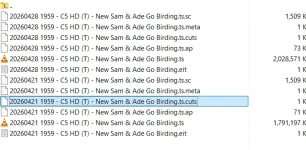
1778427698056.webp
EIT attached
Meta attached
AP attached

Notice no New: unless the EIT can be decoded but even then it may not?!?!
 

Attachments

Last edited:
Yes, that solution is not going to work. Please wait and I will post a solution.
 
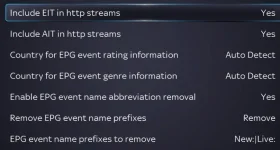
Doesn't removing the 'Live' prefix work in epg settings?

View attachment 68753
Not so worried personally about live but I can see that some people might want it removed. I will have a look at that screen though and see what I have set. If you can specify to remove "new" will it actually affect the naming of the file itself as opposed to whats in the epg file or the recording Metadata? Movieorganisor works solely on file name. Certainly going to have a play though 👍
 
Not so worried personally about live but I can see that some people might want it removed. I will have a look at that screen though and see what I have set. If you can specify to remove "new" will it actually affect the naming of the file itself as opposed to whats in the epg file or the recording Metadata? Movieorganisor works solely on file name. Certainly going to have a play though 👍
For the moment try https://github.com/TwolDE2/MovieOrganisor/commit/e24a88cd25e55c446ae031a81e47a8f5d5a9d481

But, that removes "New " without knowing if it is supposed to be there.

Another option would be open the meta file.
 
Another option would be open the meta file.
As far as I'm aware the only name that is displayed is the one in the meta (or eit) file.
The actual filename on disk is fairly irrelevant.
And, IIRC, the filename will never be called "New: ...." as that is (was) an illegal file name on a FAT file system, and the code caters for that.
 
Last edited:
the filename will never be called "New: ...." as that is (was) an illegal file name on a FAT file system, and the code caters for that.
And therein lies the problem. SanitizeFilename removes the ":". So now we have "New " in the filename instead of "New: ". So the only way, it would seem, to access the original pattern would be look in the meta file. Otherwise we may remove "New " from the filename when in fact it was legitimate.
 
And therein lies the problem. SanitizeFilename removes the ":". So now we have "New " in the filename instead of "New: ". So the only way, it would seem, to access the original pattern would be look in the meta file. Otherwise we may remove "New " from the filename when in fact it was legitimate.
As I said, it's only the meta file that matters.
 
The object of the exercise was to remove it from the filename.
 
The object of the exercise was to remove it from the filename.
That's right. Sometimes the filename has "New" and sometimes it does not (depending on the recording source) so, to capture all episodes in a single folder (or virtual folder) when the recording source may vary between episodes would need the removal of the word New.

At the end of the day its a bit of an edge case. I expect 99% of folk will record a series from the same source and all of the recordings for a particular program will either be containing the prefix "New" or none of them will - so they will all end up together regardless of whether the name of the folder/virtual folder/filename starts with the word "new" which at the end of the day is only a minor annoyance.

For the tiny number of programs that I have that is a mixture I can simply rename them manually.

Of more use would be a couple of additional search options for the "Automatic Collections" as previosuly mentioned. Then we can all forget about movieorganisor and use the built-in functionality. How does that functionality cater for "New:" / "New "? Does it use filenames or EIT data from the recordings or someting else?

Paul
 
The actual filename on disk is fairly irrelevant.
not for movieorganisor - therin lies the issue and why I relly should stop using it :-) For Movieorganisor the only thing that matters is the filename.
 
For Movieorganisor the only thing that matters is the filename.
Ah!
But the only thing that matters for the rest of Enigma2 is the meta data.
So you'll never see the result anywhere except in that plugin.
 

OpenViX Feeds Status

Back
Top