So yesterday I bought a Octagon, and it is due to be delivered today, I was going to get a Sandisk Extreme 128gb MicroSD for £23 for it, but Google Ai suggested I get a NVMe instead as it will run smoother, so I got a 256gb Ediloca FN600 (essentially a cheap Chinese brand) NVMe for £33. Did I make the better choice or would MicroSD have made zero difference even for timeshifting, etc ?

Superb quality and spec AB-Com PULSe 4K SE. Crazy offer! Only £129! FREE UK DELIVERY! 4K UHD, Enigma 2, Multiboot 4 images & more!...
Superb quality and spec AB-Com PULSe 4K Rev II Twin Satellite tuner only £179! FREE UK DELIVERY! 4K UHD, Enigma 2, SATA HDD facility, Multiboot 4 images & more!...
You are using an out of date browser. It may not display this or other websites correctly.
You should upgrade or use an alternative browser.
You should upgrade or use an alternative browser.
Just bought a Octagon SF8008 V3 Supreme, AI told me to get a NVMe over MicroSD, was it right ?
- Thread starter Blaze
- Start date


Well the Octagon SF8008 V3 Supreme features a built-in M.2 slot (M-Key PCIe NVMe) for installing an internal solid-state drive so hopefully your chinese disk will fit.
Yeah, but how does it compare to a MicroSD ? I guess I shouldn't trust AI though as I asked it if the one I bought would fit, they said yes, so gotta keep my fingers crossed.Well the Octagon SF8008 V3 Supreme features a built-in M.2 slot (M-Key PCIe NVMe) for installing an internal solid-state drive so hopefully your chinese disk will fit.
By the way, APC were meant to deliver today but just got message saying they are delayed so can't, not WOS fault though, just a shame I can't test it tonight.
well - its an nvme to usb bridge so its pretty crap. If I had my time again I would just use a plug in 2.5" USB HDD (or SSD if you want silence). I got an NVME SSD for it and it lasted about 6 months before it gave up the ghost - I am guessing it was not being trimmed right and one day "poof" - all my recordings gone. Since then I have used a USB 1Tb HDD in usb 3 port and it is running a) much faster than it did with the NVME drive I installed and b) doesn't need trimming so should last a while. By the way - it was not a crappy cheap NVME either. It was a crucial P310 1Tb NVME and is now being used as a shim for my tiling project - A VERY EXPENSIVE TILE SPACER :-(
I have used a lot of NVME ssd,s on my build image build PC and have to say not impressed (they get too hot, hve I/O errors and crash….and as you have said, a reputable provider make no difference!well - its an nvme to usb bridge so its pretty crap. If I had my time again I would just use a plug in 2.5" USB HDD (or SSD if you want silence). I got an NVME SSD for it and it lasted about 6 months before it gave up the ghost - I am guessing it was not being trimmed right and one day "poof" - all my recordings gone. Since then I have used a USB 1Tb HDD in usb 3 port and it is running a) much faster than it did with the NVME drive I installed and b) doesn't need trimming so should last a while. By the way - it was not a crappy cheap NVME either. It was a crucial P310 1Tb NVME and is now being used as a shim for my tiling project - A VERY EXPENSIVE TILE SPACER :-(
The only one so far that is working uses the casing with teh fan inside - I think this is the one you found

birdman
Moderator
I have 2 in my laptop. Not had any problems. Nor with the one in one of my RaspberryPis.I have used a lot of NVME ssd,s on my build image build PC and have to say not impressed (they get too hot, hve I/O errors and crash….and as you have said, a reputable provider make no difference!
I also have one in an external USB drive. Again, no issue.
My suspicion (with the SF8008 V3) is that it is down to the fact its an NVME and possibly down to the poorly operating NVME to USB bridge chip and the issues around trimming. Just a guess mind. For me - I use SSD's in my tower unit and laptop and no issues too. One is a SATA M.2 and the other is an NVME M.2 Both are good makes (samsung and crucial).
In the SF8008 I could not work out why the machine was so sluggish. It wasn't until I replaced it with a good old 1Tb HDD (5400rpm) that I realised it was the SSD implementation all along - it is twice as snappy with the HDD when looking at the file list and doing things that involve writing to or reading from the HDD (like EPG). I doubt very much it was a faulty SSD I put in my SF8008 but - just in case I ditched it - I could have RMA'd it but to be honest for the hassle and cost I couldn't be arsed. As a former (until last year) computer upgrade / repair engineer for home and small business users I must have fitted many hundreds of SATA and NVME SSD's both M.2 and 2.5" as upgrades to Windows 7, 8, 10 and 11 machines and never once did I ever have a failure or data loss. These were all native SATA 3 or native NVME but I was always careful to leave space for wear levelling and trimmed them on a 3 day cycle.
In the SF8008 I could not work out why the machine was so sluggish. It wasn't until I replaced it with a good old 1Tb HDD (5400rpm) that I realised it was the SSD implementation all along - it is twice as snappy with the HDD when looking at the file list and doing things that involve writing to or reading from the HDD (like EPG). I doubt very much it was a faulty SSD I put in my SF8008 but - just in case I ditched it - I could have RMA'd it but to be honest for the hassle and cost I couldn't be arsed. As a former (until last year) computer upgrade / repair engineer for home and small business users I must have fitted many hundreds of SATA and NVME SSD's both M.2 and 2.5" as upgrades to Windows 7, 8, 10 and 11 machines and never once did I ever have a failure or data loss. These were all native SATA 3 or native NVME but I was always careful to leave space for wear levelling and trimmed them on a 3 day cycle.
HELP !! I have finally had time to setup the Octagon and the NVME is not working in it. It says 0bytes and when I try and initialize I get a Error code 1. Attached here is a screenshot of what OpenWebif shows.
I took it out to reseat it, but that didn't help, it also seems seated perfectly. What can I do ? NVME : 256gb Ediloca FN600
Fill errors I get...........
"JMicron (Generic) 0B"
"Cannot access local variable 'partType' where it is not associated with a value"
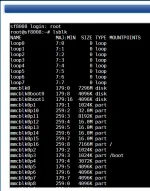
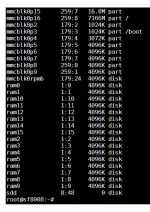
I took it out to reseat it, but that didn't help, it also seems seated perfectly. What can I do ? NVME : 256gb Ediloca FN600
Fill errors I get...........
"JMicron (Generic) 0B"
"Cannot access local variable 'partType' where it is not associated with a value"
el bandido
Forum Supporter

- Joined
- Dec 22, 2013
- Messages
- 248
- Reaction score
- 61
- Points
- 28
One possibility:
sdd 8:48 0 0 disk
The SF8008 sees the USB storage device, but the 4.4.35 kernel is getting a capacity of 0 bytes from it? The Octagon SF8008 kernel is about ten years old. A modern NVMe-to-USB bridge may technically enumerate on it while still having trouble with UAS, especially certain JMicron bridge revision
Look for kernel messages involving resets, SCSI errors, failure to read capacity, or JMicron.
Posting the full output of these Terminal or Telnet commands may or may not help:
lsusb
lsusb -t
lsmod | grep -E 'uas|usb_storage'
cat /sys/block/sdd/size
dmesg | grep -iE 'sdd|uas|usb-storage|scsi|jmicron|capacity|reset|error|fail'
sdd 8:48 0 0 disk
The SF8008 sees the USB storage device, but the 4.4.35 kernel is getting a capacity of 0 bytes from it? The Octagon SF8008 kernel is about ten years old. A modern NVMe-to-USB bridge may technically enumerate on it while still having trouble with UAS, especially certain JMicron bridge revision
Look for kernel messages involving resets, SCSI errors, failure to read capacity, or JMicron.
Posting the full output of these Terminal or Telnet commands may or may not help:
lsusb
lsusb -t
lsmod | grep -E 'uas|usb_storage'
cat /sys/block/sdd/size
dmesg | grep -iE 'sdd|uas|usb-storage|scsi|jmicron|capacity|reset|error|fail'
Thanks for trying to help. In the end it was my error. Even though I had re-seated the NVME I obviously didn't get enough contact on both tries as I emergency bought an external NVME to USB adapter and I noticed when I inserted it in that that the copper contacts were completely hidden, where-as in the Octagon there was some of it visible, so I re-seated it a third time and made sure I pushed in extra hard and this time it found it. So it was probably reading 0B because it knew a card was there but couldn't read all pins.
Only problem I have now is the CEC side of things, I am having a lot of issues trying to keep things stable with CEC on. I will have to experiment a lot first to see what I can do, probably just a settings thing.
Only problem I have now is the CEC side of things, I am having a lot of issues trying to keep things stable with CEC on. I will have to experiment a lot first to see what I can do, probably just a settings thing.