Superb quality and spec AB-Com PULSe 4K SE. Crazy offer! Only £129! FREE UK DELIVERY! 4K UHD, Enigma 2, Multiboot 4 images & more!...
Superb quality and spec AB-Com PULSe 4K Rev II Twin Satellite tuner only £179! FREE UK DELIVERY! 4K UHD, Enigma 2, SATA HDD facility, Multiboot 4 images & more!...

[VU+ Duo4K SE] timeshift on NFS drive (automount)

birnbam

New member
Joined
Jan 25, 2026
Messages
4
Reaction score
2
Points
3
What type of support thread are you creating?
Possible bug
What OpenViX Image build number are you using?
6.9.003 (Release)
Have you tried re-flashing WITHOUT settings restore?
YES
Have you tried re-flashing WITH a settings restore?
YES
Dear team,

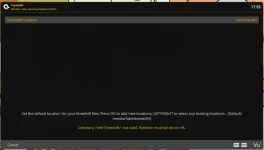
Is there a reason why I cannot point my timeshift to /net/Timeshift/

Error: Directory '/net/Timeshift/' not valid. Partition must be on ext or nfs.

but Timeshift is a nfs mount via automount. The directory is accessible and writeable.

cat /etc/auto.master
/net /etc/auto.mediathek --ghost

cat /etc/auto.mediathek
#
# automount NFS
#
Filme -fstype=nfs,rw,soft,intr,nolock birnbam104:/volume/e721899b-3809-4f57-b66e-939946f1a19d/.srv/.unifi-drive/MediaThek/.data/Filme
Timeshift -fstype=nfs,rw,soft,intr,nolock birnbam104:/volume/e721899b-3809-4f57-b66e-939946f1a19d/.srv/.unifi-drive/MediaThek/.data/Timeshift

Any ideas I can try next?

Best regards
birnbam
 
Dear team,

Is there a reason why I cannot point my timeshift to /net/Timeshift/

Error: Directory '/net/Timeshift/' not valid. Partition must be on ext or nfs.

but Timeshift is a nfs mount via automount. The directory is accessible and writeable.

cat /etc/auto.master
/net /etc/auto.mediathek --ghost

cat /etc/auto.mediathek
#
# automount NFS
#
Filme -fstype=nfs,rw,soft,intr,nolock birnbam104:/volume/e721899b-3809-4f57-b66e-939946f1a19d/.srv/.unifi-drive/MediaThek/.data/Filme
Timeshift -fstype=nfs,rw,soft,intr,nolock birnbam104:/volume/e721899b-3809-4f57-b66e-939946f1a19d/.srv/.unifi-drive/MediaThek/.data/Timeshift

Any ideas I can try next?

Best regards
birnbam
Well if you use it for timeshift, I would make it a permanent mount.
Also turn on debug, so we can see whats reported (menu/setup/ system/logs settings enable, save not to flash, local time.
I assume you have setup your NAS to allow nfs access from teh receiver?
 
Dear team,

for some reason, it's working ok now, but in the menu still shows the error -> maybe just a glitch in the ui (see screenshot)

Here is the important part of the debug log, I can see the timeshift is written to the proper NFS path ( /net/Timeshift)


17:49:21.4941 [eDVBPESReader] Created. Opening demux
17:49:21.4942 [eDVBDemux] open demux /dev/dvb/adapter0/demux0
17:49:21.4942 [eDVBTeletextParser] starting PES reader on pid=0041
17:49:21.4942 [eDVBPESReader] DMX_SET_PES_FILTER pid=0041
17:49:21.4986 [eDVBServicePlay] remove timeshift files
17:49:21.4994 [setIoPrio] best-effort level 7 ok
17:49:21.5001 [eBackgroundFileEraser] removing /net/Timeshift/timeshift.75RG6O.del OK
17:49:21.5002 [eBackgroundFileEraser] filename /net/Timeshift/timeshift.75RG6O.cuts not found: Function not implemented
17:49:21.5012 [eBackgroundFileEraser] removing /net/Timeshift/timeshift.75RG6O.sc.del OK
17:49:21.5018 [eInputDeviceInit] 0 80 (128) 1
17:49:21.5018 [eRCDeviceInputDev] emit: 0
17:49:21.5019 [eActionMap] key from dreambox advanced remote control (native): 128 1
17:49:21.5022 [InfoBarGenerics] Key: 128 (Break) KeyID='KEY_STOP' Binding='('STOP',)'.
17:49:21.5032 [eDVBChannel] pvrEvent evtStopped
17:49:21.8982 [eDVBDemux] open demux /dev/dvb/adapter0/demux0
17:49:21.8983 [eDVBSectionReader] DMX_SET_FILTER pid=67
17:49:22.2627 [eDVBServicePMTHandler] AITready
1792338972789.webp
Best regards
birnbam
 

OpenViX Feeds Status

Back
Top