Superb quality and spec AB-Com PULSe 4K SE. Crazy offer! Only £129! FREE UK DELIVERY! 4K UHD, Enigma 2, Multiboot 4 images & more!...
Superb quality and spec AB-Com PULSe 4K Rev II Twin Satellite tuner only £179! FREE UK DELIVERY! 4K UHD, Enigma 2, SATA HDD facility, Multiboot 4 images & more!...

[GiGaBlue UHD UE 4K] Gigablue receiver just crashed

Robgh

Member
Joined
Sep 26, 2024
Messages
81
Reaction score
6
Points
8
Age
76
Location
Leeds
What type of support thread are you creating?
Support question
What OpenViX Image build number are you using?
6.9.2
Have you tried re-flashing WITHOUT settings restore?
NO
Have you tried re-flashing WITH a settings restore?
NO
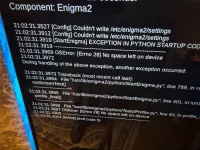
I was watching a tv program, and all of a sudden the screen went black with an error message and I have attached a photo .
 

Attachments

  • 20261028_210241.webp
    20261028_210241.webp
    245.3 KB · Views: 15
The message says "no space on device"... that means the disc is full.
 
The message says "no space on device"... that means the disc is full.
Yes, I understand that but does it mean the internal disc is full. 2 days ago there was 83% of free space on a 500Gb disc. Anyways, what can I do about it.
 
Yes, I understand that but does it mean the internal disc is full. 2 days ago there was 83% of free space on a 500Gb disc. Anyways, what can I do about it.
or somehow is corrupted.
I would remove, load on a PC and check it.

My gbue4k has been around for years with an internal disk - and over the years it has been hammered, without issues - so I would assume your disk has the issue.
 
I'm afraid that is beyond my capabilities now, but could have done it 5 or 10 years ago.
What about getting another disc with OpenVIX already preloaded. Could I do that
 
openvix is not on your HDD. Try to start box without HDD and see if that works
 
Just out of interest then, what type of disk is in the box, ie ssd, hdd suitable for video or any other
 
could be any of those
It is a 500Gb Seagate disk and has over 400Gb free, so the disk is not full but the Vix image thinks it is. What next
I've just tried the receiver without the disk and the boot up shows the same error message about the disk being full
 
Last edited:
if the box starts then do direct a check HDD before anything else.Worked fine here once. Or telnet repair (chkdsk in windows/dos) but is not so easy and could be done : telnet command disk repair
 
Sorry I posted the extra before seeing the last message. As above, I get the same error message without the disc.

When I do du -sh /dev/sdf
it returns 0
So that would no space left, if so it's weired. Anyways what if I actually formatted the disc thereby removing everything on it, would that work in the receiver
 
Last edited:
then you loose all recordings and backups.Is telnet to box not working ?
 
Surely if the box still doesn't boot without the HDD then maybe just reflash openvix?
 
then you loose all recordings and backups.Is telnet to box not working ?
I'm to bothered about losing anything, but as the disc is attached by a usb cable to my desktop, I don't know how to use telnet in linux as it wants a port number or ip address, of which I know neither.
Anyway, as I get the same error message without the disc, what's to say it won't display again after I either format or telnet.

I did think of putting an OpenVix image on a usb stick to try and load it onto the box, but when the box comes on it say image found press power in10s, but where is 'power' as it's not on the remote.
 
Last edited:
flashing box are workouts enough how to do. Small usb stick and unzip file directly to it.
 
flashing box are workouts enough how to do. Small usb stick and unzip file directly to it.
Yes that is what I want to do, but when the box comes on it says image found press power in10s, but where is 'power' as it's not on the remote.
 
Yes that is what I want to do, but when the box comes on it says image found press power in10s, but where is 'power' as it's not on the remote.
From AI:
The power button on the GigaBlue UHD UE 4K is a touch-sensitive button located on the front left side of the receiver panel. [1]

Key Functions
    • Short Press (Standby): Pressing the power button briefly puts the receiver into standby mode or wakes it up. [1]
    • Long Press (Restart/Shutdown): Holding down the power button can trigger hard reboots or menu options depending on the active Enigma2 Linux image. [1]
    • Flashing / Firmware Updates: During a USB software flash, pressing this front power button when prompted on the display initiates the installation. [1, 2]
    • Rear Main Switch: A physical hard power switch (ON/OFF) is also located on the rear panel of the unit next to the power and input connections. [1, 2]
 
no offence but if you do not know what the power button is then RTFM and is the left silver bitton on the front.
 
From AI:
The power button on the GigaBlue UHD UE 4K is a touch-sensitive button located on the front left side of the receiver panel. [1]

Key Functions
    • Short Press (Standby): Pressing the power button briefly puts the receiver into standby mode or wakes it up. [1]
    • Long Press (Restart/Shutdown): Holding down the power button can trigger hard reboots or menu options depending on the active Enigma2 Linux image. [1]
    • Flashing / Firmware Updates: During a USB software flash, pressing this front power button when prompted on the display initiates the installation. [1, 2]
    • Rear Main Switch: A physical hard power switch (ON/OFF) is also located on the rear panel of the unit next to the power and input connections. [1, 2]
Oops, yes I see it now but have never used it,doh!
When it's finished and when I reconnect the disk I hope it doesn't display the same error message. If so then I'll format it after I copy the files etc to my desktop then put them back on the disc
 
Oops, yes I see it now but have never used it,doh!
When it's finished and when I reconnect the disk I hope it doesn't display the same error message. If so then I'll format it after I copy the files etc to my desktop then put them back on the disc
Check all working before you reconnect the disk, I doubt the hdd is the problem to be honest.
 

OpenViX Feeds Status

Back
Top