Superb quality and spec AB-Com PULSe 4K SE. Crazy offer! Only £99! FREE UK DELIVERY! 4K UHD, Enigma 2, Multiboot 4 images & more!...
Superb quality and spec AB-Com PULSe 4K Rev II Twin Satellite tuner only £149! FREE UK DELIVERY! 4K UHD, Enigma 2, SATA HDD facility, Multiboot 4 images & more!...

ViX Team Vu+ Uno Image v2.3 - 19/11/2011

Thank you silver that fixed it :)

How exactly does 'Added support for HDMI-CEC' work?.. I assume i can use my TV remote to control aspects of the Vu+ Uno? just like i can use my Vu+ Uno remote to control my TV

With the autotimer say a new series programme is aired on a Sunday and a repeat is aired on a Wednesday, How do i set up the autotimer so it only reminds me on a Sunday for the new series? rather than on the Wednesday as well which i don't want to be reminded about.

So basically it reminds me for the new series only and not the repeat.

Set the autotimer to unique description but you will need to do this before Sunday but after Wednesday otherwise it will take Wednesday as the first recording and skip Sunday. Personally I leave it as is and check its recorded fine and than delete the other AT.
 
at the moment HDMI CEC is still beta stages and works for some tvs not the others i cant get it to work on mine but it works on my dads LG Scarlet

its just a new thing that tvs already have like viera link for pana, easylink for philips etc etc

i just turn mine off but have a play see if you can work it
Does it just work straight away once turned on and with the right TV?

I noticed there's Fan Control now, wasn't in 2.2.. what is PWM Value?
 
not messed with the PWM on fan control

the hdmi cec should work as its default enabled but there is setting to play with so look at it and set it the way you like
 
Set the autotimer to unique description but you will need to do this before Sunday but after Wednesday otherwise it will take Wednesday as the first recording and skip Sunday. Personally I leave it as is and check its recorded fine and than delete the other AT.

Thank you for this, i'll try this out.. I would do it your way but i don't usually record programs as i only have 1 feed at the moment :( so i just use zap rather than record that's why i'd rather not get zapped to a program i've already watched especially if it does it while i'm watching something else.
 
I record a lot and love the AT feature. Its not the same as Sly box but works the same as a Turkish made freeview box Tesco used to sell the name of which slips now.
 
not messed with the PWM on fan control

the hdmi cec should work as its default enabled but there is setting to play with so look at it and set it the way you like
Oh okay, I just don't want my receiver to overheat, Its on value 10 at the moment (default)

I record a lot and love the AT feature. Its not the same as Sly box but works the same as a Turkish made freeview box Tesco used to sell the name of which slips now.
same, I would record more if i had the 2nd feed and yep i think the AT feature is great, Better than sly+.. AT is far more customizable once you understand it.
 
With the autotimer say a new series programme is aired on a Sunday and a repeat is aired on a Wednesday, How do i set up the autotimer so it only reminds me on a Sunday for the new series? rather than on the Wednesday as well which i don't want to be reminded about.

So basically it reminds me for the new series only and not the repeat.

edit the auto timer and add a filter *Blue button irc, then add new filter for day of week set it to sunday. that will lock the timer check to ONLY happen on sundays.
 
also loving the Night skin, needs a night mute icon though...
says a lot when that's the only issue you find, well done guys.
 
Hi first of all i just want to say i love the night skin, The second thing is that i cannot scan any channels ive set up the tuner config etc and updated my xml but still come sup as no services found any advice?
 
Hi first of all i just want to say i love the night skin, The second thing is that i cannot scan any channels ive set up the tuner config etc and updated my xml but still come sup as no services found any advice?

you need to update your FPGA firmware.

download the update file from here

Code:
http://archive.vuplus.com/download/fpga/vuuno/4.4/

then ftp to your box in /tmp

press LONG blue select FPGA select the download file and choose update.

it will take about 5 mins to complete.
 
Well done all.
VIX going fronm strength to strength.
Andy I meant to say it earlier but maybe for the next update you might look at 1 thing in the autotimer.
Would it be possible to either put an option in autotimer so instead of adding a day of the week as a filter that by default you could enable that only the day of the timer is used and can be changed or turned off on an indivdual basis.
99% of the timers I have to add the inclusion of the day I want as the default records repeats on other days.
It would also make it easier for her indoors to set series link without recording several repeats or having to edit filters.
 
Well done all.
VIX going fronm strength to strength.
Andy I meant to say it earlier but maybe for the next update you might look at 1 thing in the autotimer.
Would it be possible to either put an option in autotimer so instead of adding a day of the week as a filter that by default you could enable that only the day of the timer is used and can be changed or turned off on an indivdual basis.
99% of the timers I have to add the inclusion of the day I want as the default records repeats on other days.
It would also make it easier for her indoors to set series link without recording several repeats or having to edit filters.


can you make a feature request ticket

https://www.assembla.com/spaces/openvix/support/tickets
 
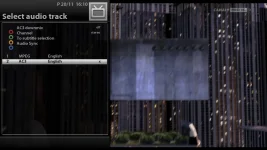
Thank you for the perfect image. :thumbsup: Love the Night HD skin. But there seems to be a little mistake. On audio selection buttons and text are not in right position.
 

Attachments

  • audio.webp
    audio.webp
    51.7 KB · Views: 53
thanks guy's i have fixed this for update soon. :) cheers andy.
 
I thought i'd point out another slight cosmetic bug, but just goes to show the fantastic work and testing that the ViX team have done when there are no major issues and less than a handful of visual issue again great work on 2.3 :thumbsup: and on the ViX_Night_HD skin love it :D

The 'Text' button is out of place on the screens where there is a text button.. on 'Log manager' 'Backup Manager' 'Image Manager' etc
 

Attachments

  • IMG-20111120-00137.webp
    IMG-20111120-00137.webp
    1.1 MB · Views: 19
  • IMG-20111120-00139.webp
    IMG-20111120-00139.webp
    561 KB · Views: 16
Great image my VU+ Uno works like a charm once more.
I have a small issue the menus seem to be stretched out of the borders of the screen. In ViX 2.2 it was fine right out of the box.
Any idea how to fix this?
 

OpenViX Feeds Status

Back
Top