Superb quality and spec AB-Com PULSe 4K SE. Crazy offer! Only £129! FREE UK DELIVERY! 4K UHD, Enigma 2, Multiboot 4 images & more!...
Superb quality and spec AB-Com PULSe 4K Rev II Twin Satellite tuner only £179! FREE UK DELIVERY! 4K UHD, Enigma 2, SATA HDD facility, Multiboot 4 images & more!...

ViX Team Vu+ Duo Image v2.3 - 19/11/2011

cant do a backup of settings. stops at 66%.
cant download any plugins, list is empty.

it always pauses for a few minutes at 66% when making a backup of your settings with the ViX backup manager, just be patient and it will complete.
 
it always pauses for a few minutes at 66% when making a backup of your settings with the ViX backup manager, just be patient and it will complete.

no I get a error message after a couple of minutes.
last version 2.2 was fast.
 
cant do a backup of settings. stops at 66%.
cant download any plugins, list is empty.

are you sure your unit is internet connected??

what settings are you trying to backup? and where too?

might be an idea to start a new thread,

as this one might need more help, and get lost n what is really a general comment thread, about the new image
 
connected to internet, path=media/hdd
I am tying to backup the default.
 
Thanks VIX Team, I love the new image so far, especially the new night skin.
Lovely job

Cheers blokes
micscave
 
Your a star, as it is bugging me lol.
Like is ay not had to do this before, screen has been spot on, this is only thing letting me down in the new image, apart form that it is bob on.
Love the way the SAT i.e GREEN button are put now, sd and hd separated, another simple layout and works really well.
 
Hi
good work guys on another good release
i have not tried it out yet am still on 2.2
just want to ask will the new night skin work on 2.2 ?
 
All good here. Not tried the night skin as yet.

My procedure:

1) FTP from box to PC - /etc/CC* (eg CCCam.cfg), /etc/enigma2/timers.xml and autotimers.xml, /usr/softcams/* (eg CCCam)

2) Flash new firmware

3) Set up tuners and network

4) Transfer channel list to box (I use Catseye's)

5) Transfer files above (not timers) back to box - use Softcam Manager to restart and autostart CCCam

5) Tweak other settings eg swapfile, A/V settings, web interface etc

6) Use the Telnet init 4, copy timers/autotimers.xml. init 3 to reinstate timers

Took about 20 mins.

Thanks.
 
Last edited:
come on pal, you have to be a little more specific than that.

exactly how is wifi not working ?

It works a while and then the connection is lost, just as it was in the earlier versions. LAN works fine.
No other problems. VIX 2.3 is a splendid work of masterpiece.
 
A small thing VLC is not working. It worked straight out of the box with VIX 2.2. Any help, Thanks.
 
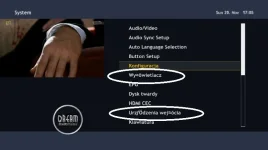
Greetings from Poland! Great image. And now the problem, which wasn't on 2.2.
There is a problem with displaying polish font (example on screen shot) in OSD. In EPG everything is fine! Problem isn't connected with skin, on VIX_Day_HD skin is same problem.

best regard
 

Attachments

  • screenshot.webp
    screenshot.webp
    19.1 KB · Views: 52
Greetings from Poland! Great image. And now the problem, which wasn't on 2.2.
There is a problem with displaying polish font (example on screen shot) in OSD. In EPG everything is fine! Problem isn't connected with skin, on VIX_Day_HD skin is same problem.

best regard
i think that is skin issue, can you try one of ViX HD skins or Magic HD.


can you show me a screenshot of ViX Day/Night HD please.


Edit: it could be the translation files pm me your email address and i will send you the files so you update/check them
 
Looking forward to trying the new image Guys..Thanks

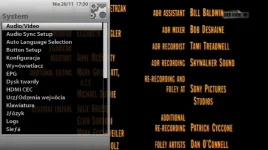
Any chance someone could post some pics of the new skin?

Thanks
 
here You are
 

Attachments

  • screenshot VIX.webp
    screenshot VIX.webp
    35.6 KB · Views: 72

OpenViX Feeds Status

Back
Top