Superb quality and spec AB-Com PULSe 4K SE. Crazy offer! Only £129! FREE UK DELIVERY! 4K UHD, Enigma 2, Multiboot 4 images & more!...
Superb quality and spec AB-Com PULSe 4K Rev II Twin Satellite tuner only £179! FREE UK DELIVERY! 4K UHD, Enigma 2, SATA HDD facility, Multiboot 4 images & more!...

ViX Team Vu+ Duo Image v2.3 - 19/11/2011

SOLVED: The full rescan solved the 'tune failed' error on all the HD channels. :)

BTW, I love the nightVIX skin, it is sexy! :D
and the IMDB plugin works like a charm
(but my xbox, panasonic plasma and neither my mediasmart connect, only 'see' the VIX DLNA media server - but can not watch movies. That's a pitty. :( )
Yep, I'm one of them. ;)

But, could not tune any of the HD channels, immediately after reflash. :(
I am making a full rescan (there 5 satellites, hence it'll take a while).
I will post back if the rescan will solve the issue.
BTW, thank you for the new release!
cheers
 
I really dont understand why anyone is have so much trouble setting up OSD. Its just soo easy to do, just use your up/down, left/right buttons either side of ok to change each axis.

I don't think you understand what people are trying to say to you. In my case if I press Right, the right edge moves inwards towards the left. Makes no sense whatsoever. I cant get it centred on full screen. Why are we messing around trying to line up the osd with our TV screens anyway? It was fine in previous versions wasn't it. Look at the amount of posts here about it. I think it may be a bit of an issue.
 
Folks
I have seen a lot of replies here referring to a night time skin. Where is it? I cannot see it in plugins and all I can see under skin setup is default, magic and vix+day_hd.
 
Change the picture format on ur tv to just scan and change all the osd back to default values they wer at

The default values they were at, make the OSD run off the left side of the screen. That's why I and many others here have had to start messing with it in the first place. When you say change the format on my TV.....change it to what? Why ? Why mess around? Again I dont think you are really listening to people here, a lot of people it seems. Why not just make the OSD fixed to full screen like it always was....?

Just re-read your post there. How do I change the format on my TV to just scan? do all TV's have this setting?
 
Last edited:
They should do. If you go into your tv Menu then look for Picture and you should have a picture format or aspect ratio and youll find the setting in there or something similar.
 
They should do. If you go into your tv Menu then look for Picture and you should have a picture format or aspect ratio and youll find the setting in there or something similar.

Thanks for the reply publisher, but I am left with the question why?

Another couple of question if I may.
1. Where's the "info" button on the VU+ Remote, some OSD's show it often alongside a "menu" button but I cannot find it on the remote.
2. Under HDMI CEC, what is the CEC address ? Is that an IP no? do we change it? how ? Mine is currently at 1.0.0.0. Can I control the TV with the VU remote rather than the other way round?

Many thanks for any help
 
Is it planned to add Blindscan for the VU+ Duo one day?
 
Another miserable experience..

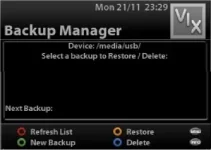
After hours of this and that, I went into inage manage rto create a backup. I started it going. It got to 40/100 and then I pressed "continue in background". After a while I wanted to see what was going on so I pressed show progress. It came up 0/100 with the word waiting. ?????????????????????? It was at 40, now its at 0. Has it gone backwards? And what does waiting mean?

I duly waited for a while before deciding that I better start again as experience one was a trip to ambiguity. So I deleted the image / partial image that had been created as I was unsure if it was complete. Upon retrying the exercise. I kept getting error messages so I decided to restart the box itself.

Now it just hangs on "starting".... so I have to re-start from scratch all over again. And all because a dialog box left me very confused.
 
menu/plugins/press green for download /skins / there you have it. :)

Folks
I have seen a lot of replies here referring to a night time skin. Where is it? I cannot see it in plugins and all I can see under skin setup is default, magic and vix+day_hd.
 
many, many improvements with new vix. on the most basic level i turn off my tv and my vu+ goes to standby automatically. while i may give out i will be the first to upgrade as every vix upgrade is simply leaps and bounds above all other image versions. could never consider anything else/
 
oops, sorry.

it is under VIX folder, just below Skins folder. My bad. :)

menu/plugins/green button/vix/skin-night-hd

enjoy it!

Where exactly? Ive looked there. Is it simply called "night time"?
 
ViX team, just a quick thank you for a lovely image.
It's smooth and I'm loving the new night skin.

Cheers
 
I am now fully up and running on Vix 2.3 I had a few issues but it is as always a great piece of software. All you have to do is install a few of the other images and you will see how good Vix has become in comparison. So a big thank you to all involved.

I notice after a full satellite scan, I am not seeing any channels on the new N1 satellite. Do I need to get a satellites.xml file or something like that?
 

OpenViX Feeds Status

Back
Top