Superb quality and spec AB-Com PULSe 4K SE. Crazy offer! Only £99! FREE UK DELIVERY! 4K UHD, Enigma 2, Multiboot 4 images & more!...
Superb quality and spec AB-Com PULSe 4K Rev II Twin Satellite tuner only £149! FREE UK DELIVERY! 4K UHD, Enigma 2, SATA HDD facility, Multiboot 4 images & more!...

ViX Team Vu+ Uno Image v2.3 - 19/11/2011

there will be a fix for this soon, via an online update, as per post 37, a few postings back
 
Thank you to the ViX Team for getting the visual bugs fixed great stuff :thumbsup: Quick update to :). bugs/requests from posts #28 #35 and #39 are all fixed. However the font bug in post #15 was missed and wasn't fixed unless that's a issue with Filebrowser?

Also i think i've noticed a issue with scheduling backups. I have picked weekly but yet its still backing up what looks like every two days :confused:

I made a manual back up on the 19th for both backup and image and also setup the weekly backup.

I've just had a look and it made a backup on the 21st and the next scheduled back up is on the 23th which shouldn't be right as its set to weekly.. really it should say 26th from when i made the back ups

Also when i change it to 30days the 'Next Backup:' date doesn't change to account for the 30days and stays on 23th.. with 2.2 image it changed date based on daily, weekly and 30days

Has anyone else noticed this?
 
In the menu settings there is an option for OSD, that will enable you to adjust the borders so they fit your screen
 
Hi and thanks for the new image - great stuff.

I used to make use of the volume control buttons on the VU+ remote on VIX 2.2 - these dont seem to work on VIX 2.3 - any ideas?
 
Soz my previous post about the volume buttons on the VU+ remote should be on the DUO thread!
 
Thank you to the ViX Team for getting the visual bugs fixed great stuff :thumbsup: Quick update to :). bugs/requests from posts #28 #35 and #39 are all fixed. However the font bug in post #15 was missed and wasn't fixed unless that's a issue with Filebrowser?

Also i think i've noticed a issue with scheduling backups. I have picked weekly but yet its still backing up what looks like every two days :confused:

I made a manual back up on the 19th for both backup and image and also setup the weekly backup.

I've just had a look and it made a backup on the 21st and the next scheduled back up is on the 23th which shouldn't be right as its set to weekly.. really it should say 26th from when i made the back ups

Also when i change it to 30days the 'Next Backup:' date doesn't change to account for the 30days and stays on 23th.. with 2.2 image it changed date based on daily, weekly and 30days

Has anyone else noticed this?


atm, every time you save the config, it will make a new backup on that day then wait 7 days before doing another, i will look at adding an option of what day to choose but for now set the backup on the day you want it to be made and leave it, do not re save the schedule.
 
Thank you to the ViX Team for getting the visual bugs fixed great stuff :thumbsup: Quick update to :). bugs/requests from posts #28 #35 and #39 are all fixed. However the font bug in post #15 was missed and wasn't fixed unless that's a issue with Filebrowser?


can you give a fullscreen grab on the screen ?
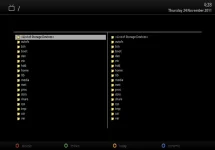
 
atm, every time you save the config, it will make a new backup on that day then wait 7 days before doing another, i will look at adding an option of what day to choose but for now set the backup on the day you want it to be made and leave it, do not re save the schedule.
Oh okay i understand, I think an option to choose a day would be good but as of when i checked earlier your right as now it running with the weekly option.

can you give a fullscreen grab on the screen ?
screenshot.webp

Just thought i'd share for anyone that wants a fullscreen shot, nice easy pain free method

go to your desktop browser and type your receivers ip address then the word grab so it will look like this '192.168.x.x/grab'
 
Oh okay i understand, I think an option to choose a day would be good but as of when i checked earlier your right as now it running with the weekly option.


View attachment 12716

Just thought i'd share for anyone that wants a fullscreen shot, nice easy pain free method

go to your desktop browser and type your receivers ip address then the word grab so it will look like this '192.168.x.x/grab'

easy way to grab is telnet in and just type

Code:
grab -j100
 
Does anyone have an issue with the picture freezing but sound continuing with poor signal levels? Occasionally, a picture breaks up due to signal disruption and will freeze but the sound will continue fine. I need to change channels back and forth to get video back. It didn't do it with 2.2 image.
 
All fine here. You using a local card?
 
Does anyone have an issue with the picture freezing but sound continuing with poor signal levels? Occasionally, a picture breaks up due to signal disruption and will freeze but the sound will continue fine. I need to change channels back and forth to get video back. It didn't do it with 2.2 image.
I have had this a couple of times as well, hasn't happened enough for it to bother me but from your post sounds like it happens to you quite a bit.
 
You could try to install new beta drivers.
20111122
- Fix video problem(at 20111114)

HTML:
http://archive.vuplus.com/download/drivers/beta/vuplus-dvb-modules-vuultimo-2.6.18-7.3-4.4.3-20111122.tar.gz
My box works fine with new drivers.
 
Happens on all, local, remote, FTA... If there's any interruption in video stream, the picture freezes, while sound carries on.

Are you sure it's not a sign that your dish is possibly misaligned or your LNB faulty ?.
I have been using a Uno for close to 8m months and only ever once had such a problem but then it was raining so hard it was bouncing a inch off the ground. As for this being a ViX 2.3 issue, i have never encountered that in all the many months i have been running the image. Im not saying that you are not having problems but i would think it more related to your dish / lnb or even coax than the image.
 
Enjoying this great image whilst coming from the factory image I can find my way with most features but I cannot seem to find where to activate the long up/down arrow function for the simple tv list or any of the mapped buttons for that matter, can anybody point me there ? Because the ' VIX' menu as pointed too does not provide them for as far as I can see or I am misunderstanding what is meant by that. And I have a short question about the channel listing; is there a setting provided that can show if the individual channels are encrypted or FTA ?
 
@captain jack, I've had this issue a few times and a restart of the box seems to solve it...it seems to me that the system starts crashing and the restart sorts it out. I too haven't had this issue before so its not the dish as Phoenix suggested as it was fine on 2.2 and other images.
 
i'm still having problems with this image mainly on the epg side of things, it's still crashing when trying to access the EPG setting see log.

now when i try to do a manual install for the epg it sets the spinner off and from then it's on and off the whole time it's downloading, to a certain point where it's now for instance germany/austria and it's locked up completely, i'm sorry to say this image is not working anywhere near as good as 2.2.100, so long as i can get the VIX "night" skin for the previous version i shall be going back to that.

sorry guy's i know you worked long and hard on producing this image, but i'm afraid it just aint working right for me.

thanks & regards: canthackit
 

Attachments

Last edited:
i'm still having problems with this image mainly on the epg side of things, it's still crashing when trying to access the EPG setting see log.

now when i try to do a manual install for the epg it sets the spinner off and from then it's on and off the whole time it's downloading, to a certain point where it's now for instance germany/austria and it's locked up completely, i'm sorry to say this image is not working anywhere near as good as 2.2.100, so long as i can get the VIX "night" skin for the previous version i shall be going back to that.

sorry guy's i know you worked long and hard on producing this image, but i'm afraid it just aint working right for me.

thanks & regards: canthackit

ViX_Night will not be available for 2.2.100.

I asked this of you before, when posting a crashlog can you past an exact step by step of what you done to make it crash.

I've got three receivers here and none have any epg issues, maybe its just you? How you've set it up?
Start a threat including the info I've asked for and post your EXACT epg setup.

Are you using XMLTV import or Crossepg? Looks to me that you cancelled a epg import mid-way.
 

OpenViX Feeds Status

Back
Top