Superb quality and spec AB-Com PULSe 4K SE. Crazy offer! Only £129! FREE UK DELIVERY! 4K UHD, Enigma 2, Multiboot 4 images & more!...
Superb quality and spec AB-Com PULSe 4K Rev II Twin Satellite tuner only £179! FREE UK DELIVERY! 4K UHD, Enigma 2, SATA HDD facility, Multiboot 4 images & more!...

[ViX_Misc] A Ghost in my Machine ?? ( HDMI-CEC problem )

2stein

ViX Beta Tester
Joined
Nov 6, 2010
Messages
1,108
Reaction score
47
Points
48
Website
github.com
Unfortunately I have a quite severe problem: once in a while the box switches to channel 1 without any obvious reason. I checked timers: none.
What could cause the box to switch to channel 1?????
Thanks.
 
Unfortunately I have a quite severe problem: once in a while the box switches to channel 1 without any obvious reason. I checked timers: none.
What could cause the box to switch to channel 1?
I am having a problem with my Vu+ Duo box with the latest ViX 3.0 Image. I put the box on standby at the end of the night and the next morning the box is on without any interference? Is there a particular setting in the box I need to do?
For both of you: please enable debuglogs, restart GUI and post logs when this has happened again.
 
Unfortunately I have a quite severe problem: once in a while the box switches to channel 1 without any obvious reason. I checked timers: none.
What could cause the box to switch to channel 1?????
Thanks.
After some more observation I found that other strange things happen: the e2 menu appears, the box powers off, etc. :-) Looks like a ghost is playing with the remote control.
Don't know whether this is just coincidence but after I played a bit with the HDMICEC settings (and I really don't know what all the options mean) the box seems to behave again.
Let's keep the fingers crossed :-)
 
I still see enigma crashes once in a while when zapping channels. sent in some logs. andyblack responded that the crashes were caused by TSPanel and suggested I reflash and not install TSPanel.
The strange thing is: I never installed TSPanel. :-)
Ref: 1357120313.5
 
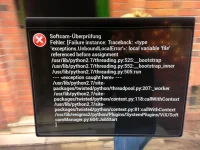
I'd rather preferred an advice on how to fix the problem...

The log is in the photo... no?

Looking at a photo of a problem is never going to help, looking at debug logs will.
I'm not getting at you, we all use screenshots to show problems at times, just pointing you in the correct way to take them as they are a lot easier to view.
 
After some more observation I found that other strange things happen: the e2 menu appears, the box powers off, etc. :-) Looks like a ghost is playing with the remote control.
Don't know whether this is just coincidence but after I played a bit with the HDMICEC settings (and I really don't know what all the options mean) the box seems to behave again.
Let's keep the fingers crossed :-)
Unfortunately, it doesn't.
I suspect that the magic RC keystrokes are created by the HDMICEC plugin. The settings of the plugin don't seem to work correctly either. I tried to disable the TV RC controlling the vu+ but with all the settings I tried the TV RC is passed thru to the vu+. I disabled HDMICEC (first option) but the ghost is still there.
So, now I removed the plugin completely. The ghost is hopefully gone now. Will have to see.
 
Unfortunately, it doesn't.
I suspect that the magic RC keystrokes are created by the HDMICEC plugin. The settings of the plugin don't seem to work correctly either. I tried to disable the TV RC controlling the vu+ but with all the settings I tried the TV RC is passed thru to the vu+. I disabled HDMICEC (first option) but the ghost is still there.
So, now I removed the plugin completely. The ghost is hopefully gone now. Will have to see.
This is really strange... although I removed the HDMICEC plugin the ghost is still there. And: I still see eHDMICEC message in the log:
eHdmiCEC: received message
eHdmiCEC: received message 83
eHdmiCEC: received message
eHdmiCEC: received message 83
eHdmiCEC: received message
eHdmiCEC: received message 83
eHdmiCEC: received message
eHdmiCEC: received message 83
eHdmiCEC: received message
eHdmiCEC: received message 83
eHdmiCEC: received message
eHdmiCEC: received message 83
eHdmiCEC: received message
How can i make HDMICEC shut up???????
Thanks.
 
This is really strange... although I removed the HDMICEC plugin the ghost is still there. And: I still see eHDMICEC message in the log:

How can i make HDMICEC shut up?
The fact that the HDMI-CEC has been disabled or even removed, will not stop the TV from sending messages. So they will show up in the log, but I assume the box is not responding to them?

If that would be the case, you must disable the HDMI-CEC support in the menu of the TV. Looking into my TV that should be possible.
 
The fact that the HDMI-CEC has been disabled or even removed, will not stop the TV from sending messages. So they will show up in the log, but I assume the box is not responding to them?

If that would be the case, you must disable the HDMI-CEC support in the menu of the TV. Looking into my TV that should be possible.
The problem is, that the box still seems to respond and e.g. switch channels. I will try to disable TV HDMI-CEC tonight.
Thanks.
 

OpenViX Feeds Status

Back
Top