Superb quality and spec AB-Com PULSe 4K SE. Crazy offer! Only £129! FREE UK DELIVERY! 4K UHD, Enigma 2, Multiboot 4 images & more!...
Superb quality and spec AB-Com PULSe 4K Rev II Twin Satellite tuner only £179! FREE UK DELIVERY! 4K UHD, Enigma 2, SATA HDD facility, Multiboot 4 images & more!...

[GiGaBlue UHD UE 4K] Adjust screen size?

maybe RTFM or use google. If we have to explain everything here to the letter this answer has not enough caracters to set here. Have 4 samsung tv's here up to date and all have the option.
Maybe the problem is there only on Gigablue but then it would probably be a driver problem for HDMI

On my VU+ duo4K SE in " settings - user interface - on screen display " I still can adjust the settings for the screen (with -height)
I cannot find a full manual for my box unless I pay for it, which I wont. Anyways, didn't you read what I posted this morning, as it sounds like you didn't.
I thought this forum was for people to get help with ViX and satellite boxes, but it it's getting like it isn't now. Incidentally do you tell everyone to RTFM.
 
I can't change the tv Picture size setting because as I said it is greyed out. I take it that is what you mean, and how do I rename HDMI to PC, because I don't have or see that option in the settings of the tv
On my samsung 55 inch (different model): Picture size setting

My settings
Picture size setting = 16:9 standard
Fits to screen = on
All other settings blanked out

also in the menu
Picture size setting = custom
Fits to screen = on or off
zoom/position = active but you may need to go into the menu option to "reset" which sets zoom= 0,0 and position = 0,0.
All other settings blanked out

If the 'picture size' setting is set to 4:3 the 'fit to screen' is blanked out. Some settings on my TV are not available at all (blanked out) but some others are dependant on some of the others settings for them to be active
 
Ok thanks, but on my samsung 50 inch tv, I have Picture Mode = Standard, Picture size setting = 16:9 and is greyed out.
The other 2 settings don't do anything regarding picture size.
 
all manuals from samsung are FREE downloadable in your own language.Can not set a link because is dutch here :)
 
all manuals from samsung are FREE downloadable in your own language.Can not set a link because is dutch here :)
Now you tell me which manual you are talking about, as I thought you meant the Gigablue box manual which I was referring to.
And after I downloaded it for my TV, there is nothing in it on how to adjust picture size when the setting is greyed out.
 
Ok thanks, but on my samsung 50 inch tv, I have Picture Mode = Standard, Picture size setting = 16:9 and is greyed out.
The other 2 settings don't do anything regarding picture size.

As someone else has mentioned Samsung TVs often have individual settings for each input (each HDMI input)

Is the enigma 2 box you are having this problem with actually displaying the picture on your TV when you go to the TV settings to change the picture size.
 
I tried changing the HDMI input from HDMI-cec to HDMI on the tv, but that didn't make any difference as I still could not change the picture size in the tv settings.

It is the enigma 2 box that I am the problem with as the top and bottom menus in both guide and display are half off the screen.

I did think of using or restoring an older backup, but as I flashed the box with the latest image, I have no idea if it would make any difference
 
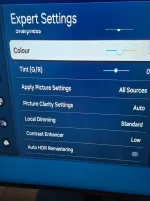
I looked at the manual for your TV.
What does
Settings / All Settings / Picture / Expert Settings / Picture Size - give you as options?
Could you take a photo of this screen setting and attach to a reply, please?

The menus on enigma should fit in a 1920x1080 frame (assuming a HD setting and normal skin) and the only time the edges or corners of menus appear outside a TV display is if it is set to overscan.
 
I looked at the manual for your TV.
What does
Settings / All Settings / Picture / Expert Settings / Picture Size - give you as options?
Could you take a photo of this screen setting and attach to a reply, please?

The menus on enigma should fit in a 1920x1080 frame (assuming a HD setting and normal skin) and the only time the edges or corners of menus appear outside a TV display is if it is set to overscan.
I don't see Picture Size in the Expert Settings, as per the picture
 

Attachments

  • 20261105_150713.webp
    20261105_150713.webp
    137.5 KB · Views: 2

OpenViX Feeds Status

Back
Top