Superb quality and spec AB-Com PULSe 4K SE. Crazy offer! Only £99! FREE UK DELIVERY! 4K UHD, Enigma 2, Multiboot 4 images & more!...
Superb quality and spec AB-Com PULSe 4K Rev II Twin Satellite tuner only £149! FREE UK DELIVERY! 4K UHD, Enigma 2, SATA HDD facility, Multiboot 4 images & more!...

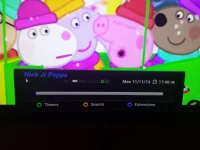
"All Channels" showing in the display but channel full-screen

  • Thread starter Thread starter hyperjase
  • Start date Start date
H

hyperjase

Guest
I've attached a screenshot of what happens ... I have no idea what causes this or how it happens as it only happens to my girlfriend. I'll get home and on the Duo display it'll show "All Channels" (as if it were on the epg) but it will be a channel on the screen. The ONLY way to do anything is press the stop button. Pressin EPG doesn't do anything neither does trying to change the channel. Pressing the OK button shows a basic display, nothing like the usual information when you press the OK button. This is a frustrating issue as I have no idea how to replicate it!
 

Attachments

  • 20131111_174011.webp
    20131111_174011.webp
    398.9 KB · Views: 33
Looks like your in timeshift mode, could she have hit the Rewind button or pause in error? It would make sense why the stop button sorts out your problem.
 
I think that may be some of the problem but how come the display shows "All Channels"?
 
Don't really know the answer to that mate, I have just put mine into timeshift and I don't get the same so could be a bug or the skin you use.
 

OpenViX Feeds Status

Back
Top