Superb quality and spec AB-Com PULSe 4K SE. Crazy offer! Only £99! FREE UK DELIVERY! 4K UHD, Enigma 2, Multiboot 4 images & more!...
Superb quality and spec AB-Com PULSe 4K Rev II Twin Satellite tuner only £149! FREE UK DELIVERY! 4K UHD, Enigma 2, SATA HDD facility, Multiboot 4 images & more!...

Any way to have just FTA Satellite and Saorview channel lists sorted alphabetically?

hoge

New member
Joined
Jun 20, 2026
Messages
6
Reaction score
4
Points
3
Hopefully someone can point me in the right direction.
I want to set up my AB-COM Pulse 4k stb that has 1xsatellite and 1xterrestrial tuner.
I'm looking to have my EPG and channel lists restricted to showing only FTA satellite and Saorview channels.
And ... they must be sorted alphabetically.
I don't mind if it's one combined list or two separate lists.
If I use the Sky UK provider, encrypted channels are shown.
If I use Freesat, the channels are not sorted alphabetically.
Do I need to use providers and bouquets or should I manually tune and edit the channel lists myself?
What are the pros and cons here?
 
Well as a new member you should first acquaint yourself with the rules of the board and know how to post correctly. There are no mind readers on here and distance can be a problem as well. However your query is so strange and hot weather has me immobile. First off you have to say the image you are using and the skin. if its not openvix then you are in the wrong place. Second why in the name of ADAM would you need the channels in alphabet order? Channel numbers are there for a reason, eg 1 for BBC, 2 bbc2 and 3 ITV.

When you set the box up correctly with autobouquets and correct numbering but once that is done you will have access o the red button and that shows all channels in alpha order. You wont need channels to be in alpha order

In other words you have a learning curve.
 
Sorry about that ... I am a genuine newbie and should have provided more info :)

I'm running openvix 6.8.009. Skin is Simple Ten Eighty. I use the AutoBouquetsMaker with the following providers:
FreeSat UK
Saorview
Sky UK (with "FTA only" set to "yes" and "Create main bouquet" set to "yes (only FTA HD)").

You're right, when watching a channel and I press the up or down button, I see the channel list in alphabetical order. So this is good.

So, I have just one main issue now. I still see encrypted channels in the channel list.
Is there any way to stop these encrypted channels showing up at all?
 
You need to set ABM correctly, so in configure make it no no yes no none top yes no nno no no. green
providers you want saorview and sky uk, you dont need freesat so saorview is region, yes yes no, sky uk yes, region toggel until you get london sd custom but it may have a seaparate entry on your image so select it, fat yes crate main yes in backet only fta hd, then yes yes yes green, providers otder make it saorview then uk green, now hide sections so hide what you dont want. green,

Keep bouquets you decide, Now scan and you should have a nice list. now goo bbc1 and ok and arrow up then menu configuration, top line say yes and green,

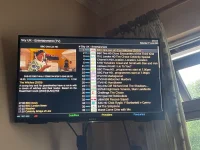
Now you should have same as pic
 

Attachments

  • IMG_1169.webp
    IMG_1169.webp
    178.8 KB · Views: 8
So you used abm to create the lists but they are stored under blue (favourites)... or from live tv press the tv button and you will see the lists abm created.
 
Thank you all for your input here. Things are looking pretty good now. The favourites are bang on !

Just one small detail - maybe there's no way around it and I can live with it if not.

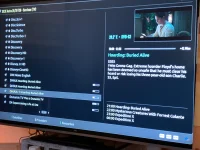
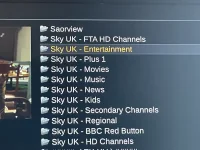
When watching live TV, if I press up or down I get a channel list (see photo).
All of the non-FTA/encrypted channels show up in here with the FTA channels.
Is there any way to remove the non-FTA channels?
 

Attachments

  • Channel-List.webp
    Channel-List.webp
    141.7 KB · Views: 10
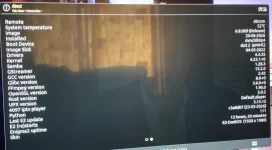
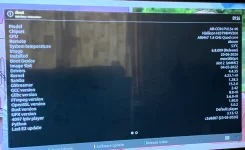
Before we go any further I want you to go menu information about and take a pic.
 
Here's the pics ...
 

Attachments

  • IMG_8220.webp
    IMG_8220.webp
    86.9 KB · Views: 8
  • IMG_8219.webp
    IMG_8219.webp
    89.3 KB · Views: 8
Ok you are on the wrong skin for now so go menu setup user interface skin selection and it should show E2- darrk-os as current, arrow down to simple ten eighty and select it and it will restart, once you have that you can set it like mine. When its loaded go to bbc1 and arrow up and if you have done ABM correctly you should have the pic I posted above but may not have the picons if not I'll tell you that next, Along the bottom you will have coloured buttons and you only need blue press that and you should get this pic. You use bouquets to get to channels. TV brings up favs as well. You should ensure your epg is saved to HDD and use openepgtvdownloader, so go menu setup epg settings epg location and make sure it does not say internal flash but hdd.

Thats how you navigate your way around, you can set the channel the box will boot to and so on.
 

Attachments

  • IMG_1175.webp
    IMG_1175.webp
    191.1 KB · Views: 2
Hey, thanks for taking time out to explain all that. It's a learning curve but it's beginning to make sense.

So, I've got it like you said and with your navigation tips I think that will work very well. Cheers.

If you've got the time, maybe we could look at getting the picons. That would be the icing on the cake !!!
 
for picons go menu plugins green down to picons, select snp-full 220x 132 and it says dark on reflection. file is big so wait. It may ask where tos ave say hdd. Once its downloaded you have to configure so go to bbc1 ok arrow up menu configuration and look for show picons in service list and make it yes.
 
That's perfect !!!
Easy to do coz your instructions are clear.
Thanks a mil. I've learned loads. Cheers
 

OpenViX Feeds Status

Back
Top