Superb quality and spec AB-Com PULSe 4K SE. Crazy offer! Only £99! FREE UK DELIVERY! 4K UHD, Enigma 2, Multiboot 4 images & more!...
Superb quality and spec AB-Com PULSe 4K Rev II Twin Satellite tuner only £149! FREE UK DELIVERY! 4K UHD, Enigma 2, SATA HDD facility, Multiboot 4 images & more!...

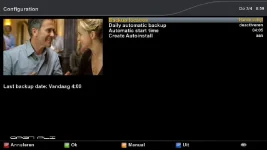
AutoBackup Plugin

  • Thread starter Thread starter t.ph
  • Start date Start date
T

t.ph

Guest
This plugin is a must
Used this before upgrading & it works bigtime
Backs up all settings incl Timers,Skins & Plugins etc (still need to install CCcam)

Upgrade then restore settings & your up & running with the latest image version but everything all setup for you as you were previously.

Thanks to VUplus NL for the heads up on this

Download from the online server.
 
Its been in the VIX images all the time :D

it does not save your Skins & Plugins i had to reinstall all mine again :p
 
Yeah i know it was there but never used it
It saved all mine & restored back to Magic HD skin along with my plugins & timers!
 
Yes, it restores all your plugins, skins!!
But you need to enable autoinstall.
 
Some additional info:
1- The AutoBackup plugin has not been adapted to ViX. That implies that it is possible that some ViX-specific items won't be restored (I have already seen reports on that on this board).
2- The plugin can be adapted to your specific wishes. To do so there are two places to make modifications:
2A: The configuration of the backup can be changed. In the file etc/backup.cfg you can add extra items to be backed up (extra = w.r.t. the items that will always be backed up, such as etc/enigma2). See the attached example.
2B: If AutoInstall has been enabled, all the plugins you added to your system will also be installed again after a refleash. But: they need to be in the feeds for that. If you also have locally installed plugins, you can add them to the file etc/autoinstall. It is also possible to use that file for removing plugins that are installed in the image by default. See attached example.

In short:
for most users it will be sufficient to install the plugin, activate the "daily backup" and activate "Create Autoinstall". Once done that, all settings and plugins will be restored after a flash. Don't worry if the flash takes more time then usual: of course downloading and installing plugins takes some time, especially if there are many.
More demanding users can make personal settings as described above.
 

Attachments

Booting takes some time because plugins needs to be downloaded and installed.

Otherwise great plugin! Saves time.
 
just take a copy of the cccam.cfg file which is in /etc and thats about all you need to do. only takes 2 seconds to install the cam, you just need the backup file cccam.cfg and your all done
 
Can someone tell me where is Autoinstall located? Thanks
 
Last edited by a moderator:
Cheers for the heads up about /etc/{backup.cfg,autoinstall}.

Very useful stuff.
 

OpenViX Feeds Status

Back
Top