Superb quality and spec AB-Com PULSe 4K SE. Crazy offer! Only £99! FREE UK DELIVERY! 4K UHD, Enigma 2, Multiboot 4 images & more!...
Superb quality and spec AB-Com PULSe 4K Rev II Twin Satellite tuner only £149! FREE UK DELIVERY! 4K UHD, Enigma 2, SATA HDD facility, Multiboot 4 images & more!...

[VU+ Duo2] Autotimer not working

  • Thread starter Thread starter dallast
  • Start date Start date
Apparently you used the quick-AT-entry.
You can change the defaults for that to match your preference. Or you can use the normal AT-entry: that way you go through all the settings.

Apologies for the delay in responding. I am so busy atm, hard to get a moment to logon. I'll review

I wonder is this the issue. Why would the quick-AT entry default to Friday's only when I have never meddled with AT settings in anyway ? I would have assumed that the quick-AT entry would invoke all default settings out of the box ?

Anyway, I will go through the AT's in the normal AT editor and review settings there as a partial fix. But I do wonder is this a bug ?

 
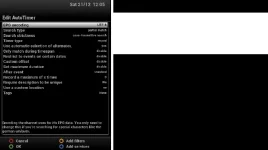
Just further to my previous post. I have now reviewed my Frasier timer in the normal AT editor. I have also reviewed my AT New Timer Default settings. In neither can I seer any option that specifies that a new AT should record on Fridays on any particular day.
So why is my Frasier timer only recording on Fridays ?

Screenshots attached.

frasier timer 1.webpnew timer defaults.webp
 
If you go to Menu --> Timers --> AutoTimer --> Menu --> 'Edit new timer defaults' you can setup the way a 'quick timer entry' will be setup.
 
If you long press green it will list all your auto timers. Scroll to Frazier and on the right you will see what days are set for that Autotimer.

Also, some shows do not list programme synopsis for each episode - there can be a general description of the show which is used every time the show is aired. If "require description to be unique" is set to "any service/recording" or "any service" A.T. will not schedule them (as it believes the show has already been recorded)

Sometimes it is better to use the Add Auto Timer button and check through all options before saving, especially as the first screen allows you to choose which days you want.


Tapatalker
 
Sometimes it is better to use the Add Auto Timer button and check through all options before saving, especially as the first screen allows you to choose which days you want.
That's why I always use that 'long way around'. I like to be in full control!
 

OpenViX Feeds Status

Back
Top