Superb quality and spec AB-Com PULSe 4K SE. Crazy offer! Only £99! FREE UK DELIVERY! 4K UHD, Enigma 2, Multiboot 4 images & more!...
Superb quality and spec AB-Com PULSe 4K Rev II Twin Satellite tuner only £149! FREE UK DELIVERY! 4K UHD, Enigma 2, SATA HDD facility, Multiboot 4 images & more!...

[Zgemma H7] Backup is too heavy?!?

I guess the Backupsuite Plugin was designed some 15-20 years ago, but it was maintained at least to a degree, up to about 5 years ago. The Backupsuite Plugin exists by using some python files and a line of scripts. It works quite well for backing up the current slot.

The Backupsuite.sh script has the most "juice" in it. Consider:
Bash:
# Detect receiver model
detect_receiver() {
    if [ -f /proc/stb/info/hwmodel ]; then
        RECEIVER=$(cat /proc/stb/info/hwmodel)
    elif [ -f /proc/stb/info/model ]; then
        RECEIVER=$(cat /proc/stb/info/model)
    fi
}

Anyway, the "roadmap" or starting point for implementing multiple receivers into a more modern plugin or image design seems to be in backupsuite.sh.
 

Attachments

Then an rsync (yes I forgot -x) ....
Although if you bind-mount the source you don't need this, and you can also then run it as a read-only file-system with no access time updates (for safety and efficiency).
 
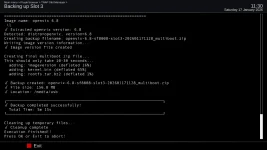
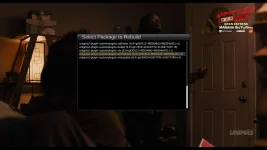
A test plugin is attached that should handle backup chores nicely. The question I guess is how many makes-models of receivers is it really compatible with? The plugin also has the capability to rebuild plugins that were previously installed in the image, which can be useful.

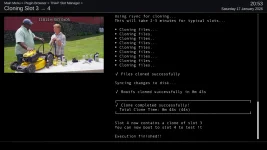
Cloning a slot takes around 40 seconds for the receivers I tested. A full image backup takes any from 3 to 9 minutes in my tests, depending on what you are backing up. And you can install ipk files into dormant slots, but this presents dependency problems at present.
Anyway....
vix-backup_20260117113006.webp

vix-clone-slot_20260117205346.webp

vix-ipk-rebuild_20260118002228.webp
 

Attachments

So what is the benefit compared to the built in backup functions?
 
This test version "Allegedly" handles up to 50 slots on Octagon SF8008. I do not have such an elaborate slot system to check and verify.

A roughly 40 second slot clone and the ability to rebuild plugins that were installed in an image are features I have never seen before in enigma2, until now.
 

Attachments

… and why would you do that?
I think that USB multi-boot is a (slightly) different case to the "builtin" one?

The only reason to do an Image Backup is in case an upgrade goes wrong - then you can flash the image backup and get back to where you were when things were working.

With USB multi-boot if I were able to clone the current image to a different ("previous-working") slot then:
  • it would be very quick using rsync, as only changed files would be copied
  • if I need to revert t hen I could just remove the USB dongle, pop it into my laptop and copy the relevant STARTUP_* file to STARTUP, reinsert a reboot.
Although for multiboot on eMMC I can see this is not so useful.
 
If a feature is useless, not needed, and broken, then shouldn’t it at minimum be eliminated from the receiver menus? Enigma2 solutions that lead to a proper embedded fix already exist!….Just something to think about.

In the process of building an image backup plugin, I checked almost every available enigma2 image groups that I could find. All of them had a working full image backup system of some type except for two images. The other one of course is OpenBlackHole. So for a feature that is useless, complete image backup is prominent and maintained in almost all other enigma2 images.

I have continued working on the plugin that was started here, and have tested it up to slot 29 on an extended slot system. Personally I have no use most of the time for 4 slots, let alone 20. But it is a pride thing to get it working to the best of its abilities –for all users.

Thanks for the multi-boot ideas as I never would have dreamed of cloning a slot! Other good ideas were presented as well. All were implemented. Plugin improvements will continue and are uploaded to the Internet.

Best Wishes for 2026!
 
In the days that all receivers had but one image and usb flash was the main recovery, then an image recovery system was important with the emphasis on providing a usb recovery image.
However, “technology“ has moved on and most boxes in the last 6 years have been multiboot capable and now in theory any receiver can be converted to multiboot. Also receivers like zgemma, gigablue, octagon etc have their own in built recovery firmware that removes the need to usb flash, allowing users to download a new image or flash from usb.

Having said that there are users that still prefer to have a copy/backup of their existing image and in that respect your software is an excellent alternative.
 
The OpenVix image backup has a recovery backup that was never completed or fully implemented. At least it appears that way when reviewing the code.

A solution to fix the backup properly in OpenVix is attached and has been tested to work on Octagon SF8008 (Develop), and in Edision osmio4k (release). The solution is pretty simple: Remove the eMMC backup attempt, then add a few lines to allow the multiboot backup to complete. This solution solves the nested file problem of both multiboot backup and eMMC attempt.

While the attached solution could be considered as a roadmap of sorts, it does work on my receivers. But there is more code that could be removed I think. The idea for me is not to butcher, but to get it working properly --which it does.
 

Attachments

The OpenVix image backup has a recovery backup that was never completed or fully implemented. At least it appears that way when reviewing the code.

A solution to fix the backup properly in OpenVix is attached and has been tested to work on Octagon SF8008 (Develop), and in Edision osmio4k (release). The solution is pretty simple: Remove the eMMC backup attempt, then add a few lines to allow the multiboot backup to complete. This solution solves the nested file problem of both multiboot backup and eMMC attempt.

While the attached solution could be considered as a roadmap of sorts, it does work on my receivers. But there is more code that could be removed I think. The idea for me is not to butcher, but to get it working properly --which it does.
The point of the emmc backup is to provide a usb flashable image, which you avoid.
Normally, anybody can flash an image,, restore settings and be back to a working image.
With multiboot, there is no need to overwrite the existing image, so you always have a backup of the previous image.
 
Last edited:
With multiboot, there is no need to overwrite the existing image, so you always have a backup of the previous image.
Surely you need to be able to clone the current set-up before an upgrade to have something to fall back to?
 
Surely you need to be able to clone the current set-up before an upgrade to have something to fall back to?
I think @twol's use case is slightly different to mine (say). He tends to do a "flash and restore", rather than an upgrade in place. This way he can flash to a different slot and restore settings while keeping the current version. Flash and restore is messy for me on my AX61 and GB receivers as they are WiFi dongle only and one of them needs drivers not in the standard image.
 
I think @twol's use case is slightly different to mine (say). He tends to do a "flash and restore", rather than an upgrade in place. This way he can flash to a different slot and restore settings while keeping the current version. Flash and restore is messy for me on my AX61 and GB receivers as they are WiFi dongle only and one of them needs drivers not in the standard image.
if WiFi dongle has ipk? -------- > then setup in users IPK folder in BackupManager so it gets installed automatically
 
Explaining how we are supposed to properly operate our receivers does not fix the problem.

The full image backup in OpenVix is broken. This is what it outputs when you make a full image backup for the Octagon SF8008 (Main Menu--->Setup--->Vix--->Image manager--->New backup)
Welcome to OpenViX for sf8008
openvix 6.8 sf8008

sf8008 login: root
Password:
root@sf8008:~# cd /media/hdd/imagebackups
root@sf8008:/media/hdd/imagebackups# ls -lh -R openvix-6.8.002.release-sf8008-20260124_131457-recovery-emmc
openvix-6.8.002.release-sf8008-20260124_131457-recovery-emmc:
-rw-rw-r-- 1 root root 13.0M Jan 24 13:21 apploader.bin
-rw-rw-r-- 1 root root 64.0K Jan 24 13:21 bootargs.bin
-rw-rw-r-- 1 root root 865.5K Jan 24 13:21 fastboot.bin
drwxrwxr-x 3 root root 4.0K Jan 24 13:14 octagon

openvix-6.8.002.release-sf8008-20260124_131457-recovery-emmc/octagon:
drwxrwxr-x 2 root root 4.0K Jan 24 13:21 sf8008

openvix-6.8.002.release-sf8008-20260124_131457-recovery-emmc/octagon/sf8008:
-rw-rw-r-- 1 root root 34 Jan 24 13:21 SDAbackup
-rw-rw-r-- 1 root root 53 Jan 24 13:21 imageversion
-rw-rw-r-- 1 root root 16.0M Jan 24 13:14 kernel.bin
-rw-rw-r-- 1 root root 67 Jan 24 13:21 noforce
-rw-rw-r-- 1 root root 152.5M Jan 24 13:19 rootfs.tar.bz2
-rw-rw-r-- 1 root root 550.0M Jan 24 13:21 usb_update.bin
root@sf8008:/media/hdd/imagebackups#
I count 9 files.

Here is what is needed besides noforce:

root@sf8008:/media/hdd/imagebackups# ls -lh -R openvix-6.8.002.release-sf8008-20260124_134415-multiboot
openvix-6.8.002.release-sf8008-20260124_134415-multiboot:
-rw-r--r-- 1 root root 53 Jan 24 14:03 imageversion
-rw-r--r-- 1 root root 16.0M Jan 24 14:03 kernel.bin
-rw-r--r-- 1 root root 67 Jan 24 14:03 noforce
-rw-r--r-- 1 root root 152.4M Jan 24 14:03 rootfs.tar.bz2
root@sf8008:/media/hdd/imagebackups#

If a feature is available in an image, especially in a prominent part of the image, then it should work as designed. If the feature is not needed then remove it or disable it. Allowing a Vix feature to output rubbish does not put a good reflection on the image itself.
 
so do ever you ask yourself why it generates these files? The ImageManager backup facility was originally written to produce a usb flashable image.
The original sf8008 was (in my view) an abortion, with a single image and then the offering of multiple image partitions on the sd card, which required hacks to work.
To make a usb flashable image (which is why ImageManager backup was originally created) it uses a special program (usr/sbin/mkupdate) and requires all the other crap..... thats Octagon.

Eventually, OpenPli convinced the Octagon guys to get their act together and create a multiboot, multiple partition box - which they did and also following zgemma added a recovery facility where you can flash a slot via the firmware..

So now their is NO need to create a backup providing you keep a settings backup (which is about 140 KB - what could be smaller) - if you or anybody want to use your software that's great.
 
Last edited:
2026 Is going to be as tough year for enigma2 image groups. Almost 1/12th of 2026 is gone.
Best of Luck to OpenVix!

VIX-Donations 2026-01-24 11-45-14.webp
 

OpenViX Feeds Status

Back
Top