Superb quality and spec AB-Com PULSe 4K SE. Crazy offer! Only £129! FREE UK DELIVERY! 4K UHD, Enigma 2, Multiboot 4 images & more!...
Superb quality and spec AB-Com PULSe 4K Rev II Twin Satellite tuner only £179! FREE UK DELIVERY! 4K UHD, Enigma 2, SATA HDD facility, Multiboot 4 images & more!...

BLACK 28.2e by mmc Discussion ONLY

Ok i have these 2 according to flipflop thats it but you want another one stan ?

He was looking for 1_0_1_13A5_966_2_11A0000_0_0_0 which is SBO AD (Audio description)
 
Hopefully sorted now :thumbsup:
 

Attachments

  • 1_0_1_13A5_966_2_11A0000_0_0_0.webp
    1_0_1_13A5_966_2_11A0000_0_0_0.webp
    2.6 KB · Views: 164
Cheers mate.
I've changed the service references to match Saorview on these.
View attachment 17599 View attachment 17600 View attachment 17601 View attachment 17602 View attachment 17603

There is also:
RTE1 +1: 1_0_16_454_3E9_2174_EEEE0000_0_0_0
RTE News Now: 1_0_16_451_3E9_2174_EEEE0000_0_0_0
RTE Junior: 1_0_16_453_3E9_2174_EEEE0000_0_0_0


I would also love to get these new fancy picons for Irish DTT + Soarsat if that was possible.

Here are the other 3 that need the black treatment:
1_0_16_451_3E9_2174_EEEE0000_0_0_0.webp1_0_16_453_3E9_2174_EEEE0000_0_0_0.webp1_0_16_454_3E9_2174_EEEE0000_0_0_0.webp
 
Just for the soarsat chappies and anyone else :thumbsup:
 

Attachments

  • 1_0_16_451_3E9_2174_EEEE0000_0_0_0.webp
    1_0_16_451_3E9_2174_EEEE0000_0_0_0.webp
    1.7 KB · Views: 148
  • 1_0_16_453_3E9_2174_EEEE0000_0_0_0.webp
    1_0_16_453_3E9_2174_EEEE0000_0_0_0.webp
    1.9 KB · Views: 146
  • 1_0_16_454_3E9_2174_EEEE0000_0_0_0.webp
    1_0_16_454_3E9_2174_EEEE0000_0_0_0.webp
    1.2 KB · Views: 146
Star plus hd

Heres a logo for Star Plus HD showing up now service ref could change, also Alibi HD starts next month but cant find logo yet , full radio set coming aswell :thumbsup:
 

Attachments

  • 1_0_19_D804_A36_2_11A0000_0_0_0.webp
    1_0_19_D804_A36_2_11A0000_0_0_0.webp
    1.3 KB · Views: 141
Alibi HD starts soon aswell , Ive done 4 versions of it here, service ref atm is 1_0_19_EF1_808_2_11A0000_0_0_0 just rename which version you choose to that ref

Iam going to add Ver 4 to full pack as it matchs ones already there
 

Attachments

  • Ver 1.webp
    Ver 1.webp
    1.5 KB · Views: 121
  • Ver 2.webp
    Ver 2.webp
    1.5 KB · Views: 122
  • Ver 3.webp
    Ver 3.webp
    1.2 KB · Views: 121
  • Ver 4.webp
    Ver 4.webp
    1.2 KB · Views: 121
Last edited:
Cheers, they look good! The only problem I have is setting the picon background to black. I'm sure I've seen it as a setting before but perhaps I'm losing my mind?
 
Yeah I'm using Night HD. I've had a look at skin.xml but can't see anything blindingly obvious
 
Cheers, they look good! The only problem I have is setting the picon background to black. I'm sure I've seen it as a setting before but perhaps I'm losing my mind?
Menu --> Settings --> System --> OSD --> Settings --> Show backgroundcolour picons
 
Thanks Rob

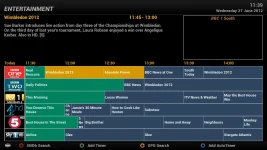
Should that setting change it in the Graphical EPG? I've currently got it set to Blue as Black wasn't working, but it still shows white behind the Picons:

screenshot.webp
 
Thanks Rob

Should that setting change it in the Graphical EPG? I've currently got it set to Blue as Black wasn't working, but it still shows white behind the Picons:

View attachment 17692
i would be well happy with the picons like that. i really do have white bars at top and bottom.... how do i do a screenshot?

cheers, Dave
 
It may be box-dependant. The VU-boxes don't allow for alpha blending + scaling at the same time (not sure about the ET's).
So you might try another set of picons?
 
Ok - Shame, I really like the black ones but I'm really fussy about things like that. Guess I'll have to wait for Sandman to renew his set. I like Flipflops but unfortunately they don't have +1 indication.

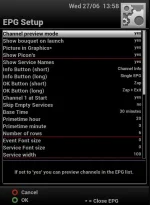
Dave - you can do screenshots through the Web UI. Default is port 80 if you're using Vix 2.4, so just type the IP of your box from the Web Browser and log in. Here are my settings (the ones you want underlined) if you want it to look the same:

screenshot.webp
 
Ok - Shame, I really like the black ones but I'm really fussy about things like that. Guess I'll have to wait for Sandman to renew his set. I like Flipflops but unfortunately they don't have +1 indication.

Dave - you can do screenshots through the Web UI. Default is port 80 if you're using Vix 2.4, so just type the IP of your box from the Web Browser and log in. Here are my settings (the ones you want underlined) if you want it to look the same:

View attachment 17694

you can also use a telnet session to take screen shots.

How to Take a screenshot from your satellite receiver
Click Here
 

OpenViX Feeds Status

Back
Top