Superb quality and spec AB-Com PULSe 4K SE. Crazy offer! Only £99! FREE UK DELIVERY! 4K UHD, Enigma 2, Multiboot 4 images & more!...
Superb quality and spec AB-Com PULSe 4K Rev II Twin Satellite tuner only £149! FREE UK DELIVERY! 4K UHD, Enigma 2, SATA HDD facility, Multiboot 4 images & more!...

Blue-HD V2

  • Thread starter Thread starter rossi2000
  • Start date Start date
heads up folks

this skin will be in the feeds i assume from HELIOS Build 1.

please do not install any IPKS from this thread as you wont be able to get any updates so its best to install from the vix feeds.

the current blue-hd feeds will be taken offline, shortly
 
Yeah I have it set to 256mb. It's on my solo. Has anyone run this on their solo without issue? I've an Ultimo so will give it a go on that over the weekend.
 
Which ipk version did you install?

My brother has a Vu Solo and all is good on that. But he is on ViX 3.0 Build 808 as Zeus wasn't too clever when we last tried. Swapfile also set to 256mb.
 
Hi,

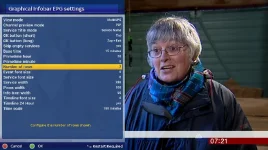
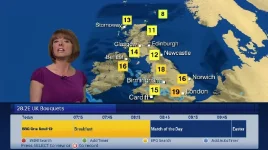
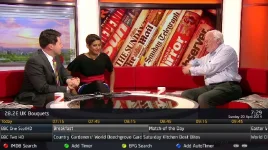
Just installed Helios build 001 on a number of different boxes. Did a plugins restore and got BlueHD skin v2.0.15 back. If I bring up the graphical info bar epg (pressing right or left direction button) I only get a single row showing epg for one channel, even though number of rows is set to 2 in the settings. Changed to vix night skin and it shows two rows (channels).

I couldn't see the skin in the plugins feed yet. Any ideas?
 
Last edited:
The skin is in the feeds I downloaded it a few minutes ago.

Found it. Looks like it had already been downloaded. Still have the problem that I can only see one row in the graphical EPG (not CrossEPG).
 
What do you mean by 'not CrossEPG'? CrossEPG can't be seen anywhere :confused:

Sorry, I meant it's not the EPG you get when you press the EPG button. It's the two line EPG you normally get when you press the left or right arrow buttons. I now only get one line of EPG. Too many different EPG views! I'll post up a screen grab shortly.
 
Ah, you mean the Graphical-InfoBar-EPG.

That's what I called it in my first post. I just wasn't too sure if that was the right name.

When in that EPG, press menu and adjust the number of lines you want to see.
As mentioned earlier, it doesn't seem to make any difference what I set this value to. It works ok with your Magic-HD-Night skin. It's just this skin I have the problem with...

Infobar EPG2.webpInfobar EPG1.webpInfobar EPG3.webp
 
Last edited:
Then it's likely a skin setting that rossi would have to take a look at, as i cant think of what could have changed to affect it this way.
 
Interestingly, i normally set the infobar view mode to 'Single EPG' for my infobar, and the number of rows setting then works. This setting is changed in 'infobar EPG settings', not graphical infobar EPG settings'
When I switch to 'Multi EPG' it indeed only displays 1 row.

Sent from my Nexus 10 using Tapatalk
 
All EPG's have their own context menu. We have:
1- G-EPG (graphical overview of multiple channels)
2- M-EPG (multi-EPG in text)
3-S-EPG (EPG of just one channel)
4- Infobar EPG (shows a number of events on the location of the infobar)

Each of them can be adjusted to your wishes via the context menu (i.e. press Menu when in that EPG).
 
Ok. Think I've 'fixed' this:

Line 641 of skin_Blue-HD.xml - removed hard coded NumberOfRows="1"

Code:
<widget name="list" position="100,85" size="1075,85" NumberOfRows="1" EntryBackgroundColor="skydarkblue" EntryBackgroundColorSelected="skygold" EntryBackgroundColorNowSelected="skygold" EntryBackgroundColorNow="skydarkblue" ServiceForegroundColorNow="skydarkblue"  ServiceBackgroundColor="skydarkblue"  ServiceBackgroundColorNow="skygold" backgroundColor="skydarkblue" EntryForegroundColorSelected="skydarkblue" EntryForegroundColorNowSelected="skydarkblue" RecordForegroundColorSelected="black" ZapForegroundColorSelected="black" scrollbarMode="showNever" zPosition="1" transparent="1" EntryFontWrap="no"/>

Extract the .xml file from the attached, and copy to /usr/share/enigma2/Blue-HD. Ensure you make a backup of the original file first - just in case!

View attachment skin_Blue-HD.zip
 
Last edited:
The skin is in the feeds I downloaded it a few minutes ago.

Not in the feeds for me, anyone know why??

Would i be ok just installing ipk from here?

Used this skin a lot a while back its boss :)
 
ooops

the number of rows = 1 was added before i was starting to modify the infobar epg so it looks like the normal infobar on 1 row.

ive removed that part for now.
 

OpenViX Feeds Status

Back
Top