Superb quality and spec AB-Com PULSe 4K SE. Crazy offer! Only £99! FREE UK DELIVERY! 4K UHD, Enigma 2, Multiboot 4 images & more!...
Superb quality and spec AB-Com PULSe 4K Rev II Twin Satellite tuner only £149! FREE UK DELIVERY! 4K UHD, Enigma 2, SATA HDD facility, Multiboot 4 images & more!...

Blue-HD V2

  • Thread starter Thread starter rossi2000
  • Start date Start date
BUILD 2.0.10 ONLINE

update available through vix software update.


changelog:-
some slim screens skinned
many menu screens skinned
new setup screens
new menu screen
split menu date and time
new record icon
new moviebar screen
new timeshift screen
new status icons (play/ff etc)
updated unhandled-key icon

loads of internal screens skinned.
some external plugins skinned for Blue-HD (WIP)

enjoy!

with version 2.0.9 FULL screen EPG wouldnt show description of the programme highlighted and the times along the top were blurry. EPG with the programme showing in top right corner was fine.

I have updated my box and absolutely love the pause/play button, the new pause bar, everything is amazing. I will report back after I update living room box regarding the EPG issue.
 
Last edited by a moderator:
yo, thx for the input :)

if you havent done so please change your full epg screen to text mode only.
graphics mode has a bug in atm.

do you still have the prob in 2.0.10?

also could you post a screenshot of the things you mentioned in your first paragraph?
 
Really impressed with this skin Rossi2000. No plans to go anywhere else. Thanks for the effort :)
 
yo, thx for the input :)

if you havent done so please change your full epg screen to text mode only.
graphics mode has a bug in atm.

do you still have the prob in 2.0.10?

also could you post a screenshot of the things you mentioned in your first paragraph?

Already had EPG on text mode.

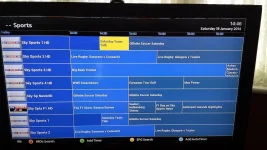
I took a screenshot of the problem on version 2.0.9 the other night.
As you can see the times are blurred, in blue, fuzzy. There is no programme description in the top left corner of the programme highlighted, the EPG takes up the whole screen. On other skins the FULL screen EPG leaves a little room to show programme description.

All settings done as you stated / requested.

2014-01-18 14.46.46.webp


I will check once I update the living room box if the problems still exist
 
Last edited by a moderator:
ahhh how do you get that screen ?

theres too many screens going on haha
 
found the screen and fixed it, will be in the next update :)

there is no room for programme description on that type of EPG screen.
 
BUILD 2.0.11 online

changelog:-
tweaked window'd offset
new window'd pngs
new Single & Multi EPG Screens and fixed Graphical EPG screen

enjoy
 
Coming along really nicely, Rossi - thanks for the work you are putting in on this mate - much appreciated :thumbsup:
 
BUILD 2.0.11 online

changelog:-
tweaked window'd offset
new window'd pngs
new Single & Multi EPG Screens and fixed Graphical EPG screen

enjoy
havent tried latest yet.
Is the time in white instead of yellow now?

Looks amazing so far cant believe how good it looks.

Since i installed this skin my Recording logo on the LED screen on the solo2 boxdoesnt come up during recordings. dont know if its related.
 
ignore my comment about the recording logo, after a couple of hours i have discovered it is a timeshift bug, took me ages and a lot of thinking.

Fantastic skin that is coming along great, you havw given us more than we could ask for and continue to do so.
Only thing i would request is again more space to see my recordings when i enter the recordings list. most of it is taken by by the theme, perhaps squeeze a few more lines out.
and on full screen epg some other skins show description so it would be great if this skin does too.

Keep it up, I hope you create other plugins and such I would definately try them, this skin is top drawer and gets better and better
 
yo, cheers for the input.

the text was kept yellow on the graphical epg, just to fix the problem, this screen still needs to be skinned, but i dont know in what style yet.

if you want the programme description in EPG can you change the PIG version? that looks way better than the standard graphical epg and has what you want.
but i will look at what you suggest aswell when i come to skin it.

ive added your suggestion about the planner to my list and will look it soon.

cheers!
 
Just installed this one and I'm sticking with it mate KEEP UP THE GOOD WORK ;)
 
WOWZERS !! I've been rocking the standard vix skin for 2 years !! This has made me change, super job, :)
 
BUILD 2.0.12 online update avaialble.

too many changes/tweaks to list
menu screens etc.
 
yo, cheers for the input.

the text was kept yellow on the graphical epg, just to fix the problem, this screen still needs to be skinned, but i dont know in what style yet.

if you want the programme description in EPG can you change the PIG version? that looks way better than the standard graphical epg and has what you want.
but i will look at what you suggest aswell when i come to skin it.

ive added your suggestion about the planner to my list and will look it soon.

cheers!
My family do not like the picture in graphics EPG, whereas I love it.

I have switched back to graphical EPG from text as you fixed that in the last not latest update. I have gone back to 8 lines of EPG instead of the 7 I personally felt worked better for text EPG. Looks great.

I look forward to trying the update. This skin is by far my fave skin and the one I am sticking to. Not just because it is reminiscent of Sly TV but it looks so slick, clean and glossy/professional. I don't know how you are doing it as others have apparently struggled.

I am loving it.

Wonder what latest update brings :)
 
Last edited by a moderator:
My family do not like the picture in graphics EPG, whereas I love it.

I have switched back to graphical EPG from text as you fixed that in the last not latest update. I have gone back to 8 lines of EPG instead of the 7 I personally felt worked better for text EPG. Looks great.

I look forward to trying the update. This skin is by far my fave skin and the one I am sticking to. Not just because it is reminiscent of Sly TV but it looks so slick, clean and glossy/professional. I don't know how you are doing it as others have apparently struggled.

I am loving it.

Wonder what latest update brings :)


i know what you mean, the graphics are second to none and dont look tacky/crap.

you must thank simonsez he is the whizz behind the graphics, he does the graphics and i do the coding.

also as i dont have to keep re-doing my infobars etc cos we got it right first time, you wont see much change on them really, most of the stuff now is skinning the the hundreds of different screens in line with blue-hd, quite a tedious task but it needs to be done so were not just doing half a job.


obviously we welcome any and all input to see what we could do better.
 
Hi rossi, could you tell me how I would go about getting rid of the picon on the info bar (one click ok on the remote when watching tv) as I don't like this feature, that is just my preference. A great job you have done. :thumbsup:

Regards,
 
you can remove some lines of code from the infobar, i will let you know when i get home.

i might introduce a solution whereby you can change things from the menus. without having to maintain 2 skins.

a blue-hd config tool or something.
 
Last edited by a moderator:

OpenViX Feeds Status

Back
Top