Superb quality and spec AB-Com PULSe 4K SE. Crazy offer! Only £99! FREE UK DELIVERY! 4K UHD, Enigma 2, Multiboot 4 images & more!...
Superb quality and spec AB-Com PULSe 4K Rev II Twin Satellite tuner only £149! FREE UK DELIVERY! 4K UHD, Enigma 2, SATA HDD facility, Multiboot 4 images & more!...

[SF8008] Button "long info"

Ale a

New member
Joined
Jan 4, 2026
Messages
14
Reaction score
0
Points
1
What type of support thread are you creating?
Possible bug
What OpenViX Image build number are you using?
6.8.002
Have you tried re-flashing WITHOUT settings restore?
YES
Have you tried re-flashing WITH a settings restore?
YES
Hi everyone,
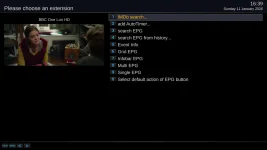
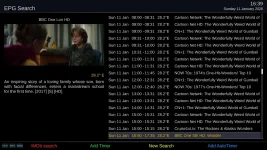
"long info" button function, you have to press "info" again to open the selected plugin's function. Example: long info > search epg > info and search epg opens.
Normally, long info > search epg is enough... and that's it.
...is this how Openvix works or do I need to adjust some settings??
Thanks
 
What receiver are you using? I noticed that when I started using my VUUno4kSE I had to long press EPG, then press EPG again. in order to get info details. My GB Quad Plus, on the other hand, which I have used for 10 years, had a dedicated INFO button.
 
Hi everyone,
"long info" button function, you have to press "info" again to open the selected plugin's function. Example: long info > search epg > info and search epg opens.
Normally, long info > search epg is enough... and that's it.
...is this how Openvix works or do I need to adjust some settings??
Thanks
"long_info" from the InfoBar opens a ChoiceBox. Select "EPG Search" and it opens "EPG Search" That is the correct behaviour. What were you expecting? Why do you press the INFO key again?
 

Attachments

  • 1.webp
    1.webp
    32.8 KB · Views: 7
  • 2.webp
    2.webp
    113.3 KB · Views: 5
Hi,
Exactly, I'm surprised that I have to press "info" again (after "info long") to open the selected extension... Let me explain: with the other images: info long>epg search>ok and epg search opens.... with Openvix: info long>epg search>ok and the choicebox closes and nothing happens.... I have to press info again (after ok) and then epg search opens. And this happens for all the extensions in the ChoiceBox.
I tried with 6.7 and 6.8 on three different STBs and the info long button behaves the same way.
Anyway, I want to say that I find Openvix (almost) perfect ;))) PS I used the epg search example for convenience!!! I'm not talking specifically about epg search / infobar but exclusively about the info button on the remote control, pressed long.
 
Does your remote control have separate INFO and EPG buttons ?
 
Okay, what have you defined for INFO long button of the button setup?

P.S. Can this be related to 'rcpositions.xml' ?
 
Last edited:
I didn't configure the "info long" function myself; it's native to the image (which, frankly, I've always used with other images for "search epg from history...").
P.S. I've never used the "epg long" button... I tried it now, and I must say it works as it should!
epg long>"your selection">ok> x
(while "info long" requires you to press "info" again).
...perfect!!! I'll use "epg long" in the future...
Thanks for the inspiration
 
Here pressing "long_info" opens the ChoiceBox and then pressing the correct number key selects the item. No closing the ChoiceBox or additional button presses needed.

If you are seeing some different behaviour we would need to see a debug log to investigate further.
 
???
No, the choicebox closes automatically after a selection... whether you select numerically or with OK.
And then I notice (again for info_long) that after selecting the choice with OK (and info again), the selection chosen by the choicebox is as if the info button remains in memory (even after a complete reboot!!)
...sorry, does the choice box from info_long or epg_long work the same way for you?? Not for me!!!
It's as if after a selection from the choicebox > OK + info again, it becomes the future function of the info button...
 
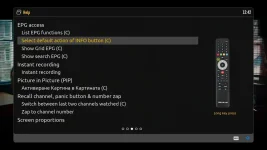
If you read the help, the button functions are explained.

e.g. HELP > INFO_LONG.

Output is "Select default action of INFO button". That is exactly what is happening, so, there is no bug.

If you want to go directly to one of the items in that list use EPG_LONG instead.
 

Attachments

  • 1.webp
    1.webp
    42.4 KB · Views: 2
Yes,
...I see the differences between the info and EPG buttons...everything works...and very well!!!! Excellent!!!! Great job!!!
Thanks ;)))
 

OpenViX Feeds Status

Back
Top