Superb quality and spec AB-Com PULSe 4K SE. Crazy offer! Only £99! FREE UK DELIVERY! 4K UHD, Enigma 2, Multiboot 4 images & more!...
Superb quality and spec AB-Com PULSe 4K Rev II Twin Satellite tuner only £149! FREE UK DELIVERY! 4K UHD, Enigma 2, SATA HDD facility, Multiboot 4 images & more!...

[VU+ Duo] CacheFlush options disappeared

  • Thread starter Thread starter hyperjase
  • Start date Start date
H

hyperjase

Guest
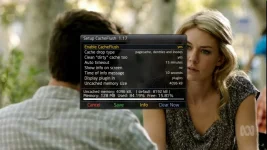
I originally installed CacheFlush and changed the access location to be in the extensions, but now I've changed it - the options have disappeared totally. Even if I remove and then re-add the plugin no options appear - completely gone!

Any idea as to how to get this back or the FTP file location of the CacheFlush conf file?
 
why exactly are you using cache flush in the first place ?
 
I have a Vu Duo and was advised to as it's tight on memory. Also using a swap file as I was finding it virtually locking up during use.
 
Cache flush should only really be used where the receiver shows signs of the infamous memory leak associated with the older 3.1.1 linux kernel, try the receiver for a day or two without cache flush to see if it is really needed.
 
What about media file playback locking up, or random spinners which lock the remote out? Spinner usually comes on for around 2 minutes then goes off. Also finding if it does lock up and have to physically switch off-on, it will likely result in an extremely slow spinner which I then have to do at least one further switch off-on (and that's assuming that the "Vu Duo" doesn't stay on in the display, rendering the remote absolutely useless).
 
Well that's what I was referring to as signs of the memory leak, so the use cache flush in this circumstance is fine, but using it when there is no need will cause the opposite effect on the receiver. That said the two duo's I had never once needed either cache flush or a swap file,.

You also have to remember that the Duo is a five year old receiver and it's only going to get worse and worse as images and plugins need more power to run, eventually at some point image teams are going to have to concede and cease support for such old and low spec hardware.


Sent from my iPad Air using Tapatalk
 
Uninstalling a plugin does not remove its settings. Reinstalling it will result in plugin using last settings. The settings file needs to be edited, (lines mentioning that plugin deleted).
 
I originally installed CacheFlush and changed the access location to be in the extensions, but now I've changed it - the options have disappeared totally. Even if I remove and then re-add the plugin no options appear - completely gone!

Any idea as to how to get this back or the FTP file location of the CacheFlush conf file?

I had exactly the same problem... I solved it by going into the settings file and changing something (my Duo receiver is not handy for me to be more specific:().

So you will find the file here: \etc\enigma2\settings
You need to use telnet cmd: init 4 (in order to stop GUI)
Then edit the particular cacheflush setting (the setting names were sufficiently suggestive for me to succeed first try!)... if the setting is egual to 3 then change it to 1 or 2 to get the plugin to be visible once again:)
Save the settings file and then use telnet cmd: init 3 (in order to restart GUI)

I am using cacheflush because I rely on usb dvb-t tuners... there is definately a problem with the Duo and the vtuner it uses to handle usb tuners. I've found it to be a godsend... the Duo would be virtually useless to me without it.

Let us know if you have any trouble finding the setting and fixing it.

cheers
 
I am using cacheflush because I rely on usb dvb-t tuners... there is definately a problem with the Duo and the vtuner it uses to handle usb tuners. I've found it to be a godsend... the Duo would be virtually useless to me without it.
Has to be a VU kernel issue rather than a dvb-t issue?
 
Has to be a VU kernel issue rather than a dvb-t issue?

I guess this may be, but it manifests itself quite badly with the use of the vtuner. I have no usb tuner problems with my Duo2. The Duo problem has remained with 3.1.1 and also the latest 3.9.6. AndyB suggested it was vtuner several years ago iirc... there have been many changes by VU since then but this problem is still there. My understanding is that the vtuner thing is part of VU's kernel.
 
I was having problems when cacheflush was installed on my duo, hanging and spinning logo, I uninstalled it and the duo runs a lot better although I dont add any plugins just the ones that come with the stock image.
 
Post deleted due error
 

Attachments

  • ABC-812015-2128.webp
    ABC-812015-2128.webp
    47.6 KB · Views: 28
Last edited:
I myself have never had this issue. Hopefully it doesn't happen:D However I do use the cacheflush plugin becuase when I bought the duo, since the first day I've had the spinning vix appear after a couple of days. And when performing actions quickly, e.g scrolling through channel lists, the box would just freeze and crash. The log would show low memory and I was told to use the cacheflush plugin. Also I do not have anything extra, just a cam, no extra plugins. I have also had to set a reboot everyday due to the box getting very slow after a couple of days.
 

OpenViX Feeds Status

Back
Top