Superb quality and spec AB-Com PULSe 4K SE. Crazy offer! Only £99! FREE UK DELIVERY! 4K UHD, Enigma 2, Multiboot 4 images & more!...
Superb quality and spec AB-Com PULSe 4K Rev II Twin Satellite tuner only £149! FREE UK DELIVERY! 4K UHD, Enigma 2, SATA HDD facility, Multiboot 4 images & more!...

[VU+ Duo4K SE] Cant connect to Plugin server

smp8

Member
Joined
Jul 9, 2014
Messages
49
Reaction score
0
Points
6
Age
58
Hi

I installed the latest version of Openvix and decided to go back to version 6.4.004. When trying to restore my plugins, I get the message that it can't connect to the server, but its fine when installing 6.5.003. Is there any way I can reinstall the plugins on this older version of Vix?

Thanks
 
No, and why would you want to run an unsupported version?

From the release notes:
Please upgrade as soon as possible. We do not maintain previous versions.
Basic feeds for the previous version will be maintained for a short period only to allow users to upgrade to the new image. Items such as Kodi, Stalker, Nodejs, QT, etc. and feeds for all other previous versions have already been removed. Sorry for any inconvenience but resources are limited and we cannot maintain parallel versions. We have worked hard to make the upgrade process as easy as possible for our users. These days upgrading from the previous version is painless. Just follow the instructions at the top of this page and you will be up and running with the new version in a few short minutes.

And 6.5 feeds will also be remove shortly.
 
Thanks for the reply. For me personally, the image updates since 6.4.004 have been awful, so I was happy to stay as I was.
 
Thanks for the reply. For me personally, the image updates since 6.4.004 have been awful, so I was happy to stay as I was.
Like what? What do you have problems with? If you don't tell us when you have problems how do you expect anything to get fixed?
 
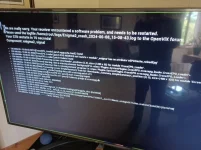
The main problem is the box crashing every time I try to update crossEPG. But I also have problems with the front panel display and the on screen display. Plus I've lost softcam management from the blue button.IMG_20240608_150853_257.webp
 
Last edited:
For CrossEPG, you have to delete the CrossEPG database on your storage device.

6.6 is out very shortly, feeds are transferring .However, no softcam manager in extension list still.
 
Last edited:
The main problem is the box crashing every time I try to update crossEPG. But I also have problems with the front panel display and the on screen display. Plus I've lost softcam management from the blue button.View attachment 66442

If you don,t post your issues, we cannot resolve them.
For Crossepg do as Abu has suggested… teh rest I am sure are resolvable.
softcam management….menu/setup/softcam management
 
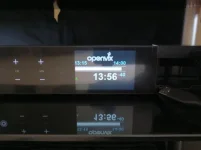
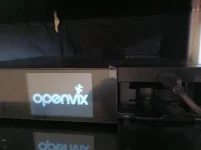
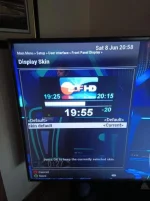
Any way to sort out the onscreen and front panel display and get them back to where they were with 6.4.004? I've tried playing with the User Interface.

IMG_20240608_135621_555.webp

IMG_20240607_125118_552.webp

IMG_20240607_123343_593.webp


IMG_20240607_150840_521.webp
 
Last edited by a moderator:
Front panel display is 'Skin default'
IMG_20240608_205806_811.webp
 
If it helps to clarify things, I have a Duo 4k (non-SE), it has the same LCD screen as the DUO 4K SE. With Vix Night HD, the LCD screen is working.

It looks like you have the Default+Picon option selected. Please try the "Default"
 
Hi All i am trying to up date my vu+duo 4k se with open vix 6.6 from 6.5 .it flashes fine but it will not store my plug ins for my vpn .My other box updated fine and stored the vpn plugin fine .Zgemma h7.But i can not get my Vu+ duo to store my vpn settings .Tried using image manager has you state but no good also tried usb image transfer .Both ways give the choice to restore settings and plugins. i have selected them .It only happens using the 6.6 image .I i reinstall 6.5 it stores the vpn settings thanks guys.
 
i can not get my Vu+ duo to store my vpn settings .Tried using image manager has you state but no good also tried usb image transfer .Both ways give the choice to restore settings and plugins. i have selected them .It only happens using the 6.6 image
Can you explain exactly what you mean? How is USB going to restore VPN settings? Where are they stored? Did you add that location to your backup?
 
When the Vu+ reboots after update ,you get the choice to save settings also save plugins i select yes to both .But with 6.6 image it will not save the vpn settings .It will do when using 6.5 image .Yet when i have done this on my Zgemma h7 se .it saves everything Thanks.
 
Have you selected that vpn location to your backup like Huevos asked ?
 
To restore any setting it must be in the backup. So the question is did you save it in your backup?
 
When the Vu+ reboots after update ,you get the choice to save settings also save plugins i select yes to both .But with 6.6 image it will not save the vpn settings .It will do when using 6.5 image .Yet when i have done this on my Zgemma h7 se .it saves everything Thanks.

so nothing has changed in Backup/Restore in ages.
So is this a failure to restore VPN settings or a VPN plugin ??: and if you restore the settings backup from 6.5 what happens - does it make a difference??

If the VPN settings are in the settings file then they will be handled by backup/restore. If it cannot find the plugin then that might be the issue..... check what is missing.
 

OpenViX Feeds Status

Back
Top