Superb quality and spec AB-Com PULSe 4K SE. Crazy offer! Only £99! FREE UK DELIVERY! 4K UHD, Enigma 2, Multiboot 4 images & more!...
Superb quality and spec AB-Com PULSe 4K Rev II Twin Satellite tuner only £149! FREE UK DELIVERY! 4K UHD, Enigma 2, SATA HDD facility, Multiboot 4 images & more!...

[CrossEPG-Config] Confused why my EOG shows loads of <n/a>

modellermark

New member
Joined
Oct 28, 2015
Messages
5
Reaction score
0
Points
0
I don't do a huge amount with my satellite as it is a holiday system (for the caravan) but I have an issue where the EPG shows loads of <n/a> on the channels list.

It is an Xtrend ET8500 and fully updated.

Not sure what I have done but if it is easiest to rip the EPG off an put it back on a basic quick guide would be appreciated.

I just need the Freesat / Freeview channels really (it has dvs and dvt receivers in it) so which ever works out is great.

Sorry if I haven't researched enough or it sounds like a real newby question.

I have a Gigablue Quad too for the home and that is absolutely fine so not sure what I have done with the Xtrend.

Thanks for any advice, Markopenvix_na.webp
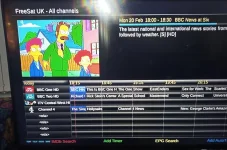
 
This is not an EPG issue, it is bouquet issue. Any channels listed in bouquets but no longer existing in the database of channels (lamedb) will show up as N/A.

Run AutoBouquetsMaker again and it should resolve your issue. Change bouquets or restart afterwards to ensure you are not looking at a cached copy. If this does not fix the issue, post back with details of the image (Menu > Information > About)

Then also post a screenshot of what you have set in AutoBouquetsMaker providers page.
 
Last edited:
Brilliant - thanks - that makes sense.
I will get it plugged back in first thing in the morning and give it a go and report back.
Thanks again, Mark
 
This is not an EPG issue, it is bouquet issue. Any channels listed in bouquets but no longer existing in the database of channels (lamedb) will show up as N/A.

Run AutoBouquetsMaker again and it should resolve your issue. Change bouquets or restart afterwards to ensure you are not looking at a cached copy. If this does not fix the issue, post back with details of the image (Menu > Information > About)

Then also post a screenshot of what you have set in AutoBouquetsMaker providers page.

Right - All solved thanks!

Reraan things but didn't seem to sort it ... eventually i did the delete ABM ... then updated providers .. then scanned and it was all happy as originally it wasn't finding the freeview list but after all this it did.

So all nice and tidy now - thanks again for the help
 

OpenViX Feeds Status

Back
Top