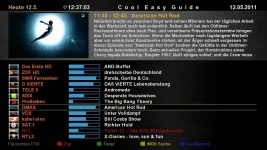
Cool TV Guide V5 by Coolman
Cool TV Guide V5 by Coolman
Multilanguage
for OE 1.6
green = all the stations now run
light blue = channel is selected
blue = all channels
red = recording
"Pad"
2 page vertical
8 page down
4 left side
6 right side
and switch on and zapping channels without EPG! (Adjustable)
Pad with quilting, as usual
Reset to 5
Full Reset to 0
1 Zoom in
3 zoom out
7 switching between 4 Guides (adjustable)
Switch 9 to 20 clock
<Day - (Guide-dependent)
> Day + (Guide-dependent)
red = Zap (adjustable)
langrot = Zap + exit (adjustable)
green = timer (adjustable + edited)
= green for sending automatically to the Car add timer (adjustable)
yellow = cool switch (adjustable)
long yellow bouquet = list (set)
blue = cool search function (adjustable)
long blue = Do Search Function (adjustable)
OK = Cool Info Guide (adjustable)
langOK = (adjustable)
Rec = QuickRec
kurzEPG / Guide Info = Select (zap through all the guides)
HELP = Display all commands
Setup menu =
TV = Timer List
= Power Off Timer
3D view / default view (selectable)
/ Usr/lib/enigma2/python/Plugins/Extensions/CoolTVGuide/Cool3D /
There are two folders in it
Standard (default view)
MyDesign (for your self-made designer)
SkinDesign the folder comes directly into the skin
e.g. / Usr/share/enigma2/BlackAlu-Coolman-Mod/SkinDesign /
thus can smile now everyone has his own look and buttons make it easy for yourself
TV Guide Cool, Cool Tiny Guide, Multi Cool Guide Nice Guide Cool, Cool Info Guide, Cool Single Guide, Easy Guide Cool, Cool Uni guide, cool search and setup
were stored in an extra folder CoolSkin ...
Thus you can now change the Skinns without restarting
I also made notes for Skinner, so you can install it simply smile
the setup:
You can now assign your own keyboard ...
since there never was an agreement smile
The height adjustable for your picons!
Thus you can determine your height and frame cells themselves
and you can even left the distances and the number you want to see your picons set!
crossroad as Picon and off!
start on channel 1 (adjustable)
Primetime e.g. 20:15 (adjustable)
Font size, columns, even the timeline are all set!
Home screen can be selected! Choose a simple switch to Cool or 7 what do you want to have ..
Display of the bouquet in the Skin
who will be happy bouquet has just about the setup ...
set is also the bouquet display at Start On / Off
But I think it is practical to place a button on his bouquets ...
because the plugin remembers the position anyway, and the bouquet ...
Standard Picon folder:
/ Usr/share/enigma2/picon /
CoolPico standard (mini-picon) folder:
/ Usr/share/enigma2/picon/coolpico /
You can also select any other location for your Picon / Coolpico
although the coolpico picon folder in the folder always must be
In the setup you will link to your new PICON FOLDER
NOT the CoolPico .. but only the PICON FOLDER!
(The coolpico is found automatically)
So in the setup must be e.g.
/ Usr/share/enigma2/picon /
or
/ Mnt / usb / picon /
u.s.w.
super cool is the cool search function ...
Missed shipment .. or already started?
no problem .. Simply press the blue button and you see directly where a repeat run!
or you go into the Cool Info Guide
there you have the new CoolSimilar
that shows you for each shipment whether it is sent somewhere again
Who has his box connected to the Internet will look forward to IMDb
But you must also help you still feed on the IMDb invite ...
Cool Free Tuner
when shooting are not selectable transmitter gray smile
Cool Timer Alarm!
This feature is brand new and has no other big grin EPG
It checks your timer recordings ...
recordings are moved through the channel, but are still in time without having to be cut,
then the recording remains red
But the recording is cut, then the display is yellow!
So even if you see a yellow recording, then it is high time to check this!
so much fun!
Instructions:
copy the ipk to the TMP and how to install all plugins ...
Attention at the request of many users:
Cool TV Guide is not in the plugin folder!
So not to be found in Extensions ...
it is called, where you the info / EPG button pressed long ...
but would recommend to anyone
the Multiquickbutton VU + modded by plnick plugin to install ...
Thus, you can then e.g. Cool TV Guide go directly to the red buttom!
Simply install and you have full access over your keyboard layout
VTI also the panel, plug-ins for everything you have already pre-configured by plnick ...
for me a "must have" on every VU + big grin
Multi QuickButton for VU + solo / duo version 2.7.8
Picon / CoolPico:
since there are always problems
attached even my default Picon (Littleleo's Black 3D Button picons)
complete with CoolPico
Simply copy the box on your path to choose and it runs Picon smile
Caution:
requires only the enigma2-plugin-extensions-cooltvguide_Coolman_V5_all.ipk
Only those who want to have a cool design ...
which must be the enigma2-plugin-extensions-cooltvguideskin_Coolman_V5_all.ipk
down load
Beware of problems or crash:
if you do not see any info in the EPG, or even a crash gets ...
it is due to a non-customized skin!
You either used a different skin,
or changes in the FTP
e.g. / Usr/share/enigma2/EuerSkin/skin.xml
You will find it more
<Screen name = "CoolTVGuide ".........
<Screen name = "CoolTinyGuide "........
So for each view typically an entry from
TV Guide Cool, Cool Tiny Guide, Multi Cool Guide Nice Guide Cool, Cool Info Guide, Cool Single Guide, Easy Guide Cool, Cool Uni guide, cool, search
changes from the simple to
<Screen name = "xxxCoolTVGuide ".........
<Screen name = "xxxCoolTinyGuide "........
then it should work