Superb quality and spec AB-Com PULSe 4K SE. Crazy offer! Only £99! FREE UK DELIVERY! 4K UHD, Enigma 2, Multiboot 4 images & more!...
Superb quality and spec AB-Com PULSe 4K Rev II Twin Satellite tuner only £149! FREE UK DELIVERY! 4K UHD, Enigma 2, SATA HDD facility, Multiboot 4 images & more!...

[VU+ Duo2] Crash in transcoding setup screen

finbarr

Forum Supporter
Donated Member
Joined
Jan 23, 2014
Messages
211
Reaction score
1
Points
0
Upgraded to Zeus build 17 last night and see a crash on the Duo2.

Steps:
- Open the transcoding plugin
- Press Yellow to set defaults, OR try to set 'Auto set Framerate / Bitrate' from 'On' to 'Off'

Doing either of those causes the box to crash.

From looking at the stack trace, it looks like an incorrect call to the function 'addNotifier' :

Code:
http://code.vuplus.com/gitweb/?p=vuplus_dvbapp;a=blob;f=lib/python/Components/config.py;h=c8862cdf6cbdd469073e20d81155232f87e4a302;hb=3f469db0acd3e4dd7a43ca4cc00e26bb5c13f385#l115

The cause, could be because I changed some transcoding settings using OpenWebIf earlier in the day. (e.g. I had already set 'Auto set Framerate / Bitrate' for encoder '0'.)
 

Attachments

yju2ezyb.jpg
 
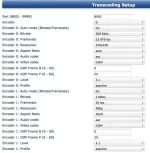
Sure. If you open OpenWebIf and set your transcoding settings to the following:

Screen Shot 2014-04-01 at 14.17.33.webp

Then:

Code:
- Menu
- Addons
- Transcoding Setup
- Change  'Auto set Framerate / Bitrate' from 'On' to 'Off'

Crash occurs then.

I will upgrade to 18 when I get home and let you know if it still happens.
 
Can you try changing 'Auto set Framerate / Bitrate' from 'On' to 'Off' in OpenWebIf first.

Then in the plugin UI, toggle from off to on and off again.

I just upgraded to build 18 and the crash still happens.


Code:
action ->  SetupActions right
self.onChangedEntry [<bound method SetupSummary.selectionChanged of <class 'Screens.Setup.SetupSummary'>>]
KEY: 106 RIGHT                                                 
[OpenWebif] page '/api/remotecontrol?command=106&_=1396359169462' ok (json)
KEY: 106 RIGHT                                                             
action ->  SetupActions right                                       
unknown action SetupActions/right! typo in keymap?
action ->  SetupActions right                      
Traceback (most recent call last):      
  File "/usr/lib/enigma2/python/Components/ActionMap.py", line 68, in action
  File "/usr/lib/enigma2/python/Components/ActionMap.py", line 48, in action
  File "/usr/lib/enigma2/python/Components/ConfigList.py", line 227, in keyRight
  File "/usr/lib/enigma2/python/Components/ConfigList.py", line 41, in handleKey
  File "/usr/lib/enigma2/python/Components/config.py", line 355, in handleKey
  File "/usr/lib/enigma2/python/Components/config.py", line 326, in setValue
  File "/usr/lib/enigma2/python/Components/config.py", line 115, in changed
TypeError: setAutomode() takes exactly 3 arguments (2 given)
(PyObject_CallObject(<bound method NumberActionMap.action of <Components.ActionMap.NumberActionMap instance at 0x274cb20>>,('SetupActions', 'right')) failed)    
]]>                                                   
                </enigma2crashlog>
        </crashlogs>                                      
</openvix>
 
Ok, I've figured out how to reproduce it (and work around it).

In my /etc/enigma2/settings file I see that have these transcoding options:

Code:
config.plugins.transcodingsetup.encoder.1.automode=On
config.plugins.transcodingsetup.encoder.0.gopframep=20
config.plugins.transcodingsetup.encoder.0.bitrate=200000
config.plugins.transcodingsetup.encoder.0.automode=On
config.plugins.transcodingsetup.encoder.0.framerate=23976
config.plugins.transcodingsetup.encoder.0.aspectratio=0
config.plugins.transcodingsetup.encoder.0.resolution=320x240

So if you init 4, add those to your settings file, then init 3, you will see the crash when turning on and off auto-transcoding in the UI.
 
How did you change this value to
Code:
automode=On
[STRIKE]
It should be true/false.[/STRIKE]
 
Last edited:
I didn't set that value myself directly. They only way it could have been set is from OpenWebIf or Vix itself. I would think OpenWenIf as I was tweaking those settings remotely while using transcoding.
 
I've figured out how to get it to that value.

1. Open transcoding settings in OpenWebIf
2. Set 'Encoder 1: Auto mode (Bitrate/Framerate)' to Off
3. Set 'Encoder 1: Auto mode (Bitrate/Framerate)' to On
4. Go to 'Power Control' and reboot Enigma GUI

Now, take a look at the settings file...

Code:
root@vuduo2:/etc/enigma2# cat settings | grep -i automode
config.plugins.transcodingsetup.encoder.1.automode=On
 
This crash still occurs in Helios build 006.
 
Sure. Thanks Rob.

1. Open transcoding settings in OpenWebIf
2. Set 'Encoder 1: Auto mode (Bitrate/Framerate)' to Off
3. Set 'Encoder 1: Auto mode (Bitrate/Framerate)' to On
4. Now, to see the crash basically turn on and off auto-transcoding in the OSD UI using the Transcoding Addon.
 
I'm also getting this problem in 006 Helios.

Sent from outer space using intergalactic carrier pigeon
 
no crash here

Code:
[OpenWebif] page '/api/saveconfig?key=config.plugins.transcodingsetup.encoder%5B1%5D.automode&value=On&_=1398348990231' ok (json)
[OpenWebif] page '/api/saveconfig?key=config.plugins.transcodingsetup.encoder%5B1%5D.automode&value=Off&_=1398348994786' ok (json)

maybe try a virgin reflash no restore.
 

OpenViX Feeds Status

Back
Top