Superb quality and spec AB-Com PULSe 4K SE. Crazy offer! Only £129! FREE UK DELIVERY! 4K UHD, Enigma 2, Multiboot 4 images & more!...
Superb quality and spec AB-Com PULSe 4K Rev II Twin Satellite tuner only £179! FREE UK DELIVERY! 4K UHD, Enigma 2, SATA HDD facility, Multiboot 4 images & more!...

[VU+ Duo] Crashing when recording

  • Thread starter Thread starter markh29
  • Start date Start date
M

markh29

Guest
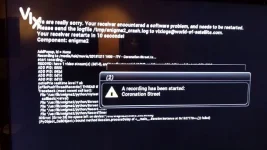
Hi, I bought a vu duo 2 weeks ago and was sent pre flashed with vix by wos

Setup with 1tb hard drive and was working fine, suddenly it crashes everytime it tries to record a programmed programme
There is a crash log which I have no idea of how to get on here, the box is installed at a friends so I cant access it at moment

Any help.appreciated
 

Attachments

  • 20131211_201214.webp
    20131211_201214.webp
    36 KB · Views: 23
To upload a crashlog, hit the go advanced button below the post area.
Looks like your flash is full.
Whether that's because it's recording to flash or something else is corrupt, is impossible to tell from here...
Do you have telnet access to the box?
Is the hard drive mounted? Blue button -> ViX -> Mount Manager.
 
Hi

I thought id seen that on the picture of his screen he sent, I don't have telnet access unfortunately, I will ask him to look if the hdd is mounted, I cant remember if I done that, I know I used the box to format and initialise the HDD and that was successful

If the HDD is not mounted, will mounting it resolve the issue?

Regards
 
Not if the flash is full. You'll need to resolve that issue first.
 
Ahh ok, how can I check if it is or not, and if so, what do I do to erase/rectify?

Many thanks
 
Right, i think im going to just start again, is build 802 stable? or is there a safer option, i cant afford to keep having to go and collect this box to sort it out if i can help it

Is the process for the hdd just, initialise and mount or is there anything else i need to check to make sure the flash isnt getting used for storage by anything?

cheers
 
Yeah, perfectly safe to start again & use build 802, you could even create a settings back-up & restore it after flashing 802.
As you already initialised the HDD you shoudn't need to do it again, but again will do no harm (you will lose any recordings though).
When you set-up the EPG, just make sure it saves to the HDD & not internal flash.
 
Thanks alot, how do I check epg location? I dont recall setting it up in the first place, maybe thats the problem

M
 
EPG location: Menu -> Setup -> System -> EPG -> Settings -> EPG Location
Back-up Settings: Blue button -> ViX -> Backup Manager -> green button
 
Thanks Judge, I think ive got that now so im going to go over to his place and try it later, have I missed anything out from what im planning on doing

Reflash image
Set Tuners
Add Auto Bouquets
Format/Initialise HDD
Cam
Check Rec Paths
EPG Set up (including rec path)

Is Setanta Ireland on Auto Bouquets? I couldn't find it last time so installed a channel list

Mant thanks
 

OpenViX Feeds Status

Back
Top