N

Superb quality and spec AB-Com PULSe 4K SE. Crazy offer! Only £129! FREE UK DELIVERY! 4K UHD, Enigma 2, Multiboot 4 images & more!...
Superb quality and spec AB-Com PULSe 4K Rev II Twin Satellite tuner only £179! FREE UK DELIVERY! 4K UHD, Enigma 2, SATA HDD facility, Multiboot 4 images & more!...
You are using an out of date browser. It may not display this or other websites correctly.
You should upgrade or use an alternative browser.
You should upgrade or use an alternative browser.


abu baniaz
Moderator
You need to setup a password on receiver.
Use the passwd command in telnet.
Use the passwd command in telnet.

N
nikefreak4eva
Guest
All Sorted Just Updated to new Image Openvix 019 is it ? now I can connect to FTP Wop Wop !!! - I did get worried it got stuck on Booting 99 - Power off /on at the Back all fine so far - lets see what other problems I come across hope its all smooth now
N
nikefreak4eva
Guest
Please See
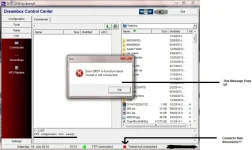
This is the Issue im Having on PC And on Vue du on if I go into Mount Viewer :
Shows Icon on HHD with a Red X then Ip then a Green Tick then NFS??
Click ok on it
Mount Using FSTAB (Mount at Boot) --- is that what it should be ?
Active Enable
Local Share Name
Mount Type NFS Share
Server IP 192.1******
Server Share Media/HDD/
Use as HDD Replacment NO
Mount Options rw,nolock,tcp
Can anyone Help
This is the Issue im Having on PC And on Vue du on if I go into Mount Viewer :
Shows Icon on HHD with a Red X then Ip then a Green Tick then NFS??
Click ok on it
Mount Using FSTAB (Mount at Boot) --- is that what it should be ?
Active Enable
Local Share Name
Mount Type NFS Share
Server IP 192.1******
Server Share Media/HDD/
Use as HDD Replacment NO
Mount Options rw,nolock,tcp
Can anyone Help
Try FilezillaI use router, which is defined in my configuration. But quite often DCC shows this screen. The only possibility is to try connect again.

Fizella is ok. But not the same with old Dreambox users than DCC.Try Filezilla
N
nikefreak4eva
Guest
Hi there My Vu Duo is Connected to my Router with Ethernet hard wired - and over Wirless to my laptop - it shows as connected but I cant access any files on my vu duo
200 PORT command successful. Consider using PASV this is what it says in DCC
200 PORT command successful. Consider using PASV this is what it says in DCC
abu baniaz
Moderator
Do you get the same issue with Filezilla?
N
nikefreak4eva
Guest
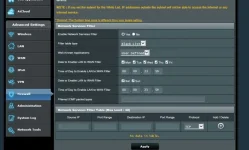 Never Used Filezilla? don't know what it is?
Here is a Pic of my Router Firwall - do I need to do anything in here if so please Advice thanks guys for your efforts
abu baniaz
Moderator
DCC normally works fine once you have set a password on receiver.
Filezilla is an ftp client. I would try that first.
Good luck.
Filezilla is an ftp client. I would try that first.
Good luck.
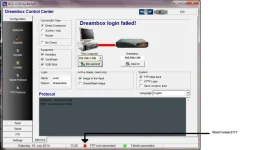
Have you checked your receiver IP?Go to network settings to see what's your receiver IP. Open DCC and in upper left corner(connection type) click "router". Now you can see:computer IP-receiver IP-router IP.Enter receiver IP(if it's not correct)and click reconnect.If you want a static IP address,disable DHCP in network settings.View attachment 36051Never Used Filezilla? don't know what it is?
Here is a Pic of my Router Firwall - do I need to do anything in here if so please Advice thanks guys for your efforts

