Superb quality and spec AB-Com PULSe 4K SE. Crazy offer! Only £129! FREE UK DELIVERY! 4K UHD, Enigma 2, Multiboot 4 images & more!...
Superb quality and spec AB-Com PULSe 4K Rev II Twin Satellite tuner only £179! FREE UK DELIVERY! 4K UHD, Enigma 2, SATA HDD facility, Multiboot 4 images & more!...

[VU+ Ultimo4K] Deep standby

claus

New member
Joined
Apr 6, 2012
Messages
22
Reaction score
0
Points
1
Still new on the ultiomo 4K Sorry..

But how do i set the box in deep standby by default when switch off ?
Can the box wake up and do recordings in deep standby ?

Still have som problem about the EPG config ( Cross efg and EPG importer)

I am on 1W Canal Digital nordic.

Best regards Claus
 
Still new on the ultiomo 4K Sorry..

But how do i set the box in deep standby by default when switch off ?

If you hold down the on/off button on the remote (a long press of the button rather than a momentary press) you should get a shutdown menu where one of the options is deep standby.

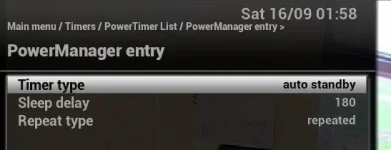
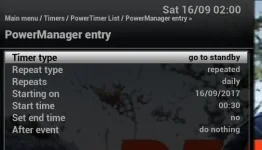
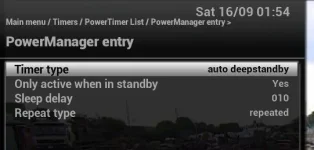
A short press of the on/off button on the remote puts the box into standby. You can set up a power timer (menu -> timers -> power timers) to automatically switch the box into deep standby if the box has been in standby for x number of minutes (Image_A.jpg). You can use multiple power timers. I have one that switches the box to standby at a certain time each day (Image_B.jpg) . I have another that puts the box into standby after 3 hours of not touching the remote (Image_C.jpg). These can be or are automatically overridden for timer recordings etc.

Can the box wake up and do recordings in deep standby ?

Yes
 

Attachments

  • Image_C.webp
    Image_C.webp
    12.4 KB · Views: 12
  • Image_B.webp
    Image_B.webp
    20 KB · Views: 15
  • Image_A.webp
    Image_A.webp
    15.6 KB · Views: 16
I simply set timers and autotimers to go into deep standby when they're finished.
The first one of the day doesn't, but the rest nearly all do.

At the end of the day, I put the box into deep standby with the remote if there are no recordings running/due to start.

If you access the box from other rooms, then power timers are probably needed.
 
I simply set timers and autotimers to go into deep standby when they're finished.
The first one of the day doesn't, but the rest nearly all do.

At the end of the day, I put the box into deep standby with the remote if there are no recordings running/due to start.

I have a habit of semi-watching the TV whilst playing on the computer and don't always notice the warning message/countdown that the box is about to shut down. On hearing silence I realise it has done so and hit the button on the remote to get it instantly up again - hence having a 10 minute margin in standby before the box automatically then goes to deep standby.
 

OpenViX Feeds Status

Back
Top