Superb quality and spec AB-Com PULSe 4K SE. Crazy offer! Only £129! FREE UK DELIVERY! 4K UHD, Enigma 2, Multiboot 4 images & more!...
Superb quality and spec AB-Com PULSe 4K Rev II Twin Satellite tuner only £179! FREE UK DELIVERY! 4K UHD, Enigma 2, SATA HDD facility, Multiboot 4 images & more!...

[ViX_Misc] Different methos of adding AutoTimer causing issues?

  • Thread starter Thread starter AnotherDish
  • Start date Start date
[STRIKE]Whether you press record and then add auto timer or do it by the blue button, result is the same. You cannot alter any of the timer values imported.

Even if we had an option to press that allows us to edit, that would be a good addition.[/STRIKE]

Ignore me. I'm confused.
 
Last edited:
Sorry Abu, I'm still confused. Are we talking about different things or am I missing something?

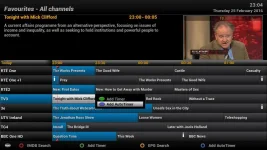
1) Graphic EPG, press record, choose Add AutoTimer. Then exit to live TV. AutoTimers are set.

epg1.webp epg2.webp


2) Graphic EPG, press blue button for Add AutoTimer, config screen for the AutoTimer is shown.

epg3.webp
 
Right more pennies dropping. I have edited my post. Sorry for confusing the issue. Using record button, doing as you have demonstrated sets the Autotimers, and done. End of.


I think that the OP wants the following:

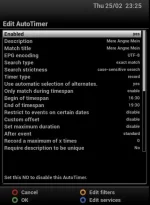
Graphical EPG, select program, blue button (add auto timers), you get screen as above, then you get the edit screen as pictured. This edit screen has more options to fine tune.
 

Attachments

  • think this is what he wants.webp
    think this is what he wants.webp
    26.5 KB · Views: 5
Last edited:
Exactly. In my case, for some reason the autotimer defaults ignore that there is no filter set for the day of the week, and proceeds to add an autotimer for only Thursday (I tried it today) despite me having day of the week filter disabled.

If it brought up the above screen, then at least you have the option to fine tune it or confirm the details.
 
Setting up an autotimer without being able to edit the conditions is not as useful as setting one up and being able to edit it.

Difference between a blunt tool and a precision instrument.
Which is why the Blue button (Add Auotimer) is there.
If you just want to add an AutoTimer with the defaults then you cab do so and remain where your are in the Graphical EPG. IIRC, popping up the AutoTimer menu (or any other "Screen") will, when you exit it, drop you back to "now" in the EPG, as it has no way of knowing where you originally were (from a thread several months ago...).

The same applies to using the Green button (Add Timer) and setting options there (such as where to put the recording..).

You have two options - use whichever you need.
 
Exactly. In my case, for some reason the autotimer defaults ignore that there is no filter set for the day of the week, and proceeds to add an autotimer for only Thursday (I tried it today) despite me having day of the week filter disabled.

If it brought up the above screen, then at least you have the option to fine tune it or confirm the details.

This is my exact issue, specifically why I was asking if it was possible to open up the editor screen from that record then add autotimer menu. Due to this weird error, it basically males using this version of the autotimer pointless. I guess this isn't intended is it?
 
This is my exact issue, specifically why I was asking if it was possible to open up the editor screen from that record then add autotimer menu. Due to this weird error, it basically males using this version of the autotimer pointless. I guess this isn't intended is it?
So why not just press the blue button?
 
I just think it's uneccesarry to have 2 options earmarked to add auto timer. I know we have been here before regarding remapping the coloured buttons, but just having the record button to do everything makes more sense to me, nice and easy keeping in line with the Vix philosophy..
 
I just think it's uneccesarry to have 2 options earmarked to add auto timer. I know we have been here before regarding remapping the coloured buttons, but just having the record button to do everything makes more sense to me, nice and easy keeping in line with the Vix philosophy..
Still don't get it. Both options are extremely handy.
 
Yes but why 2 options, 1 makes even more handy :p
Why not?
If a show is on once a week for 10 weeks, record button, autotimer.

If a show is on a few times a week, different times... blue button, autotimer, set timer options.
 
Judge is right. If you always want the options then only ever use the blue button. If you only sometimes want the options then you are catered for too. I really don't see what all the fuss is about.
 
So is there no way to make it so hitting record then the add autotimer option ignore the date filter?
 
So is there no way to make it so hitting record then the add autotimer option ignore the date filter?

Yes, just press the blue button.
Two less button presses for the result you want.
 
Yes, just press the blue button.
Two less button presses for the result you want.

You say two less yet I have to manually deflect the date filter, then hit the green button twice to get through the extended options. Maybe I'm just doing this wrong?
 
You say two less yet I have to manually deflect the date filter, then hit the green button twice to get through the extended options. Maybe I'm just doing this wrong?

Thought you wanted the extra options provided by 'blue button' press as a screen when you press 'record', 'down', 'ok'?

Setting pre-configured defaults is a different matter.
 
Thought you wanted the extra options provided by 'blue button' press as a screen when you press 'record', 'down', 'ok'?

Setting pre-configured defaults is a different matter.

Well I've got my pre-configured defaults to not filter by date, yet even by adding by the record, down, ok method, It still filters by date. This surely isn't meant to happen, right?
Someone else in this thread mentioned having this issue too.
 

OpenViX Feeds Status

Back
Top