Superb quality and spec AB-Com PULSe 4K SE. Crazy offer! Only £129! FREE UK DELIVERY! 4K UHD, Enigma 2, Multiboot 4 images & more!...
Superb quality and spec AB-Com PULSe 4K Rev II Twin Satellite tuner only £179! FREE UK DELIVERY! 4K UHD, Enigma 2, SATA HDD facility, Multiboot 4 images & more!...

[VU+ Duo2] Different remote button actions

  • Thread starter Thread starter wbarrett
  • Start date Start date
Hi Lothar2,
I mad some more tests. rtmp must be working properly on OpenViX as Das Neue und Dresden are also rtmp streams. The spinner is normal when the server cannot be reached and they should disappear after 2-3 minutes. I tested with ARD HD and ARD. After the 2-3 minutes the box responses normally. As always I did not have a single crash:-)

ciao
 
Good morning,

now its a Clean .080 on the box. Only restore Bouquet and nothing changed in settings. It work better. No crash. the server cannot be reached show spinner vor 1 minute, then the box responses normally again.
But, "Das Neue" often play only Sound and many other channels need long time to begin. Dresden TV run jerky. bad network?
Now i do setup the Box one after the other and show when crash come back. will report later.

About "rtmp". Do you have MediaPortal on your DUO2 and run MyVideo streams correctly?
 
Hi,
with IPTV everything can happen because they are often unofficial streams. Das Neue plays quite OK and Dresden has very bad PQ.

I tested 3 MyVideo streams from the first 3 MyVideo entries and they played fine. With MyVideo2 I have sometimes problems. Any special video I should check?

ciao
 
You have Mediaportal from feed? Updated from itself installed?
 
Edit:

Now i have changed in channellist settings "preview=on" and have installed MediaPortal from feed without update.
IPTV still work without crash.

to MediaPortal:
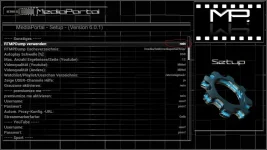
with standard setting "rtmpdump verwenden=Nein" no MyVideo stream will run. but no error, no crash. see screener.

mediaportal settings.webp mediaportal myvideo rtmp-no.webp

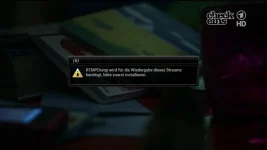
with setting "rtmpdump verwenden=Ja" i get this error message:

mediaportal myvideo rtmp-yes.webp

How do you do to run MyVideo? :confused:

IPTV from channellist is at this time but still ok. I will continue with the setup.
 
Problem found! MediaInfo from Feed is the cause. :thumbsup:
If Stream/IpTV is problematic to play or begin not immediate to play (display spinner) then VIX crash with segfault. uninstall MediaInfo and reboot VIX will not fix the problem.
First log after install MediaInfo, second log after uninstall MediaInfo.

after all i have install/deinstall i have do a reboot!
-install Mediaportal=all ok
-install HbbTV=all ok
-install my picons= all ok
-setup paths(EPG, logs, e.g.) =all ok
-install MediaInfo= crash
-uninstall MediaInfo=still be crash
-FactoryReset in Menu and restore my Vix .078 settings without plugins=still be crash (on build .078 mediainfo was also installed)
-remove MediaInfo entrys from "settings"=still be crash

next to do list:
-FactoryReset without restore settings=?????
-install MediaInfo(newer/older Version and not from feed)= ?????
 

Attachments

Last edited:
-FactoryReset without restore settings=crash (mediaInfo and other plugins are not delete after a FactoryReset! Why?)
-manual delete MediaInfo and entrys from settings = all OK :thumbsup:


next to do list:
-install mediainfo from other source (newer/older Version)= ?????
-restore .080 backup and install MediaInfo from other source (newer/older Version)= ?????
 
Last edited:
-FactoryReset without restore settings=crash (mediaInfo and other plugins are not delete after a FactoryReset! Why?)
-manual delete MediaInfo and entrys from settings = all OK :thumbsup:


next to do list:
-install mediainfo from other source (newer/older Version)= ?????
-restore .080 backup and install MediaInfo from other source (newer/older Version)= ?????

Factory reset is the wrong term to describe this function in my opinion but it has always been named so going all the way back to the first enigma images. All a factory reset does is wipe the user area of the image, it does not remove any plugins you have installed, it's a fairly useless feature as far as I am concerned and really should be removed or updated if possible.
 
THx phoenix,

for info about FactoryReset. and yes, as it is currently it should indeed be removed or updated if possible. :)


Update about MediaInfo segfault:
-manual remove and install attached Version 2.5=all OK :thumbsup:

This was a difficult birth. Please Update MediaInfo on feed.

Gruss Lothar

@Trial
I tested 3 MyVideo streams from the first 3 MyVideo entries and they played fine.

How do you do that? :confused:
-rtmp=off = no stream begin to play
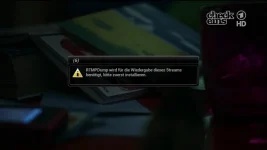
-rtmp=on = Error message
mediaportal myvideo rtmp-yes.webp
 

Attachments

Last edited:
Update about MediaInfo segfault:
-manual remove and install attached Version 2.5=all OK :thumbsup:

This was a difficult birth. Please Update MediaInfo on feed.
Done for build 087 (taking your word for this version working fine; I didn't test it).
 
I do now the same on my latest imageBackup from .080. I hope i have also segfault any more. Report follow.
 
there must be also a problem with other plugin or updated plugin in my full image backup.
If i restore my last full image backup .080 and do the same:
-FactoryReset without restore settings
-manual delete MediaInfo and entrys from settings (without install the new Version)
the segfault will not gone. :confused:

I go Clean from.
 
Last edited:
I give up. :smash:

same clean begin as in the morning, always segfaults after install HbbTV and MediaPortal in one session->reboot. And not even have installed MediaInfo.
There must be a deeper problem with Image. Or i must reboot after each plugin?
 
Yes most time used startchannel have HbbTv. i will restore, change and try.
 
Hi,
I always start on a channel with HbbTV so this could not be the reason. As for MyVideo I did not change anything. Which video should I try? I only tested the first video by pressing OK several times in the 3 MyVideo entries.

ciao
 
Hi,
I always start on a channel with HbbTV so this could not be the reason. As for MyVideo I did not change anything. Which video should I try? I only tested the first video by pressing OK several times in the 3 MyVideo entries.

ciao

So it is. And for MyVideo, on my Vix no one Video will run. fu..... rtmp. :( Please make a full Backup from your Duo and send to me. i`m a :baby: in Linux. I think you have anything installed more give you rtmp support. but what? You use ApolloHD?


Does your start up channel have HbbTV support? If so, try an other service, that doesn't.

HbbTV as startchannel have nothing to do with it, test negativ. I have now all plugins deinstalled, removed cccam, remove samba, remove channelist, clean "settings" and plugin folder, but i become IPTV no more to run on my old backup image. Segfault all time.
shame me, that i do not a backup from working nearly finished Vix in the morning. I was very sure that MediaInfo was the cause, but on my backup image the way from morning doesn't work.
The curiosity, go i return to VTI, s i can do install many many Plugins, copy old settings and and and, no one crash and IPtV+MyVideo run smoth. :confused:
It must be to find but why VIX clean run, and after setup no more.
 
Last edited:
It can come from record or epgrefresh in backgroud? Last i have new downloaded and flash with a other stick. install only epgrefresh, IPTV updater, do all setup, restore Autotimer and timer. IPTV run. then start a record from Sat1_SD and from this time on IPTV segfault begin.

Good night
 
Hi,
I test with a recording in the background. As I record only once in a while it might be a reason.

ciao
 

OpenViX Feeds Status

Back
Top