Superb quality and spec AB-Com PULSe 4K SE. Crazy offer! Only £129! FREE UK DELIVERY! 4K UHD, Enigma 2, Multiboot 4 images & more!...
Superb quality and spec AB-Com PULSe 4K Rev II Twin Satellite tuner only £179! FREE UK DELIVERY! 4K UHD, Enigma 2, SATA HDD facility, Multiboot 4 images & more!...

[ViX_Misc] Display Directory Size

CRMS

Forum Supporter
Donated Member
Joined
Jun 18, 2020
Messages
339
Reaction score
2
Points
18
I've looked in the "0 Help Menu Info" items and then Movie List Setup and can't find anything to select display directory size.

Any chance that the directory size in Play list could be included in a future software version??

So bottom right which is:

"Directory xxGB (yy%) free diskspace"

could read:

"Directory zzG/MB xxGB (yy%) free diskspace"

And I can't find a Help button on the Gigablue V2 handset and wonder if there is one.

I also note "Enable automatic collections"? Is that a new option and does it do similar to tags or movieorganisor?
 
I also note "Enable automatic collections"? Is that a new option and does it do similar to tags or movieorganisor?

It seems to create 'virtual' directories for series recordings.
I record to a NAS and if I enable it one machine then everything appears to be in separate folders but not on any other box if that makes sense?
 
Thanks. I'll try and see what happens.
 
I also note "Enable automatic collections"? Is that a new option and does it do similar to tags or movieorganisor?

I've been using it for ages, it alters how recordings are displayed, but doesn't change the actual files/folders, so when you switch it off you're back to where you were.
 
Help may be on F1.

I don't understand the directory question.
 
Sorry got port and starboard crossed.
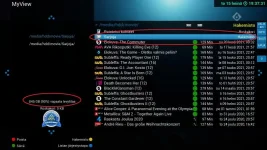
In the bottom left corner of the Playlist screen is a display of freespace of hard drive: -
"Directory xxGB (yy%) free diskspace"

It would be really useful to amend the read out in the bottom left corner to include the size of the directory in that read out: -
"Directory zzG/MB xxGB (yy%) free diskspace"

Hope that is clear.
 
Ok, but it is not a directory. That percentage is the total space on the drive minus the total used.
 
I think that it is about this : the size of the selected directory is missing

MovieList.webp
 
I think that it is about this : the size of the selected directory is missing

View attachment 62389
What directory? Directories don't have sizes. They increase automatically to accommodate the contents. The free space listed is the free space on the mount.
 
Last edited:
What directory? Directories don't have sizes. They increase automatically to accommodate the contents. The free space listed is the free space on the mount.

I think he means showing the size of the folder when you select it.
 
It would be a nice feature if one could always immediately see the total space used by the files in a folder or collection just by placing the cursor on it.
 
This is a good idea, but a tricky one, which is probably why we don't have it already. It'd have to be fairly carefully implemented to prevent slowness whilst scrolling past a directory of no interest, especially as the default is to scroll past all your directories before you get to recordings. If you remember to use left and right to page, it isn't quite as bad, but not everyone remembers to use these.
 
This is a good idea, but a tricky one, which is probably why we don't have it already. It'd have to be fairly carefully implemented to prevent slowness whilst scrolling past a directory of no interest, especially as the default is to scroll past all your directories before you get to recordings. If you remember to use left and right to page, it isn't quite as bad, but not everyone remembers to use these.

Maybe "info" is a reasonable compromise when selecting a directory or collection? It does nothing at the moment.
 
Probably something as simple as a pause before starting to work out the size of the directory, which gives time to scroll past before things lock up. There are some complications though:
1. The filling of file sizes is done using data binding from the skin, so it's not very controllable
2. Python directory walks are slow :(

There might be some interesting things we can do now that we've got Python 3 features available to us.
 
Probably something as simple as a pause before starting to work out the size of the directory, which gives time to scroll past before things lock up. There are some complications though:
1. The filling of file sizes is done using data binding from the skin, so it's not very controllable
2. Python directory walks are slow :(

There might be some interesting things we can do now that we've got Python 3 features available to us.
Python walks are not just slow -I ripped a few out of the code when testing because at one point it took over 10 minutes to boot up after an image flash (I did have a couple of HDD‘s attached as I was testing the Harddisk code)
 
os.walk is a poor performer on Python 2. Python 3 improves it, and has also got os.scandir, which is 50-75% quicker. Some figures for my TV directory (6000~ files, ignoring the initial load measurement when it's scanning the actual disk)

os.scandir: 88ms
os.scandir+os.lstat: 411ms

and for a slightly more realistic subdirectory of 600 files (120 recordings)
os.scandir: 10ms
os.scandir+os.lstat: 44ms

So, it'll be a sluggish browsing experience if you have very big directories, or if you ever browse an entire drive

A bit of caching would help, as would a delayed render of the size.
 

OpenViX Feeds Status

Back
Top